

Appearance
Databricks
The Databricks Source connects an AI System to one or more Databricks workspaces through one service principal. Scout, Agent Tests, and the Risk Agent read the AI assets of the workspaces: serving endpoints, registered models, and Genie spaces. Metric Tests cannot use a Databricks Source.
An organization can also connect Databricks as an organization Source. AI Discovery then reads the same assets. See AI Discovery.
| Used by | Agent Tests, Scout, Risk Agent. AI Discovery, for an organization Source. |
| Mode | Pull |
| Credentials | Client ID and OAuth secret of a service principal, and the workspace URLs |
| Metric selection | Not applicable |
What this is
Scout, Agent Tests, and the Risk Agent read these assets in each workspace:
| Asset | What they read |
|---|---|
| Serving endpoints | Name and creator |
| Registered models in Unity Catalog | Name and owner |
| Genie spaces | Name. A Genie space has no owner. |
Modulos reads metadata only. Modulos does not read table data, does not send questions to Genie, and does not change anything in Databricks. Modulos does not count the built-in endpoints of Databricks or the models of the system catalog.
The Source works with Databricks on AWS, Azure, and Google Cloud. One Source can hold many workspaces with the same service principal.
Where in Modulos
AI System → Settings → Sources → Add Source → Databricksadds the Source.- Connect Sources in the registration wizard opens the same dialog.
Organization → Source & Connectors → Organization sources → Add Source → Databricksadds an organization Source.
Before you start
- An Organization Admin makes Databricks available. See Source & Connectors.
- You need a Databricks administrator who can manage service principals and give permissions in each workspace.
- Owners of the AI System, Organization Admins, Risk Managers, and Policy Managers can connect a Databricks Source to an AI System. See Who can do what. Only an Organization Admin can add Databricks as an organization Source.
How to create the service principal
- In the Databricks account console or in a workspace, create a service principal. On Azure, you can add an existing Entra application by its application ID.
- Copy the application ID of the service principal. This is the client ID, a GUID.
- Add the service principal to each workspace that Modulos must read.
- Give it the Workspace access entitlement in each of these workspaces. It does not need Databricks SQL access.
- Create an OAuth secret for the service principal.
- In the Generate secret dialog, open the Other APIs tab. Add
genie,model-serving, andunity-catalog, and set each to Read. - Copy the secret.
Modulos needs all three scopes. A secret with these scopes cannot call other Databricks APIs.
OAuth secrets expire
Before the OAuth secret expires, create a new one. Then update the Source in Modulos.
How to give read access
Modulos sees only the assets that the service principal can see. An asset that you do not share with the service principal does not show in Scout or in AI Discovery. Modulos cannot tell that the asset is missing. Give the service principal access to each asset in scope. Give these permissions in each workspace:
| Asset | Permission |
|---|---|
| Serving endpoints | CAN VIEW on each serving endpoint |
| Registered models | USE CATALOG on the catalog, USE SCHEMA on the schema, and EXECUTE on the models. Each model shows only with all three. |
| Genie spaces | CAN VIEW on each Genie space |
To give access to many assets at one time:
- Add the service principal to a group, and give the permissions to the group.
- For registered models, give USE CATALOG, USE SCHEMA, and EXECUTE on the catalog or on the schema. The grant applies to each model under it.
- For Genie spaces, give CAN VIEW on the folder that holds them. The spaces inherit it.
- A serving endpoint has no parent level, so give CAN VIEW on each endpoint. To do this for many endpoints, use the permissions API or the Terraform resource
databricks_permissions.
Each workspace has its own permissions. Repeat the grants in each workspace.
Do not give SELECT on the tables of the Genie spaces. With CAN VIEW and no SELECT, Genie gives no data to the service principal.
If the workspaces use IP access lists, let the Modulos egress IP addresses connect. To get these addresses, contact Support.
How to connect Databricks
- Open
AI System → Settings → Sources. - Select Add Source.
- Select Databricks.
- Type a Source Name.
- Type the workspace URLs in Workspace URLs, one URL on each line.
- Paste the client ID into Client ID.
- Paste the OAuth secret into Client Secret.
- Optional: select Check connection to test the sign-in before you save.
- Select Save.
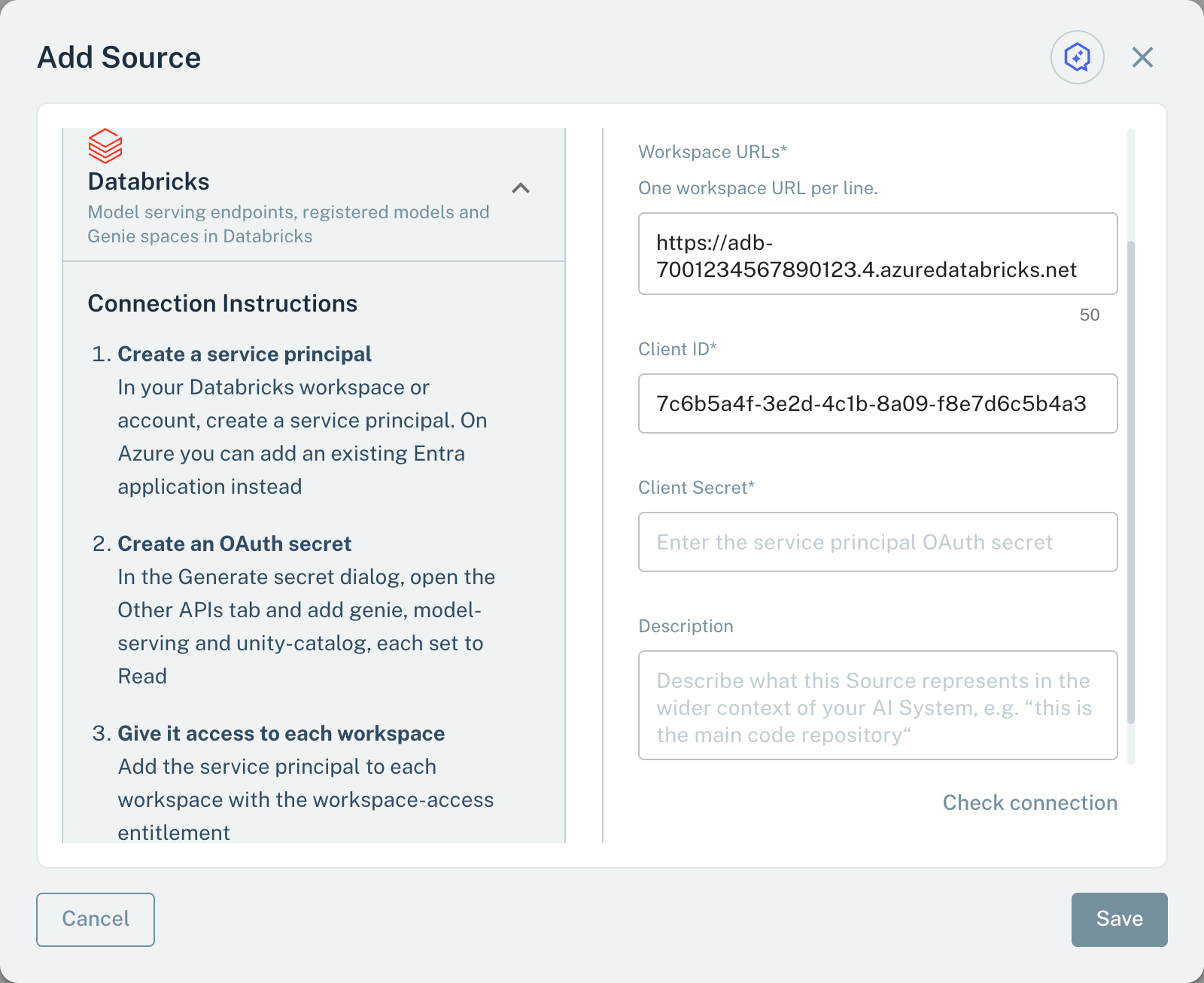
Add a Databricks Source.
- Workspace URLs One workspace URL on each line.
- Client ID The application ID of the service principal.
- Client Secret The OAuth secret of the service principal.
A workspace URL has the form https://<workspace host>. The form cuts each line to this form, so a URL that you copy from the browser, with a path or ?o=, also works. The host must end in .cloud.databricks.com (AWS), .azuredatabricks.net (Azure), or .gcp.databricks.com (Google Cloud). For example, https://adb-1234567890123456.7.azuredatabricks.net.
When you save, Modulos signs in to the workspaces as the service principal. If one workspace or more accepts the sign-in, Modulos saves the Source. The sign-in does not test the permissions on the assets. The Configuration check tests them after the save.
Save errors
If no workspace accepts the sign-in, Modulos does not save the Source. Modulos shows one of these messages:
| Message | What to do |
|---|---|
| Databricks rejected the client ID or client secret, or the service principal is inactive. Check the service principal and update this source. | Check the client ID and the secret. Make sure that the service principal is active. |
| The secret of the service principal needs the unity-catalog, model-serving and genie scopes, each set to Read. | Create a new secret with the three scopes. See How to create the service principal. |
For other errors, Modulos shows "Connection failed". Check the workspace URLs and the IP access lists. Modulos waits 6 seconds in total for the sign-in to all workspaces.
Configuration check
After you save the Databricks Source of an AI System, Modulos checks its configuration. For each workspace, the Configuration check tab of the Source shows these checks:
| Check | Type | What it tests |
|---|---|---|
| Signs in | Required | The service principal can sign in to the workspace and use it. The status is Missing permission when Databricks reports that the service principal has no Workspace access entitlement. |
| Lists serving endpoints | Required | Databricks gives the list of serving endpoints to the service principal. |
| Lists Genie spaces | Optional | Databricks gives the list of Genie spaces to the service principal. |
| Lists registered models | Optional | The service principal sees one or more registered models of the metastore. If it sees no model, Modulos shows the warning one time for the metastore, on one of its workspaces. |
A check that has a problem shows what to do. If the workspace does not use Genie spaces or registered models, it is not necessary to correct a warning on that check. For the results and for the times when Modulos checks, see Configuration check.
Scout, Agent Tests, and the Risk Agent
Scout, Agent Tests, and the Risk Agent read a Databricks Source with read-only queries:
- AI assets: the serving endpoints, registered models, and Genie spaces, with counts for each workspace and a table with workspace, kind, name, and owner.
- Problems: the workspaces that Modulos could not read, and the asset lists that Databricks refused.
You can get the assets of all workspaces of the Source or of one workspace. When Scout, an Agent Test, or the Risk Agent gets more than one Databricks Source, it reads each of them. If you name one workspace that is in two of these Sources, the AI agent reads it with the first of the two Sources only.
AI Discovery
An Organization Admin can connect Databricks as an organization Source. The service principal, its grants, and the fields of the dialog are the same as for the Source of an AI System. See Organization Sources.
Each scan of AI Discovery reads the serving endpoints, the registered models, and the Genie spaces of an active organization Source. Each of them becomes a detection. A scan stores more data than Scout reads. It also stores the description of each asset, the ready state of a serving endpoint, and the dates of serving endpoints and registered models. See Data that Modulos stores.
When you accept a candidate, the Draft AI System gets a Databricks Source of its own, with the workspaces of the detections only (How a Source follows a candidate into an AI System).
A scan does not read the Databricks Source of an AI System.
Limits
| Limit | What happens |
|---|---|
| Only granted assets | Modulos lists only the assets that the service principal can see. |
| Registered models | A model belongs to a metastore. Modulos lists it one time, under the first workspace of that metastore. |
| Genie spaces | Modulos reads no owner for a Genie space. |
| Other assets | Modulos does not read Databricks Apps, notebooks, jobs, or clusters. |
| Workspace URLs in one Source | 100 |
| Assets in one reply | Scout shows the first 200 assets and the number of the others. |
| Save | Save waits 6 seconds in total for the sign-in to all workspaces. |
| Long lists | Modulos reads at most 20 pages of the list of registered models and of the list of Genie spaces. A page of registered models has 100 models. If a list is longer, Scout says that the totals are incomplete. The list of serving endpoints has no such limit. |
Important considerations
- Use a dedicated service principal with the three scopes and the read permissions only.
- If the service principal gets new grants, the new assets show in the next query.