

Appearance
Organization Taxonomy
The organization taxonomy is a shared library of risk definitions. It gives all AI Systems the same names and structure. With it, you can compare, add, and audit the quantified risk of all AI Systems.
What this is
Quantification without shared categories gives numbers that you cannot compare or add together.
A good taxonomy gives:
- comparability across AI Systems
- portfolio reporting to leadership, boards, auditors, and regulators
- resource allocation by the decrease in risk that each investment gives
- institutional learning: when an incident occurs, its lessons go to all teams
Where in Modulos
The taxonomy has three tabs in Organization → Risk Management:
- Category Taxonomy: the categories.
- Threat Vector Taxonomy: the threat vectors.
- Risk Taxonomy: the risks. Each risk has one category. It gets one or more threat vectors when you create it.
Each tab has Create New to add an item and Show archived to show the archived items. For the other Risk Management tabs, see Risk Operating Model.
Permissions
Risk Managers create, edit, and archive taxonomy items. Organization Admins and Members can see the taxonomy.
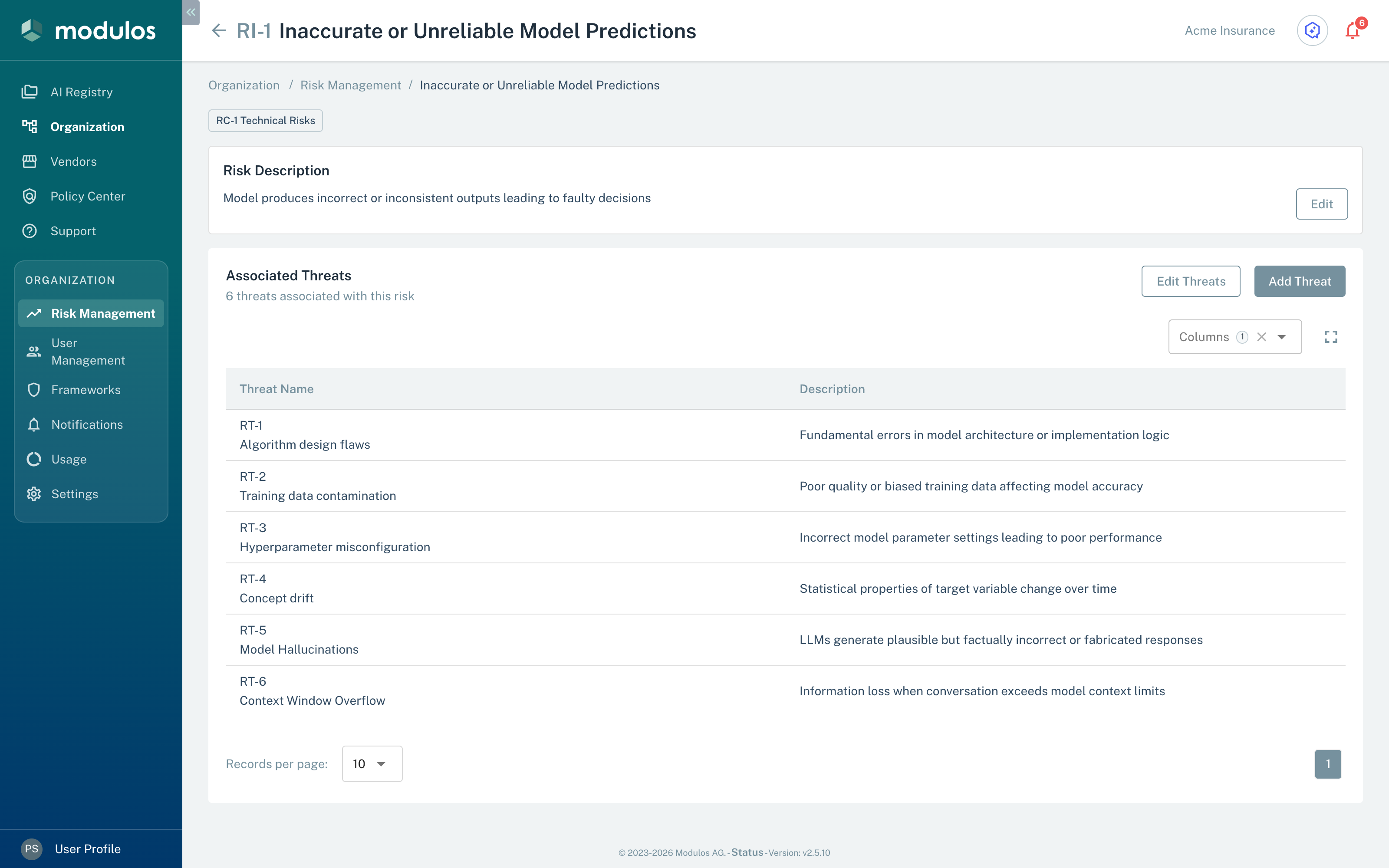
A taxonomy risk and the threat vectors that AI Systems can select for it.
- Edit Changes the name or the description, and archives the risk.
- Add Threat Connects more threat vectors to this risk.
- Associated Threats The threat vectors that AI Systems can select for this risk.
How it works
The taxonomy has three levels:
- Categories: groups for totals and for the risk appetite.
- Risks: risk definitions for all AI Systems of the organization.
- Threat vectors: the paths through which a risk can cause a loss.
For example, this part of the default taxonomy has one category, two of its risks, and some of their threat vectors:
Category Risks Threat vectors
- Technical Risks
- Adversarial Attack Vulnerability
- Direct Prompt Injection
- Indirect Prompt Injection
- Model extraction
- Inaccurate or Unreliable Model Predictions
- Model Hallucinations
- Concept drift
- Adversarial Attack Vulnerability
One threat vector can belong to more than one risk. The Associated Risks column of the Threat Vector Taxonomy tab shows the number of risks of each threat vector.
An AI System selects risks from the taxonomy. For each risk, the AI System selects some of the threat vectors of that risk. Modulos then makes one risk threat in the AI System for each selected threat vector.
Principles for a good taxonomy
These principles keep a taxonomy usable:
- No overlap: give each risk one definition. Two definitions of the same risk cause double counts.
- Complete but not too large: include the information that is necessary for mitigations. Too much information makes the taxonomy hard to keep up to date.
- Stable but versioned: keep names stable to compare values from different dates, and record each intentional change.
- Clear ownership: specify who can propose changes and who examines them.
- Made and bought systems: include threats at the model level and threats in the deployment context.
Default taxonomy shipped with Modulos
Each new organization starts with a default taxonomy of frequent AI risks. It is a starting point. Extend it for your domain, your architecture, and your operating model.
The default taxonomy has five categories:
- Technical Risks: model quality, data quality, attacks, and cybersecurity
- Operational Risks: human factors, monitoring, and daily operations
- Legal & Compliance Risks: privacy, liability, contracts, and regulatory exposure
- Ethical & Reputational Risks: fairness, offensive outputs, transparency, and trust
- Governance Risks: governance structure, documentation, accountability, and oversight
Examples from the default library:
| Category | Example risks | Example threat vectors |
|---|---|---|
| Technical Risks | Inaccurate or Unreliable Model Predictions, Poor Data Quality or Integrity, Adversarial Attack Vulnerability | Model Hallucinations, Data poisoning, Direct Prompt Injection |
| Operational Risks | Human-AI Interaction Failure, Over-Reliance on Automation, Insufficient Monitoring and Incident Response | Training inadequacy, Automation complacency, Failure to intervene |
| Legal & Compliance Risks | Personal Data Privacy Violation, Product Liability for AI Decisions, Contractual Non-Compliance | Data breaches, Unauthorized access, Retention violations |
| Ethical & Reputational Risks | Algorithmic Bias and Fairness Issues, Harmful or Offensive Content Generation, Lack of Transparency (Trust Erosion) | Representation gaps, Prompt manipulation, Safety filter bypass |
| Governance Risks | No Formal Risk Assessment Process for AI, Insufficient Documentation and Audit Trail, Inadequate Third-Party Risk Management (AI Supply Chain) | Ad-hoc assessments, Poor documentation, Version control gaps |
Use these examples as a start. Change the taxonomy until it agrees with your AI Systems.
How to customize it
When a team adds a risk to an AI System, Modulos shows only the threat vectors of that taxonomy risk. To make a threat vector available in AI Systems, connect it to the taxonomy risk first.
- Start with the default taxonomy: use it as a baseline and extend it.
- Add threats for your domain: record how your systems can cause losses in your environment.
- Connect threat vectors to risks: give each risk the threat vectors that apply to it.
- Change the taxonomy after incidents: add what you learn from incidents to the definitions.
Add a risk to the taxonomy
- Open
Organization → Risk Management → Risk Taxonomy. - Select Create New.
- Type a Risk Name and a Description.
- Select a Category.
- In Threat Vectors, select one or more threat vectors.
- Select Add Risk.
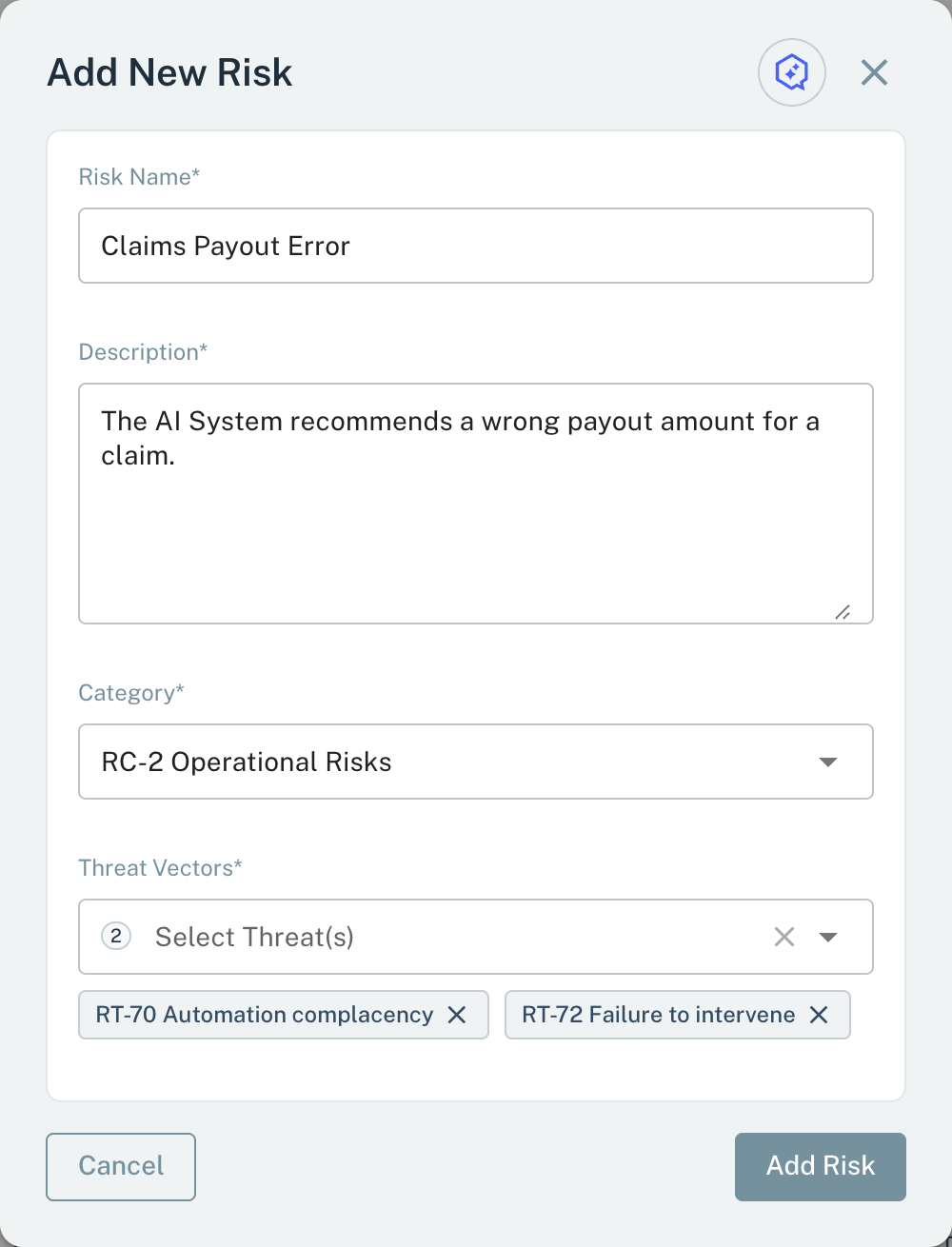
A new taxonomy risk needs a name, a description, a category, and one or more threat vectors.
- Category* Each taxonomy risk has one category.
- Threat Vectors* Select one or more threat vectors for the risk.
- Add Risk Adds the risk to the taxonomy.
Change the threat vectors of a risk
- Open the risk in
Organization → Risk Management → Risk Taxonomy. - To connect more threat vectors, select Add Threat.
- Select the threat vectors in Select Threat(s), and then select Save.
- To remove a threat vector, select Edit Threats.
- Select the delete icon on the row of the threat vector, and then select Remove Threat.
Archive an item
- Open the category, the risk, or the threat vector.
- Select Edit.
- Select Archive.
- In the confirmation dialog, select Archive.
An archive is permanent. Show archived shows the archived items with an Archived badge. You cannot add an archived risk to an AI System. An archive does not remove the item from the AI Systems that use it.
Important considerations
Changes to the taxonomy change how you can compare values from different dates:
- New categories, risks, or threat vectors usually cause no problems.
- A new name or a merge of two items is a governance change. For such a change, think about this procedure: archive the item and create a new item.
Why customization matters
The quality of risk quantification is a result of the structure that the taxonomy gives. A taxonomy for your domain makes estimates easy to examine and to compare. Then you can use risk values to make decisions.