

Appearance
Claude Enterprise
The Claude Enterprise Source connects an AI System to a Claude Enterprise organization on claude.ai. Modulos reads the activity feed, the directory, the settings, the plugins, and the adoption and cost data of that organization. Modulos only reads. It does not change or delete data in the Claude organization.
| Used by | Metric Tests, Agent Tests, Scout, Risk Agent |
| Mode | Pull |
| Credentials | A Compliance Access Key, an Analytics API key, or the two keys |
| Metric selection | Type the metric name |
For the Claude API organization on platform.claude.com, use the Claude Console Source. It uses a different key.
What this is
The Claude Enterprise Source reads six items. Each item needs one key with one scope:
| Item | Key | Scope |
|---|---|---|
| Activity feed | Compliance Access Key | read:compliance_activities |
| Organizations, roles and groups | Compliance Access Key | read:compliance_org_data |
| Users and group members | Compliance Access Key | read:compliance_user_data |
| Organization settings | Compliance Access Key | read:compliance_org_data |
| Plugins and marketplaces | Compliance Access Key | read:compliance_org_data |
| Adoption and cost | Analytics API key | read:analytics |
You can use one key or the two keys. Tests and AI agents read only the items that your keys give access to.
Where in Modulos
AI System → Settings → Sources → Add Source → Claude Enterpriseadds the Source.AI System → Settings → Sources → select the Sourceshows What this source can read to the users who can open the Settings of the AI System.
Who can do what
The Sources page has the general permissions. For this Source, the Owners of the AI System can open What this source can read and select Check again. Editors and Viewers cannot open the Settings of the AI System and do not see the Source there.
Before you start
- An Organization Admin makes Claude Enterprise available. See Source & Connectors.
- The primary owner of the Claude organization activates the Compliance API in claude.ai, in
Organization settings → API.
How to create the keys
Create the keys in claude.ai, in Organization settings → API:
- In the Keys section, create a Compliance Access Key.
- Select the scopes
read:compliance_activities,read:compliance_org_data, andread:compliance_user_data. - Do not select
delete:compliance_user_data. - If Modulos must read adoption and cost data, create an Analytics API key with the scope
read:analytics.
A Compliance Access Key starts with sk-ant-api01-. You cannot add a scope to a key after you create it.
How to connect Claude Enterprise
- Open
AI System → Settings → Sources. - Select Add Source.
- Select Claude Enterprise.
- Type a Source Name.
- If you have a Compliance Access Key, paste it into Compliance Access Key.
- If you have an Analytics API key, paste it into Analytics API Key.
- Keep API URL (optional) empty. Modulos then uses the API of Anthropic.
- Select Save.
You must enter one or two keys.
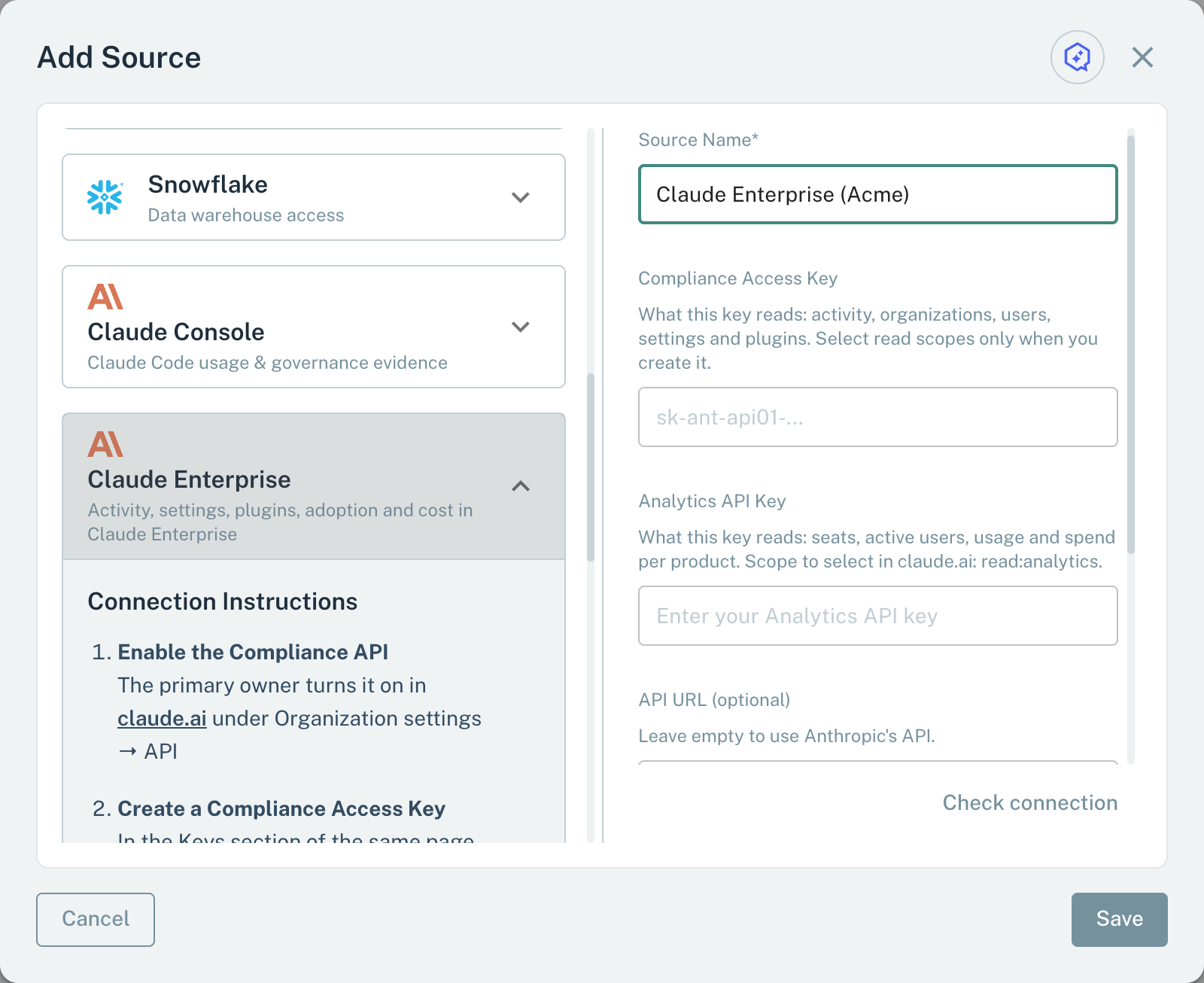
- 1Compliance Access KeyReads activity, organizations, users, settings, and plugins.
- 2Analytics API KeyReads seats, active users, usage, and cost.
- 3API URLKeep it empty. Modulos then uses the API of Anthropic.
What this source can read
When you save a Claude Enterprise Source, Modulos checks what each key can read. If Modulos can read no item, it does not save the Source and shows the cause, for example that the Compliance API is not active. Open the Source to see What this source can read, with one status for each item. In AI System → Settings → Sources, the Connection column shows Healthy when Modulos can read one or more items.
| Status | What to do |
|---|---|
| Available | Tests and AI agents can read the item. |
| No key | Add the key that the item needs. |
| Key rejected | Anthropic did not accept the key. Create a new key and enter it again. |
| Wrong key type | Create the correct type of key in claude.ai in Organization settings → API. |
| Missing scope | Create a new key with the scope. You cannot change the scopes of a key. |
| Not enabled | The primary owner activates the Compliance API. For Adoption and cost, Anthropic must activate the Analytics API. If only Organization settings is not enabled, Anthropic must activate it for your parent organization. For these two cases, speak to your Anthropic representative. |
| Unknown | Modulos could not do the check. Select Check again after some time. |
After a change in claude.ai that keeps the same keys, select Check again. For example, do this after the primary owner activates the Compliance API. For a new key, edit the Source and enter the key. If an active Compliance Access Key of the Claude organization has the scope delete:compliance_user_data, the panel shows a warning with the name of the key.
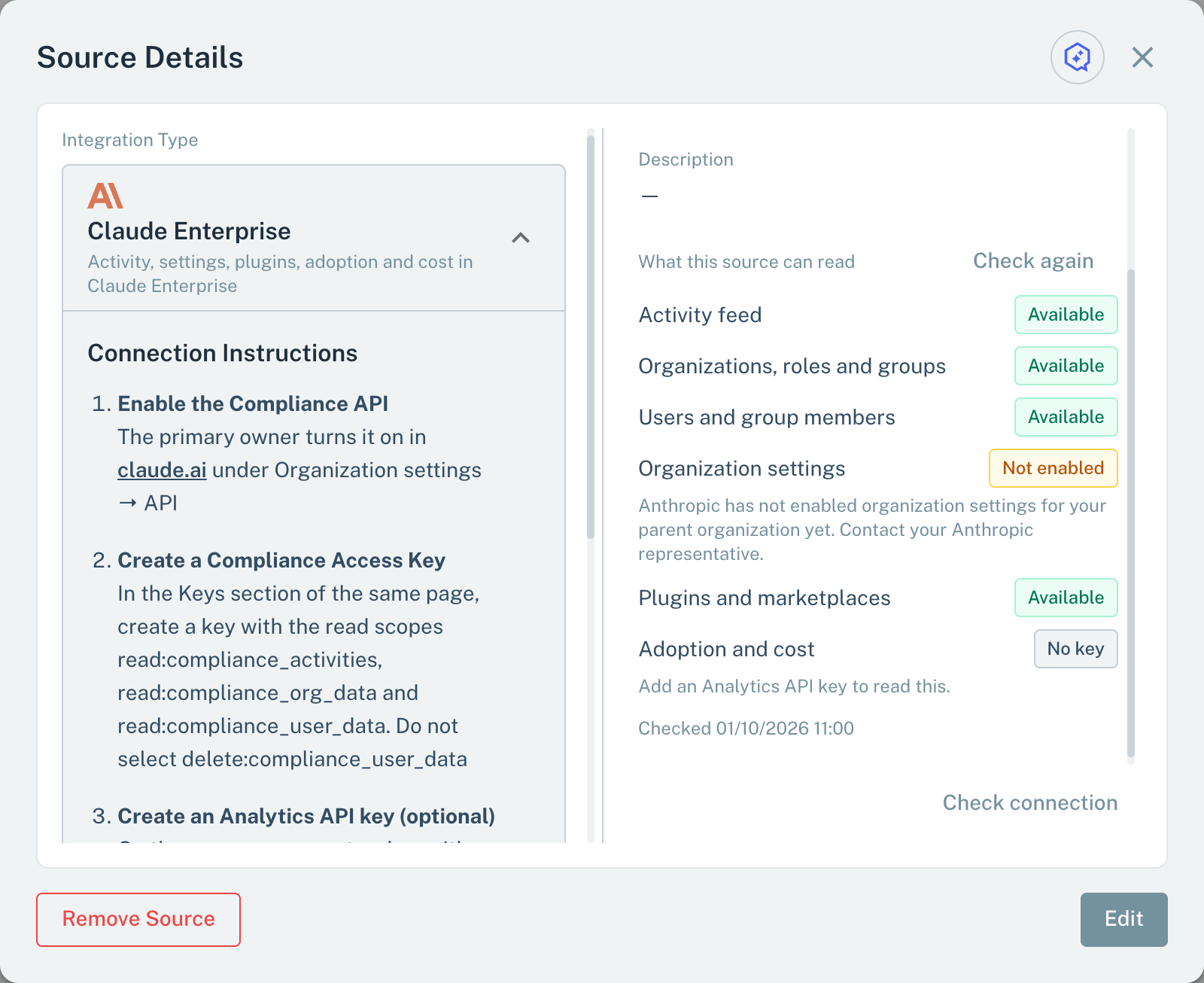
- 1AvailableTests and AI agents can read the item.
- 2Not enabledThe item is not active. The text under it gives the cause.
- 3Check againTests the keys again and shows the new statuses.
Metrics for Metric Tests
A Metric Test on a Claude Enterprise Source reads one of these metrics:
- In the test dialog, type the name as the table shows it.
- Select Check.
A metric gives a value only when its item is Available. The metrics of Plugins and marketplaces and of Organization settings also must have Organizations, roles and groups. If an item is not available, Check does not find its metrics.
| Metric | Value | Item |
|---|---|---|
assigned_seats | Assigned seats on the most recent day of the analytics data | Adoption and cost |
active_users_7d | Users who used Claude (chat, Claude Code, or Cowork) in the last 7 days. Each user counts one time. | Adoption and cost |
active_users_30d | The same count for the last 30 days | Adoption and cost |
seat_utilization_30d | Part of the assigned seats, from 0 to 1, that have a holder who used Claude in the last 30 days | Adoption and cost |
cost_per_active_user_30d_usd | Spend in USD for the last 30 days, divided by active_users_30d. Only for Enterprise plans that pay by usage. Plans that pay by seat report usage credits. | Adoption and cost |
mcp_server_changes_30d | MCP servers (connectors) added, changed, or removed in the last 30 days | Activity feed |
inference_hook_denials_7d | Requests that the inference hooks of the organization blocked in the last 7 days | Activity feed |
data_exports_30d | Exports of the audit log, the data, or the member list in the last 30 days | Activity feed |
attributed_report_views_30d | Views and downloads of Smart Reports that attribute usage findings to individual members in the last 30 days, sessions opened from such a report, and administrators shown which members a recommendation suggests | Activity feed |
library_submissions_30d | Skills or plugins that members submitted to the organization library in the last 30 days | Activity feed |
plugin_version_changes_30d | Changes to the plugin version that members get in the last 30 days | Activity feed |
member_owned_plugins | Plugins in the personal marketplaces of members | Plugins and marketplaces |
remote_reach_plugins | Plugins that declare an MCP server or a CLI. Plugins that Anthropic did not classify are not counted. | Plugins and marketplaces |
plugins_not_passing_scan | Plugins with a current version that has a content scan result other than "pass" | Plugins and marketplaces |
sso_enforced | 1 if single sign-on is enforced in each linked organization that controls the setting, 0 if not. No value if no linked organization controls the setting. | Organization settings |
chat_retention_days | The longest chat retention of the linked organizations, in days. No limit, or no period set by an administrator, counts as 36,500 days. | Organization settings |
content_redaction_enabled | 1 if content redaction is on in each linked organization that controls the setting, 0 if not. No value if no linked organization controls the setting. | Organization settings |
ip_allowlist_configured | 1 if an IP allowlist with one or more ranges is on in each linked organization that controls the setting, 0 if not. No value if no linked organization controls the setting. | Organization settings |
If the cost data does not include all 30 days, cost_per_active_user_30d_usd gives no value.
Scout, Agent Tests, and the Risk Agent
Scout, Agent Tests, and the Risk Agent read the items of a Claude Enterprise Source that are Available:
- Activity feed: sign-ins, plugin events, exports, blocked requests, and changes to settings, connectors, and MCP servers.
- Organizations, roles and groups: organizations, custom roles, and groups.
- Users and group members: members with their roles.
- Organization settings: the settings in effect, for example single sign-on, content redaction, IP allowlist, and retention, and the Compliance Access Keys.
- Plugins and marketplaces: the plugins in the organization and personal marketplaces, with their "remote reach" and their content scan result.
- Adoption and cost: seats, invites, spend, the active users of chat, Claude Code, and Cowork, and the use of connectors, skills, and plugins.
If Modulos can read no item, Scout tells you why. See Scout, Agent Tests, and Risk Agent.
Important considerations
- Give each key the read scopes only. Modulos does not write to the Claude organization.
- After you save, the keys are hidden. When you edit the Source, enter again each key that the Source must keep. An empty key field removes the stored key.