

Appearance
Azure
The Azure Source connects an AI System to one or more Azure subscriptions through a service principal. Metric Tests read Azure Monitor metrics of one resource. Scout, Agent Tests, and the Risk Agent read the resources, the model deployments, the Foundry agents, and the costs.
| Used by | Metric Tests, Agent Tests, Scout, Risk Agent |
| Mode | Pull |
| Credentials | Tenant ID, client ID, and client secret of a service principal |
| Metric selection | Select the resource, then the metric |
Where in Modulos
AI System → Settings → Sources → Add Source → Azureadds the Source.
Before you start
An Organization Admin makes Azure available. See Source & Connectors.
How to create the service principal
Do these steps in the Azure portal:
- In Microsoft Entra ID, open App registrations.
- Create a registration.
- Copy the Directory (tenant) ID and the Application (client) ID.
- In Certificates & secrets, create a client secret.
- Copy the value of the client secret.
- In each subscription that Modulos must read, open Access control (IAM).
- Add a role assignment that gives the Reader role to the app.
Two functions of Scout, Agent Tests, and the Risk Agent have different role rules:
- Foundry agents: create a custom role with the one data action
Microsoft.CognitiveServices/accounts/AIServices/agents/read. Give it to the same app on the subscriptions. The Microsoft documentation tells you that this permission also gives access to the threads and messages of the agents. - Cost report: the Reader role is sufficient. If you use a custom role with less access, also give the Cost Management Reader role to the app.
How to connect Azure
- Open
AI System → Settings → Sources. - Select Add Source.
- Select Azure.
- Type a Source Name.
- Paste the tenant ID into Tenant ID.
- Paste the client ID into Client ID.
- Paste the client secret into Client Secret.
- Type the subscription IDs to read in Subscription IDs (Optional), with a comma between them.
- Select Save.
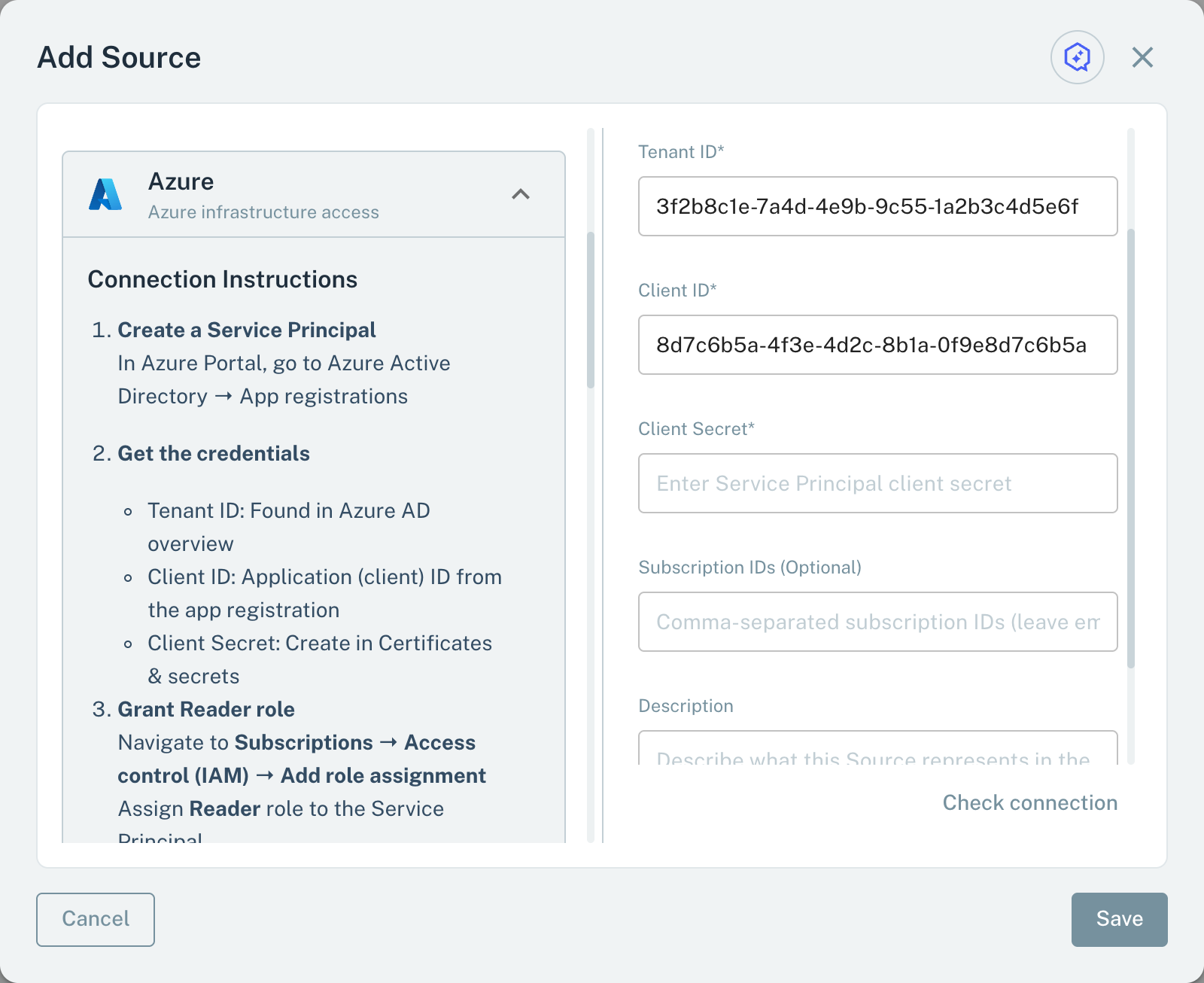
- 1Tenant IDThe tenant of the service principal.
- 2Client SecretThe secret of the service principal.
- 3Subscription IDsEmpty: all subscriptions that the service principal can see.
Keep Subscription IDs (Optional) empty to read all subscriptions that the service principal can see. When you save, Modulos signs in as the service principal and lists its subscriptions. If the service principal sees no subscription, the Source is not saved.
Metrics for Metric Tests
A Metric Test on an Azure Source reads one metric of one resource:
- In the test dialog, select the Azure Source.
- Select the Subscription.
- If necessary, select a Resource Group to make the menu shorter.
- Select the Resource, for example a virtual machine, a storage account, or a database.
- Select the Metric.
When the test runs, Modulos asks Azure Monitor for the metric in the schedule period of the test, or the last hour if the test has no schedule, as one interval. The value is the primary aggregation of the metric in that interval, for example the average or the total. A metric gives a value only when that aggregation is Average, Total, or Count.
Scout, Agent Tests, and the Risk Agent
Scout, Agent Tests, and the Risk Agent read an Azure Source with read-only queries:
- Subscriptions and resource groups that the service principal can see.
- Resources: a query by name or type, Azure Resource Graph queries, and the properties and tags of one resource.
- Model deployments: the model, version, SKU, capacity, and status of Azure OpenAI and Microsoft Foundry deployments.
- Foundry agents: the agents of each Foundry project, with model, tools, and version, and the instructions of one agent. This needs the custom role above. Modulos cannot read classic projects that use a hub.
- Costs: Cost Management data for a period of up to 365 days, grouped by one to three Cost Management dimensions, for example
ServiceName,ResourceGroupName, orResourceLocation. Scout can give one total or the cost for each day, week, or month. The costs of the last 4 days can change.
Important considerations
- Give the service principal read roles only.
- Before you give the role for Foundry agents, make sure that your organization permits access to agent threads and messages.