

Appearance
Vijil
The Vijil Source connects an AI System to one agent in the Vijil Console. Metric Tests read the scores of the latest Vijil evaluation of that agent. Scout, Agent Tests, and the Risk Agent read the agent and its evaluation results.
| Used by | Metric Tests, Agent Tests, Scout, Risk Agent |
| Mode | Pull |
| Credentials | Client ID, client secret, and agent ID |
| Metric selection | Select the score in the menu |
Where in Modulos
AI System → Settings → Sources → Add Source → Vijiladds the Source.
Before you start
- An Organization Admin makes Vijil available. See Source & Connectors.
- The agent must have one or more evaluations in Vijil.
How to prepare Vijil
- In the Vijil Console, open
Settings → API Keys. - Create a key.
- Copy the client ID, which starts with
vk_. - Copy the client secret. The Vijil Console shows the secret one time only.
- Get the ID of the agent in the Vijil Console.
How to connect Vijil
- Open
AI System → Settings → Sources. - Select Add Source.
- Select Vijil.
- Type a Source Name.
- Paste the client ID into Client ID.
- Paste the client secret into Client Secret.
- Paste the agent ID into Agent ID.
- Select Save.
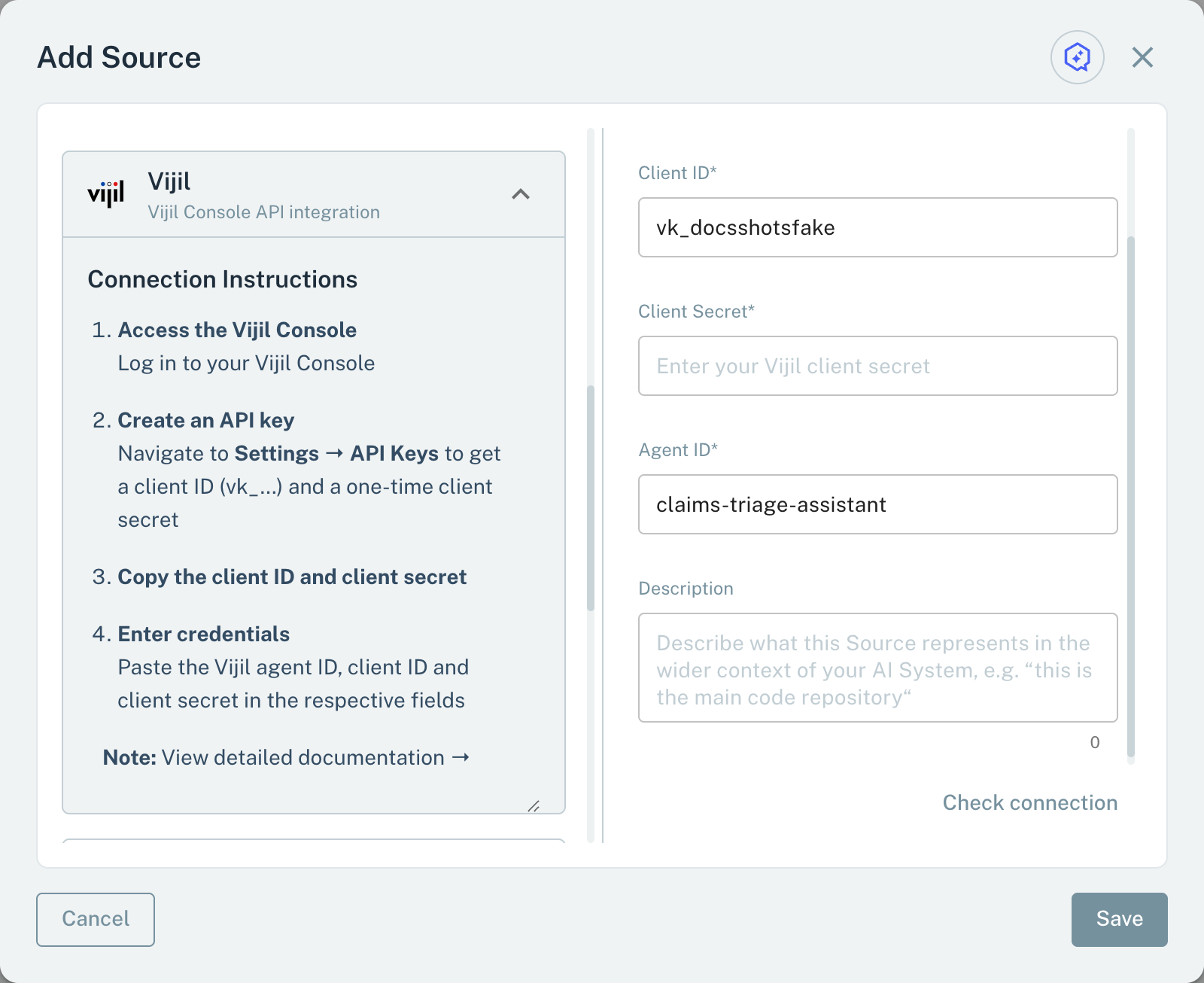
- 1Client IDIt starts with vk_.
- 2Agent IDThe agent whose evaluation scores Modulos reads.
When you save, Modulos signs in to the Vijil Console and reads the agent. If the credentials are incorrect or Modulos does not find the agent, the Source is not saved.
Metrics for Metric Tests
A Metric Test on a Vijil Source reads one score of the latest evaluation of the agent:
- In the test dialog, select the Vijil Source.
- Select the Metric.
The menu shows the harness, scenario, and probe metrics of the latest evaluation. Below the metric, the dialog shows its category, its ID, and its type. If the agent has no evaluation, the menu shows "No evaluation data found. Run an evaluation in Vijil first."
Vijil gives scores from 0 to 1. Modulos multiplies them by 100. Because of this, a Metric Test compares values from 0 to 100.
Scout, Agent Tests, and the Risk Agent
Scout, Agent Tests, and the Risk Agent read a Vijil Source with read-only queries:
- Agent: the name, the model, and the status of the agent.
- Evaluations: the latest evaluation, with its name, score, and status.
- Scores: the harness, scenario, and probe scores of an evaluation by its ID, all scores, or selected scores by their IDs.
Modulos does not start evaluations in Vijil.
Important considerations
- A Metric Test reads the latest evaluation only. If the latest evaluation does not have the metric, the run ends with the error "Metric not found in source". If the metric has no score in that evaluation, the test gets the value 0.
- Run the Vijil evaluation before the Metric Test runs. The test does not wait for an evaluation.