

Appearance
Requirements
Requirements represent the “what” in a framework: the obligations that come directly from the underlying regulation or standard.
What this is
Requirements are the compliance “contract” you are trying to satisfy for a project scope. They are:
- framework-derived (they preserve the Source document structure)
- mapped to Controls (so you implement once and reuse)
- fulfilled deliberately (so an owner records the attestation that the obligation is satisfied)
For the end-to-end model, see Governance Operating Model.
Where in Modulos
Project → Requirementsto browse obligations, filter by framework, and track fulfillmentRequirement detailto review mapped Controls and mark the Requirement fulfilled when ready
Who can do what
Permissions
- Most project members can view Requirements and their mapped Controls.
- Project Owners assign Requirement owners and manage scope.
- The Requirement owner marks a Requirement as fulfilled.
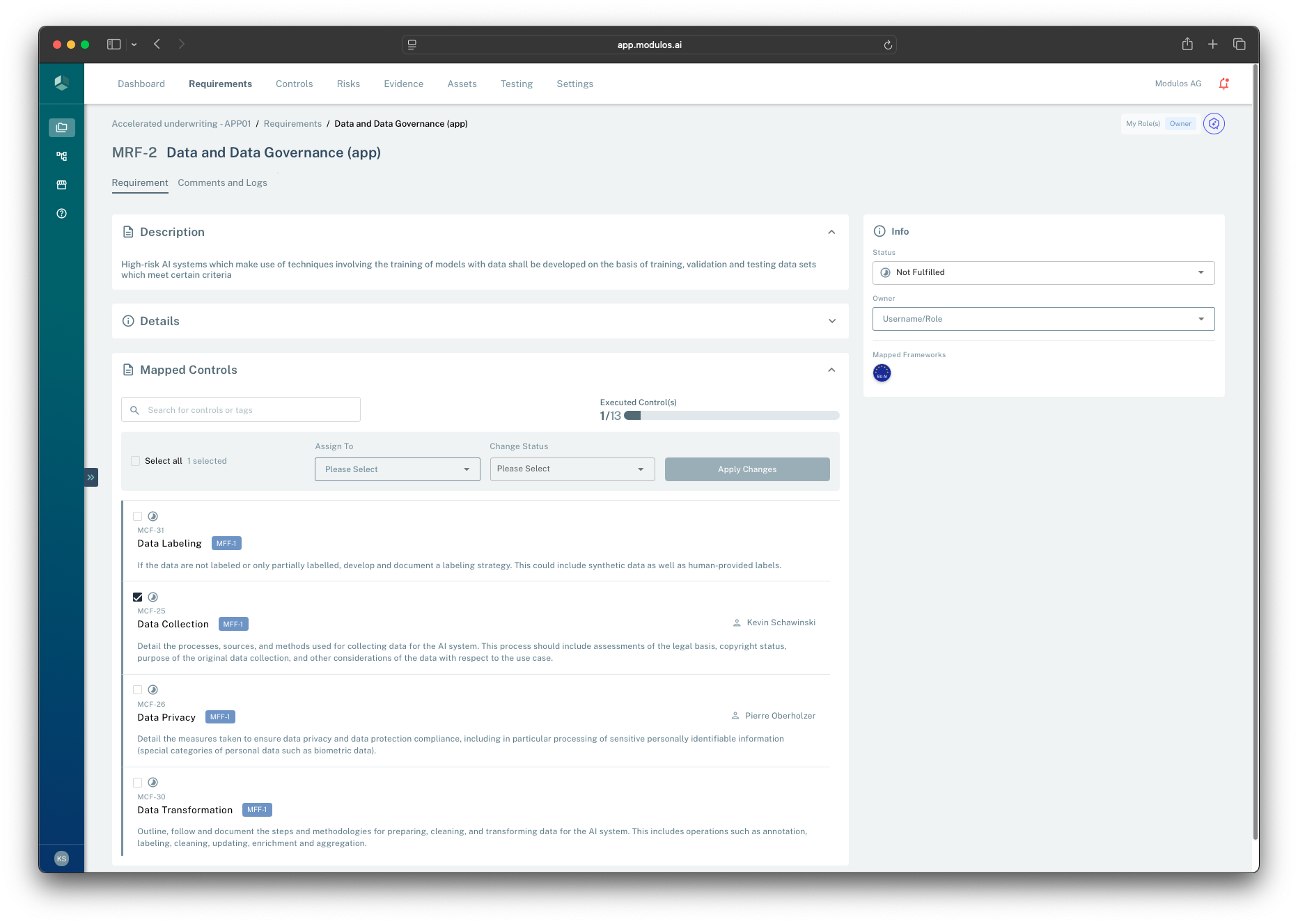
- 1Requirement contextThe header preserves framework codes and keeps traceability to the Source.
- 2Fulfillment status and ownerRequirements track not fulfilled to fulfilled; the owner attests when it is satisfied.
- 3Mapped Controls progressThe executed Controls rollup helps you see how close the obligation is to being reviewable.
- 4Mapped Controls listRequirements link to Controls so implementation work is reusable across frameworks.
How it works
Requirements are framework-derived
When you add a framework to a project, Modulos creates Requirements that preserve the framework’s codes and structure. This protects traceability: auditors can see exactly which obligation a Control and Evidence item is intended to satisfy.
Controls implement Requirements
Requirements do not contain implementation work. They link to Controls that implement the obligation.
This enables:
- many Requirements → one reusable Control
- one Requirement → multiple Controls (when the obligation needs multiple measures)
Status and readiness are different
Requirements have a fulfillment status:
- Not fulfilled → Fulfilled
- optionally Out of scope for non-applicable items
They also have a separate ready for review signal.
This is the non-obvious part: in Modulos, fulfillment is an attestation step.
What “ready for review” means
A Requirement becomes ready for review once all linked Controls are in a final state (typically executed or out of scope). This is a prompt to the Requirement owner:
- review the linked Controls and their Evidence
- confirm the obligation is satisfied for this project scope
- then mark the Requirement fulfilled
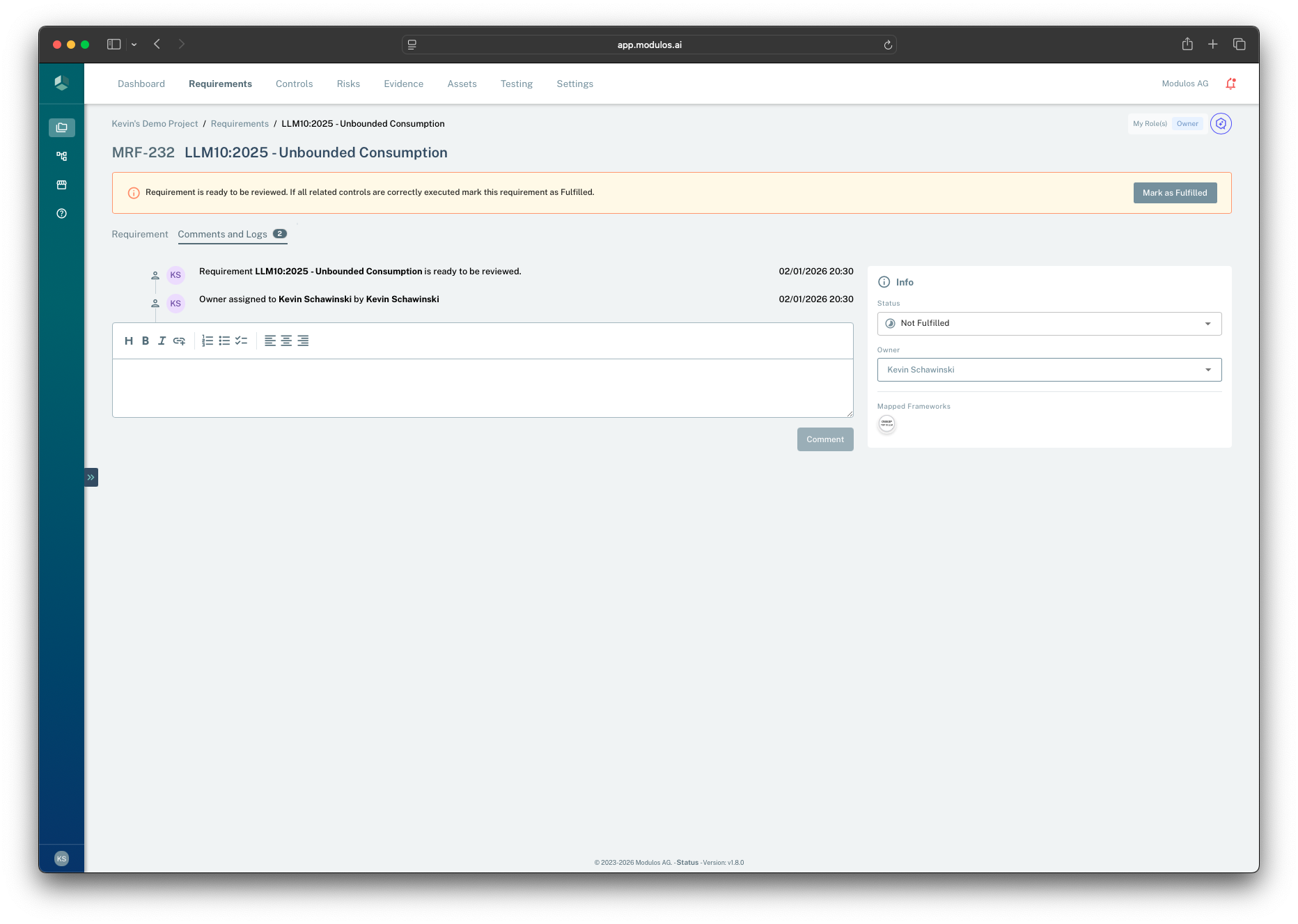
- 1Ready for review bannerSignals the Requirement owner that all linked Controls are final and it is time to attest.
- 2Mark as fulfilledRecords the fulfillment decision as part of the audit trail.
- 3Comments and logsShows why the Requirement became ready and captures the rationale for the decision.
- 4Status and ownerFulfillment status stays explicit until the owner attests.
Marking a Requirement as fulfilled
Only the Requirement owner can mark a Requirement fulfilled, and only when all linked Controls are final.
This records the decision “this Requirement is fulfilled” as part of the audit trail.
The diagram below shows how a Requirement becomes ready for review once all linked Controls are final, and how the owner attests by marking it fulfilled.
Requirement readiness
Each linked control must be final before the requirement is ready for review.
Linked controls
Control AExecuted
Control BExecuted
Control COut of scope
Requirement
Requirement
Risk management
Becomes ready when all linked controls are final.
Readiness
Ready for reviewAll linked controls are final
FulfilledOwner attests after review
A requirement cannot be fulfilled unless all linked controls are final — executed, or explicitly marked out of scope with a reason.
How to use it
1
Start from frameworks
Add the right frameworks so Requirements match your audit scope
2
Assign a Requirement owner
An owner is accountable for fulfillment decisions and keeps the Requirement moving
3
Execute linked Controls
Implement the mapped Controls and attach Evidence to Control components
4
Review when ready
When the Requirement becomes ready for review, validate Evidence and rationale
5
Mark fulfilled
Record the attestation decision once all linked Controls are final
Important considerations
- Requirements are obligations, not tasks. Use Controls to capture implementation work.
- “Fulfilled” should be defensible with Evidence. If you cannot explain it to an auditor, it is not fulfilled yet.
- Use “Out of scope” sparingly and align it with the project scope statement so exclusions are auditable.