

Appearance
AI System Dashboard
The AI System dashboard is your operational view of governance progress. It summarizes what is complete, what is in review, and where work is blocked.
What this is
Use the dashboard to answer three questions quickly:
- Are we on track to be audit-ready for this scope
- What is blocking progress right now
- Where is risk concentrated and how does it compare to limits
Where in Modulos
AI System → Dashboard
The Dashboard is the progress view. The registration record itself (intended purpose, EU AI Act classification, owners, state, and scopes) lives on AI System → Overview, the first item in the sidebar and the page that opens from the AI Registry; see Register an AI System.
Who can do what
Permissions
- Anyone with access to an AI System can usually view its dashboard.
- Actions surfaced from the dashboard follow normal AI System permissions. For example, exporting and changing settings require elevated AI System rights.
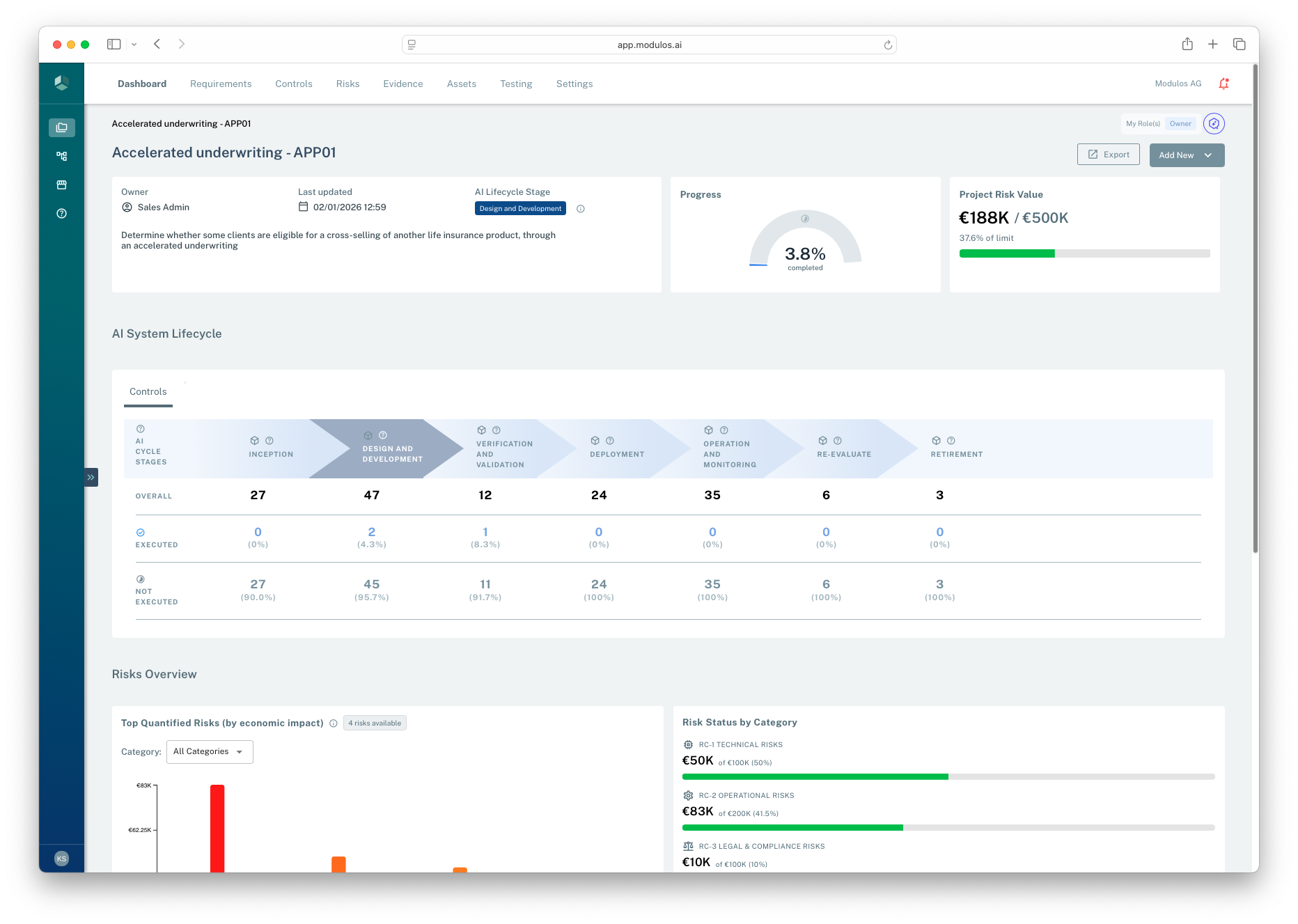
- 1Scope contextAI System name, owner, and scope statement anchor the dashboard.
- 2Progress rollupProgress is derived from underlying Requirement and Control statuses.
- 3Risk signalAI System risk value compares quantified exposure to the AI System risk limit.
- 4Lifecycle viewFor AI Systems, lifecycle stage segments reporting and Control coverage.
How it works
The dashboard is a rollup across AI System work items.
Governance progress
When governance is in use, the dashboard summarizes:
- overall progress based on Control and Requirement statuses
- what is waiting on review versus what is still being implemented
- framework coverage and the distribution of work across frameworks
AI Assessment Progress
When the Control Assessment Agent is enabled for your organization, two cards at the top of the dashboard summarize its coverage:
- AI Assessment Coverage: how many Controls have a stored assessment out of all assessable Controls (Archived and Out of scope Controls are excluded; Executed Controls count), with a percentage.
- AI Readiness: the average readiness score across assessed Controls, or a dash until at least one assessment exists.
Only the latest assessment of each Control counts, and the footer shows when the last assessment ran. Each card links into AI System → Controls with the matching filter: Controls not yet assessed, or assessed Controls sorted lowest score first. See Control Assessment Agent.
AI lifecycle stage
For AI Systems, the dashboard shows the selected AI lifecycle stage. This is a lightweight way to segment work and reporting by lifecycle phase.
The organization AI System typically does not use AI lifecycle stages.
Risk signals
When risk quantification is in use, the dashboard surfaces:
- top quantified risks by economic impact
- risk status by category
- utilization against the AI System’s risk limits
This is a decision signal. The durable audit trail lives on the underlying objects and their Comments and Logs.
Dashboard rollups
Two rollup chains. One audit-ready signal.
Governance progress
Status of work items rolls into project progress.
Controls
Requirements
Frameworks
Project progress
Risk decision signals
Quantified exposure summed against limits.
Risks
Threat vectors
Quantification
Decision signal
Audit-ready execution
What an auditor can verify on this project
✓Traceable status changes
✓Evidence attached
✓Decisions documented
Dashboards are summaries. The durable audit trail lives on the underlying objects' Comments and Logs — drill in from any rollup to see who decided what, when, and why.
How to use it
1
Start with the scope
Confirm the AI System description still matches what is being governed
2
Check what is blocked
Look for items in review or missing Evidence that prevent completion
3
Prioritize the top gaps
Focus on the Controls and Requirements that drive the most work remaining
4
Use risk as a decision signal
Quantify and monitor the most important threats and compare to limits
5
Drill into the audit trail
Open the underlying objects to see rationale, Evidence, and logs
Important considerations
- Dashboards summarize. Decisions should still be traceable through Evidence, reviews, and object logs.
- If the dashboard looks incomplete, it may reflect missing scope, missing frameworks, or missing permissions.
- Treat the AI lifecycle stage as a reporting aid, not as a compliance gate.