

Appearance
Vendor Overview
Vendors is the area of Modulos for the third parties that your organization uses. It keeps one record for each Vendor, with the documents of that Vendor.
What this is
A Vendor in Modulos is a third party that your organization uses to make, deploy, or operate an AI system. Examples are:
- providers of foundation models
- data suppliers and data labeling companies
- cloud and monitoring providers
- contractors and implementation partners
Vendors are at the organization level. One Vendor record is for all AI Systems that use the Vendor. Modulos does not link a Vendor record to an AI System, a Control, or Evidence. Scout and the AI agents of Modulos do not read Vendor records or Vendor documents.
The sidebar shows Vendors only when Vendors and governance are enabled for your organization. If you do not see it, contact Modulos.
Where in Modulos
- Vendors in the sidebar shows all Vendors in a table, with filters.
- Select a Vendor to open its record, with the Overview and Documents tabs.
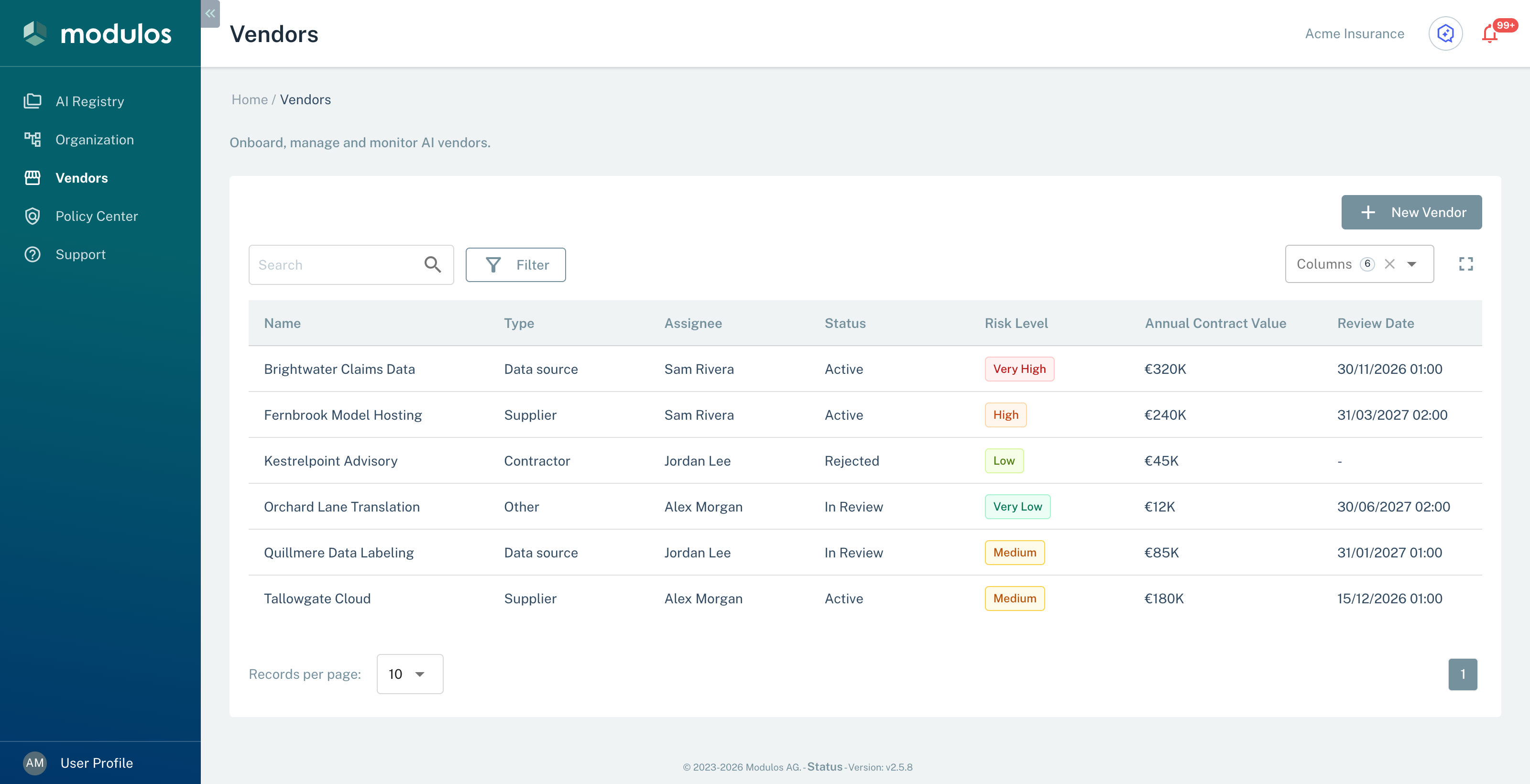
- 1FilterShow only the Vendors with the selected Type, Status, or Risk Level.
- 2New VendorOpen the Add New Vendor dialog.
- 3Review DateThe date of the next check. Sort by it to find due Vendors.
Who can do what
Permissions
- Each user of the organization can see, add, edit, and delete Vendors, and upload, download, and delete Vendor documents.
- The organization roles, for example Organization Admin, do not change these permissions.
AI System roles do not change Vendor permissions.
How it works
The Vendors table has these parts:
- The Search field finds Vendors by name.
- Filter has the Type, Status, and Risk Level filters. They show only the Vendors with the selected value.
- The columns are Name, Type, Assignee (the Responsible Person of the Vendor), Status, Risk Level, Annual Contract Value, and Review Date. You can sort the table by each column.
Vendor Records tells you what each field means. Vendor Documents tells you which files you can upload.
How to use it
- Select New Vendor and add the Vendor with a responsible person.
- Set the status, the risk level, and the date of the next check.
- Upload the important documents, for example a DPA, a SOC report, or a cybersecurity questionnaire.
- Update the record when a contract changes, or when your AI system uses the Vendor for a different purpose.
Important considerations
- Keep one Vendor record for all teams and AI Systems. Put the Evidence of an AI System in that AI System.
- You set the Risk Level of a Vendor to show which Vendors to examine first. Modulos does not calculate it, and it is not a monetary risk quantification.
- For the Review Date, Modulos sends no reminder. Vendor Records tells you how to find the Vendors that are due.