

Appearance
Results & Remediation
Results record the outcome of each test run with its time. Remediation turns failures into changes to Controls, systems, and Evidence.
What this is
A test is useful only when you use its result:
- Results tell you what happened.
- Remediation tells you what to do next.
Where in Modulos
AI System → Runtime Inspection → select a test → Resultsshows the history of runs and their details.AI System → Runtime Inspection → select a testlets you run a Metric Test by hand and manage its links to Controls.AI System → Jobsshows the runs of Jobs, which include scheduled test runs.Notifications(the bell in the page header) shows the notifications that failed and error results cause.
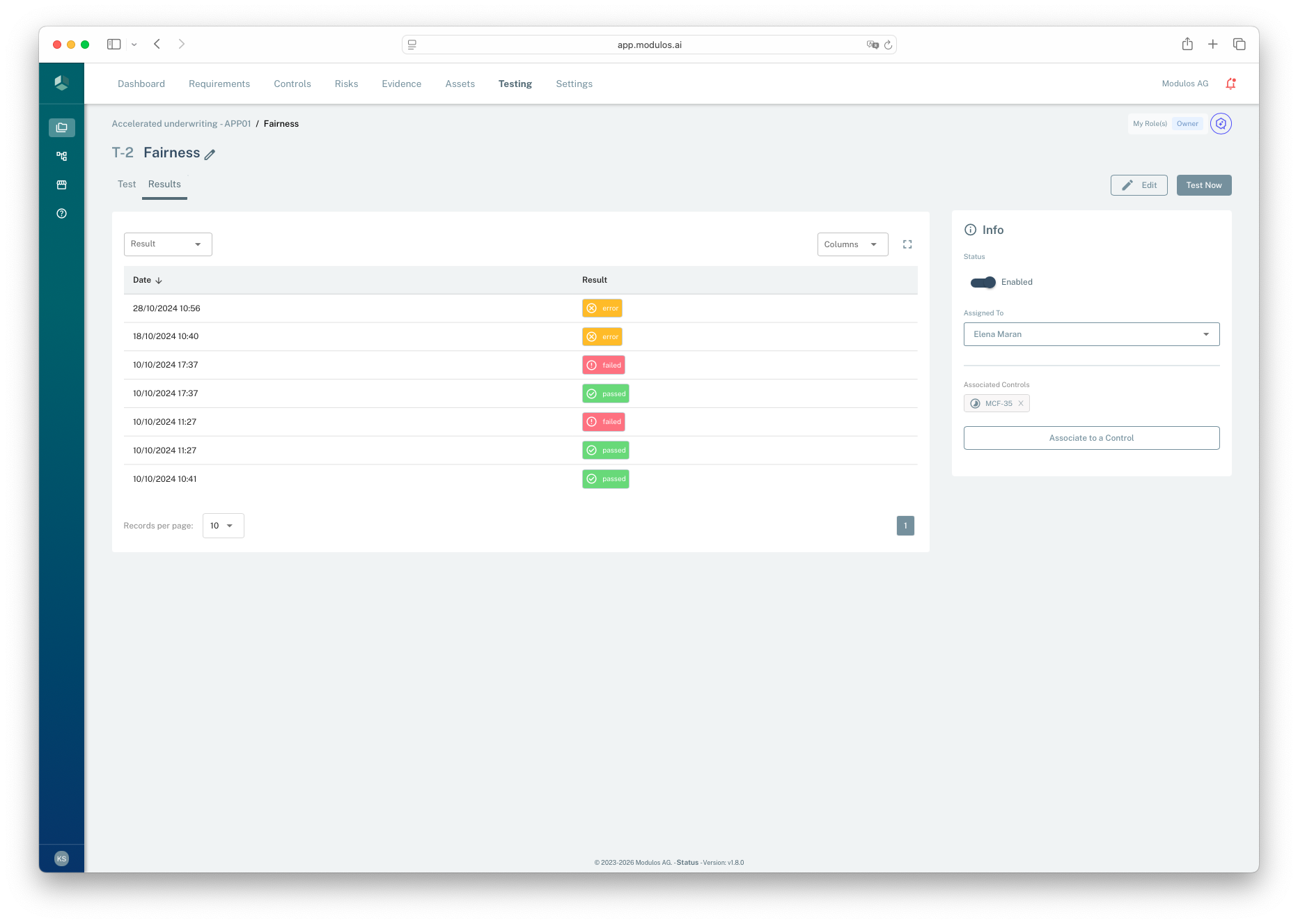
- 1ResultsThe history of the runs of the test.
- 2Test NowRuns the test by hand, for example to check a change.
- 3ResultThe result of each run: passed, failed, or error.
- 4InfoSets the test to Enabled or Disabled, and sets the user who gets the notifications.
- 5Associated ControlsLinks the test to Controls. Its results then change the status of these Controls.
Result statuses
Each test run gives a result status:
- Passed: the condition is met.
- Failed: the condition is not met, or the value does not have the type of the metric. The details of the result give the cause.
- Error: Modulos could not check the condition because the data path is not healthy.
An error result has these typical causes:
- The connection to the Source fails.
- The Source does not have the metric name.
- The lookback window has no recent data point.
An Agent Test run ends with the same three results. An Agent Test run with an error shows a message that gives the cause. See Errors.
Who gets notified
Failed and error results go to these users:
- the assignee of the test
- the users assigned to the linked Controls
Each user gets one result notification for a run, also when the user is the assignee and is assigned to more than one linked Control. A passed result is recorded and sends no notification.
When the run sets a linked Control from Executed to Not Executed, the assignee of that Control also gets a notification of the status change.
For an Agent Test, only a failed run sends notifications. The assignee of each linked Control that the run sets from Executed to Not Executed gets one. See What a failed run does to Controls.
What a failed result does to Controls
A Metric Test that is linked to a Control changes the Control when the result is failed or error. For each linked Control that is Executed, Modulos does these steps:
- It sets the Control to Not Executed. The log of the Control names the test as the cause. The assignee of the test is the user who made the change.
- It sets each Fulfilled Requirement of the Control to Not Fulfilled.
- It removes the ready for review mark from each Requirement of the Control.
A Control that is Not Executed, Out of Scope, or Archived does not change. A passed result does not set a Control back to Executed.
An Agent Test changes Controls only when a run is failed. An error result of an Agent Test changes no Control.
What remediation looks like in practice
Modulos does not keep remediation in a different area. A practical loop has these steps:
- Triage
- If the status is error, correct the integration or the metric first.
- If the status is failed, read the details of the result first.
- If the value does not have the type of the metric, correct the metric or the data.
- If the value does not agree with the condition, find the cause in the AI System or the Control.
- Correct the root cause
- Change the system, the procedure, or the configuration that the metric shows.
- Update the governance records
- Update the Control narrative if necessary.
- Attach Evidence that shows what changed and when.
- Check again
- Select Test Now, or monitor the scheduled runs until the signal is stable.
A failed test that is linked to a Control sets the Control to Not Executed. After you correct the cause and the test shows passed, set the Control to Executed again on its page.
Related pages
Tests & Schedules
How tests are set up, scheduled, and linked to Controls
Jobs
Run tests on a schedule or together, and read the runs
Evidence
How to attach Evidence and keep it available for audit
Reviews, Statuses, and Readiness
How statuses and Reviews work for governance objects
Operating Model
The end-to-end Runtime Inspection model in Modulos