

Appearance
Sources of an AI System
A Source of an AI System is a connection from that AI System to an external system, with its credentials. Metric Tests, Agent Tests, Scout, and the Risk Agent read the Sources of the AI System. The Source type sets which of them can read a Source. See Supported Source types.
A Source can also belong to the organization. AI Discovery reads those Sources. See Organization Sources.
Where in Modulos
AI System → Settings → Sourceslists the Sources of the AI System and adds new Sources.- The Connect Sources card of the registration wizard adds Sources to a Draft, with the same dialog. See Register an AI System.
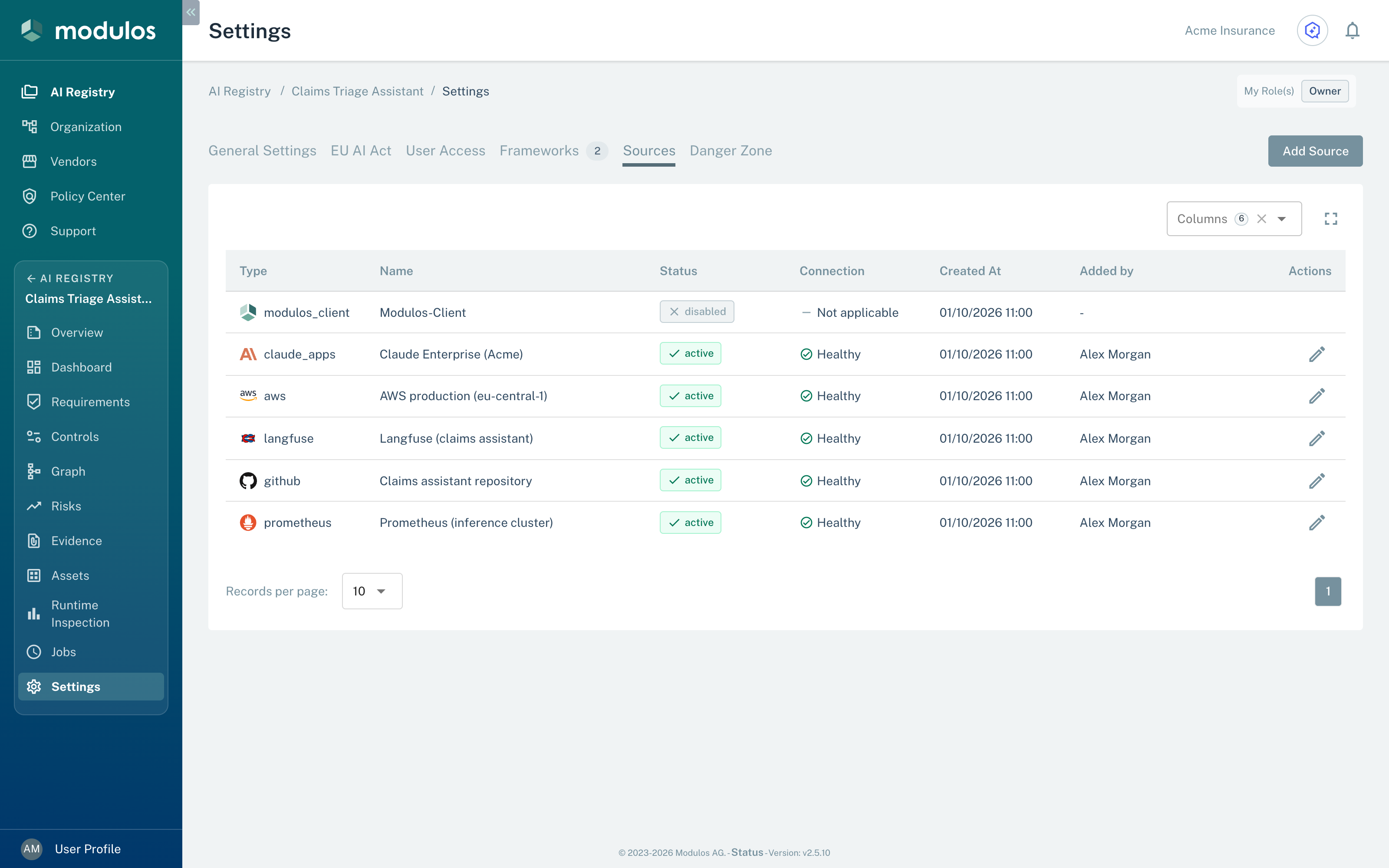
The Sources of an AI System, with their type and the result of their last check.
- Sources tab The Sources of an AI System are in its Settings.
- Add Source Adds a Source to the AI System.
- Configuration check The result of the last check of each Source.
Who can do what
Permissions
- Owners of an AI System add, change, and remove its Sources in
AI System → Settings → Sources. Organization Admins, Risk Managers, and Policy Managers can do this in each AI System. - Editors and Viewers cannot open the Settings of an AI System and do not see its Sources there. Editors select Sources in Metric Tests, Agent Tests, and Scout.
- Organization Admins make Source types available or unavailable for the organization. See Make a Source type available.
How to add a Source
- Go to
AI System → Settings → Sources. - Select Add Source.
- Select the Source type.
- Enter the data of the Source. The page of the Source type tells you how to prepare the external system and what to enter. See Supported Source types.
- Select Save.
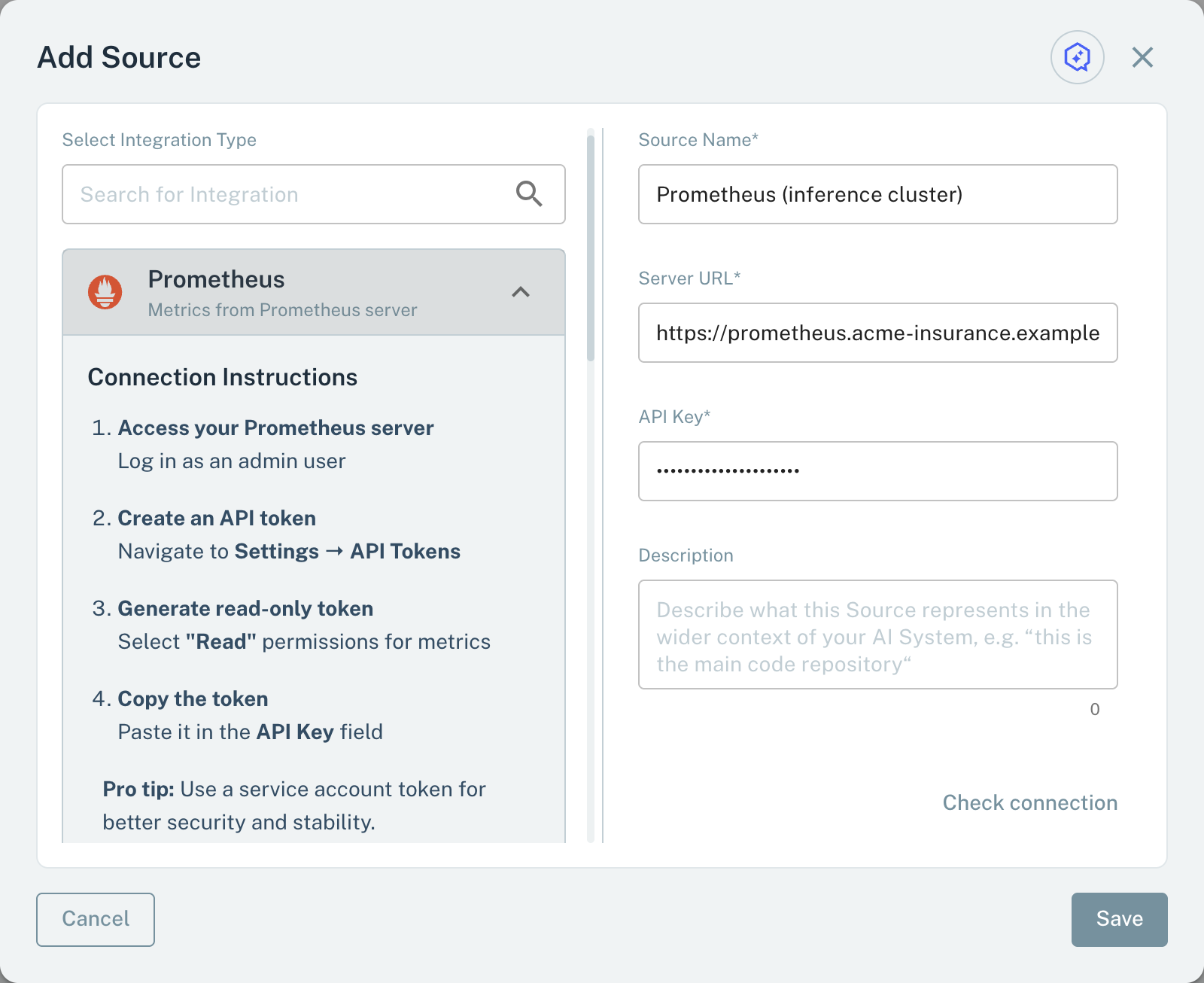
Add a Source: select the type and give its credentials.
- Source type The external system to connect to the AI System.
- Fields The credentials and settings of the selected type.
- Save Modulos tests the connection before it saves the Source.
The connection test
When you save a Source, Modulos tests the connection. If the test fails, Modulos does not save the Source. Most types then show a general error. The type pages tell you what Modulos checks.
Check connection in the dialog does the same test before you save. After you save in AI System → Settings → Sources, the dialog stays open and shows the Configuration check tab. In the registration wizard, the dialog closes.
The name of a Source must be different from the names of the other Sources of the AI System.
The configuration check
After a Source connects, Modulos checks its configuration. The Configuration check column of the Sources table shows the result. See Configuration check.
How to change or remove a Source
- Go to
AI System → Settings → Sources. - Select the Source.
- To change the Source, select Edit. To remove it, select Remove Source.
The removal is permanent. In AI System → Settings → Sources, Modulos asks you before it removes the Source. You cannot remove a Source while a Metric Test uses it. An Agent Test does not prevent the removal: Modulos takes the Source out of the Sources of the Agent Test.
Pull and push
- A pull Source: Modulos connects to the external system and reads the data. All types in the Add Source dialog are pull Sources.
- A push Source: your code sends data to Modulos. Modulos Client is the push Source. Each AI System shows it. It is active only when the organization activates Modulos Client.
A Source from AI Discovery
When an AI System starts as a candidate of AI Discovery, Modulos copies the organization Source that found the candidate into the Draft. In the Draft, the Connect Sources card of the registration wizard shows the copy. Remove on that card removes it immediately, with no question. After the registration, you change or remove it in AI System → Settings → Sources, as you do the other Sources of the AI System. The rules of this copy are in How a Source follows a candidate into an AI System.