

Appearance
Reviews & Statuses
Statuses communicate progress. Comments and reviews make status changes auditable.
The non-obvious part of Modulos governance is that each object type reaches its final status differently:
- Controls change status directly; every change is confirmed with a logged comment
- Requirements become ready for review once their linked Controls are final, and the Requirement Owner marks them fulfilled
- Assets use formal review requests with reviewer approval
For the full model, see Governance Operating Model.
The diagram below shows how status changes, comments, and reviews connect into an audit trail.
Audit trail
A user action becomes a durable audit trail through object logs.
Action
Update control
Attach evidence
Mark requirement fulfilled
Capture
Log entry on objectDurable
Timestamp, actor, before/after — kept on the object. This is the auditor's source of truth.
Notification to assignee
Personal queue, dismissable — moves work along but is not the audit record.
Audit trail
Comments and Logs
whowhatwhenwhyevidence
Status changes, comments, and review decisions land on the same trail. Auditors trace the thread from any object.
Notifications are personal and dismissable; logs are durable and auditable. Encourage teams to capture rationale in comments — that's what closes the loop for an auditor.
Concept-specific status
Different concepts have different status semantics:
The diagram below compares Control execution and Requirement fulfillment at a glance.
Controls vs requirements
Same trail, different jobs: implementation versus obligation.
Concept
Controls
Status
Not executedExecuted
Status change
Direct change+Logged comment
Locks
Executed controls become audit-sensitive — edits restricted to preserve integrity.
Concept
Requirements
Status
Not fulfilledFulfilled
Readiness
Becomes ready when all linked controls are final.
Fulfillment
Requirement owner attests by marking fulfilled.
WhyControls are implementation units; requirements are obligations. The two statuses live side by side because they answer different audit questions.
Controls
Controls track execution state: Not executed → Executed (or Out of scope / Archived).
Whoever holds the right to change status sets it directly on the Control detail page:
- Select the new status.
- Confirm the change in the dialog with a comment.
- The comment lands in the Control's Comments and Logs, so the trail shows who changed the status, when, and why.
Once a Control reaches a final status, it becomes audit-sensitive: editing is locked while the status stands, and moving the Control out of a final status asks for another confirmed, commented change.
Requirements
Requirements track fulfillment state:
- Not fulfilled → Fulfilled
- optionally Out of scope or Archived
Requirements also have a separate ready for review signal. A Requirement becomes ready for review once all linked Controls are final; the Requirement Owner then reviews the completed Controls and marks the Requirement fulfilled. This review at the Requirement level is the approval record.
Assets
Assets are the one object type that keeps a formal review request flow. To change an asset's status (for example to Completed), you request the status change, assign one or more reviewers, and a reviewer approves or rejects it. The decision and its rationale land in the asset's history.
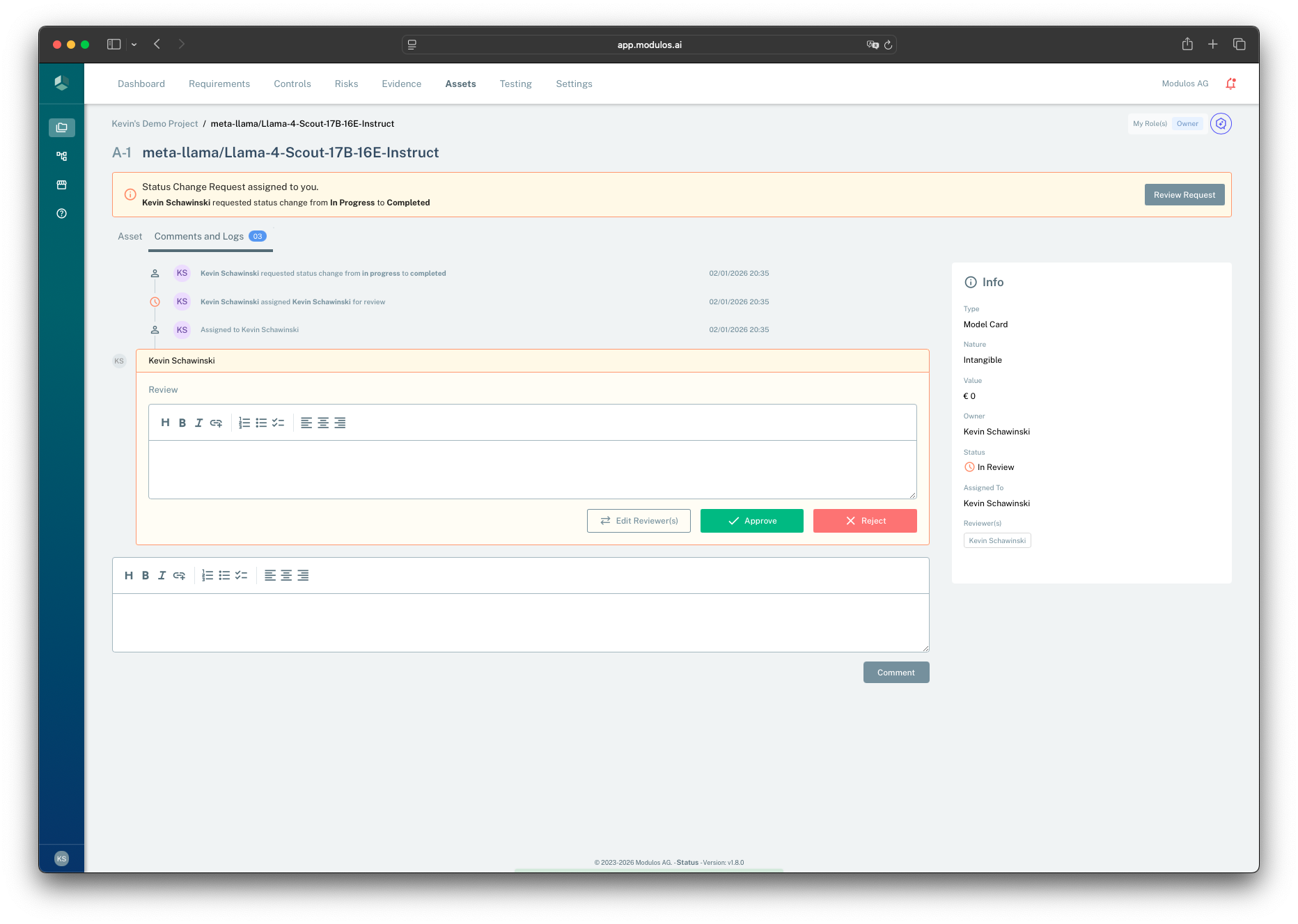
- 1Review requestWhen a status change is requested, reviewers see a banner and can open the review.
- 2Review commentCapture rationale so auditors can follow the decision later.
- 3Approve or rejectThe decision applies the status change or keeps the prior status.
- 4Current stateStatus and reviewer assignment provide the context for the decision record.
How people use this in practice
Control execution: implement → set status → comment
Typical workflow:
- An Editor (or Control Owner) implements the Control by completing components and attaching Evidence.
- When ready, they change the status to Executed and confirm the change with a comment.
- The status change and its comment become part of the Control's
Comments and Logs.
Requirement fulfillment: ready for review → fulfill
Typical workflow:
- Controls mapped to the Requirement reach a final status.
- The Requirement becomes ready for review.
- The Requirement Owner validates that the linked Controls and Evidence satisfy the obligation.
- The Requirement Owner marks the Requirement fulfilled.
Reopening work without losing integrity
In continuous governance, things change:
- a system changes
- a vendor changes
- an incident reveals a missing Control
Modulos is designed to allow reopening work while preserving the "why":
- moving a Control out of a final status requires another confirmed status change with a comment, so the reversal is explained on the same trail
- when Requirements are already fulfilled, reverting the underlying Controls should be deliberate and explainable