

Appearance
Runtime Inspection Operating Model
Runtime Inspection turns signals from an AI System in operation into verification for governance. You connect an AI System to data Sources, add tests, and link the tests to Controls. Audits then show what the AI System does in operation.
Governance loop
Four stations, one operating model.
Continuous verification
Runtime Inspection gives measurable signals that you can monitor over time.
Connect
Add Sources and select the signals to trust
Test
Set conditions and schedules, or describe a check for an agent
Respond
Find the cause of a failure and correct it
Prove
Link results to Controls and keep the audit trail
The dashed arc marks restart — every cycle re-enters Connect with what changed since the last pass.
Where to do what
Runtime Inspection work is in two places: the settings of the AI System, and the pages in the AI System.
| What you want to do | Where in Modulos | Output |
|---|---|---|
| Set up the Sources that give testing data | AI System → Settings → Sources | AI System Sources |
| Add a Metric Test | AI System → Runtime Inspection → New Test → Metric Test | Test in the tests table |
| Add an Agent Test, a check that an AI agent judges against your Pass Criteria | AI System → Runtime Inspection → New Test → Agent Test | Verdict and Run Report |
| Run a Metric Test immediately | AI System → Runtime Inspection → select a test → Test Now | Test result |
| Read earlier results of a test | AI System → Runtime Inspection → select a test → Results | Result history |
| Link a Metric Test to a Control | AI System → Runtime Inspection → select a test → Associate to a Control | Link between test and Control |
| Run tests on a schedule, or together | AI System → Runtime Inspection → Create Job | Job |
| Read the Jobs of the AI System and their runs | AI System → Jobs | Jobs and run history |
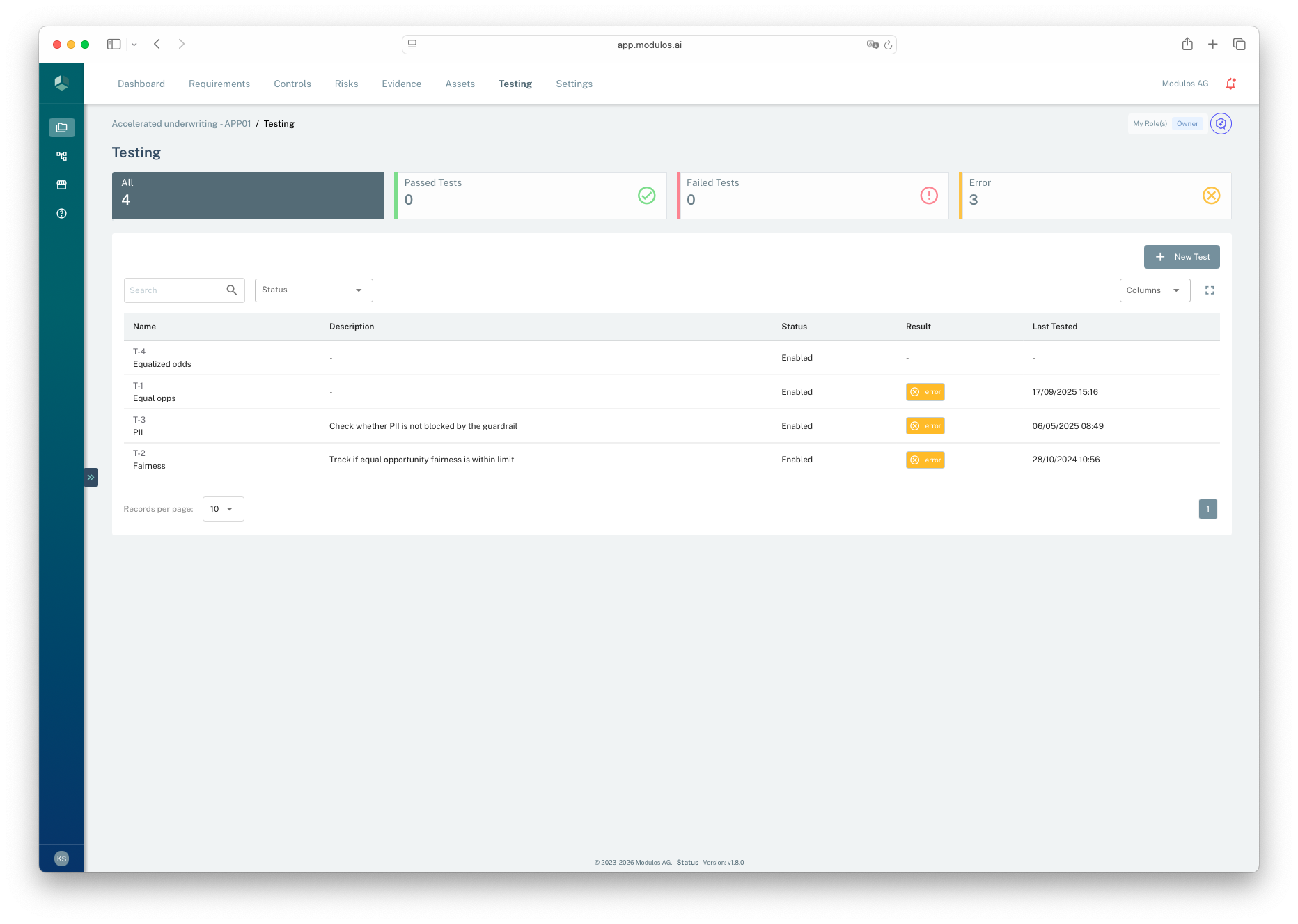
- 1AllThe number of tests. The cards for Passed Tests, Failed Tests, and Error show counts only.
- 2Create JobRuns tests together, or on a schedule, as a Job.
- 3New TestAdds a Metric Test or an Agent Test.
- 4ResultThe latest result of the test: passed, failed, or error.
Who can do what
An AI System role and an organization role together set your permissions.
AI System roles
- Owner and Editor can add, change, and run tests, and create Jobs.
- Only the Owner can open
AI System → Settings, where you manage Sources. See AI System Settings. - Viewer can read tests, results, and Jobs for assurance and audit.
Organization access
Organization Admins, Organization Risk Managers, and Organization Policy Managers can read and edit all AI Systems of the organization, and manage their Sources.
How Runtime Inspection works in Modulos
Runtime Inspection has five objects:
- Sources: service accounts of an AI System. Tests read their data from the Sources.
- Metrics: named measurements. A Source has them, or you make them in Modulos.
- Tests: a Metric Test checks one condition on one metric. An Agent Test gives an AI agent Pass Criteria in words.
- Results: timestamped outcomes with a status and details.
- Jobs: runs of one or more tests on a schedule or by hand. See Jobs.
When a Metric Test runs, Modulos reads the latest available data point of the metric in a lookback window. Then it checks the condition. For Agent Tests, see Agent Tests.
You can link a test to a Control. A failed Metric Test then sets each linked Control that is Executed to Not Executed, and Modulos sends a notification to the users responsible. A result of error from a Metric Test has the same effect. See Results & Remediation.
How to use this
1
Connect Sources
Use stable service accounts and check the connections
2
Add a few high-signal tests
Start with metrics that show the result of a Control
3
Assign an owner
Make one person responsible for failures
4
Link tests to Controls
Use operating data as audit-ready verification
5
Read trends regularly
A failure shows a change in the system, the Control, or the data. Correct the cause
Important considerations
- Use Runtime Inspection to monitor continuously if a Control works. Do not use it to write Control narratives.
- Use stable tests. Outcome metrics are better than vanity metrics.
- If a test shows error, correct the data path first. If a test shows failed, read the details of the result. The value does not agree with the condition, or the value does not have the type of the metric. Find the cause.
- Modulos shows schedule times in your local time zone.
Related pages
Sources
AI System Sources, supported types, and how secrets are handled
Tests & Schedules
Conditions, operators, schedules, and links from tests to Controls
Jobs
Run tests on a schedule or together, and read the runs
Results & Remediation
Read results, find the cause of failures, and make a remediation loop
AI System Settings
Where Sources and framework settings are at the AI System level
Governance Operating Model
How Controls, Evidence, and reviews work together