

Appearance
Microsoft Copilot Studio
The Microsoft Copilot Studio Source connects an AI System to the Copilot Studio agents of a Power Platform tenant. Scout, Agent Tests, and the Risk Agent read the inventory of the agents and the details of each agent. Metric Tests cannot use a Copilot Studio Source.
| Used by | Agent Tests, Scout, Risk Agent |
| Mode | Pull |
| Credentials | Tenant ID, client ID, and client secret of an Entra app |
| Metric selection | Not applicable |
What this is
A Copilot Studio Source covers the full tenant or one environment:
| Coverage | Dataverse environment URL | What Modulos reads |
|---|---|---|
| Full tenant | Empty | The agent inventory of all environments, and the agent details of the environments that you select |
| One environment | The URL of the environment | The agents of that environment, with their details |
For agent details, each environment must have an application user with a read-only security role. For the agent inventory of the full tenant, only the AI Reader role in Microsoft Entra ID is necessary. Modulos only reads from Copilot Studio. It does not create, change, or delete agents or environments.
Where in Modulos
AI System → Settings → Sources → Add Source → Microsoft Copilot Studioadds the Source.AI System → Settings → Sources → select the Sourceshows the selected environments and their status to the users who can open the Settings of the AI System.
Before you start
An Organization Admin makes Microsoft Copilot Studio available. See Source & Connectors.
You need Microsoft administrators who can register apps, give Entra roles, and manage Dataverse application users.
How to prepare Entra and Power Platform
In the Microsoft Entra admin center:
- Open App registrations.
- Create a single-tenant app. The app needs no API permissions and no admin consent.
- Copy the Directory (tenant) ID and the Application (client) ID.
- In Certificates & secrets, create a client secret and copy its value.
- For the full tenant, open Roles & administrators and give the AI Reader role to the app.
The AI Reader role lets Modulos list the environments of the tenant and their agent counts. Without it, Modulos cannot save a full-tenant Source.
Client secrets expire
Before the client secret expires, create a new one in Entra. Then update the Source in Modulos.
In the Power Platform admin center, do these steps in each environment that Modulos must read agent details from. Skip the environments where you need only the agent counts.
- Open
Manage → Environmentsand open the environment. - Select Settings, then
Users + permissions → Security roles. - Select New role.
- Set Include App Opener privileges for running Model-Driven apps to Off.
- Give the role Organization-level Read on Agent (
bot) and Agent component (botcomponent), and no other rights. - Add the app as an application user. See Manage application users in the Microsoft documentation.
- Give the security role to the application user.
Use the Organization level. Modulos compares the agents that it can read in an environment with the agent count of that environment. A lower access level hides agents and gives the status Role too narrow.
How to connect Copilot Studio
- Open
AI System → Settings → Sources. - Select Add Source.
- Select Microsoft Copilot Studio.
- Type a Source Name.
- Paste the tenant ID into Tenant ID.
- Paste the client ID into Client ID.
- Paste the client secret into Client Secret.
- Set the coverage with Dataverse environment URL:
- For the full tenant, keep Dataverse environment URL empty. Select Discover environments, then select the environments to read agent details from.
- For one environment, paste its URL into Dataverse environment URL. Get the URL in the Power Platform admin center, in
Manage → Environments.
- Select Save.
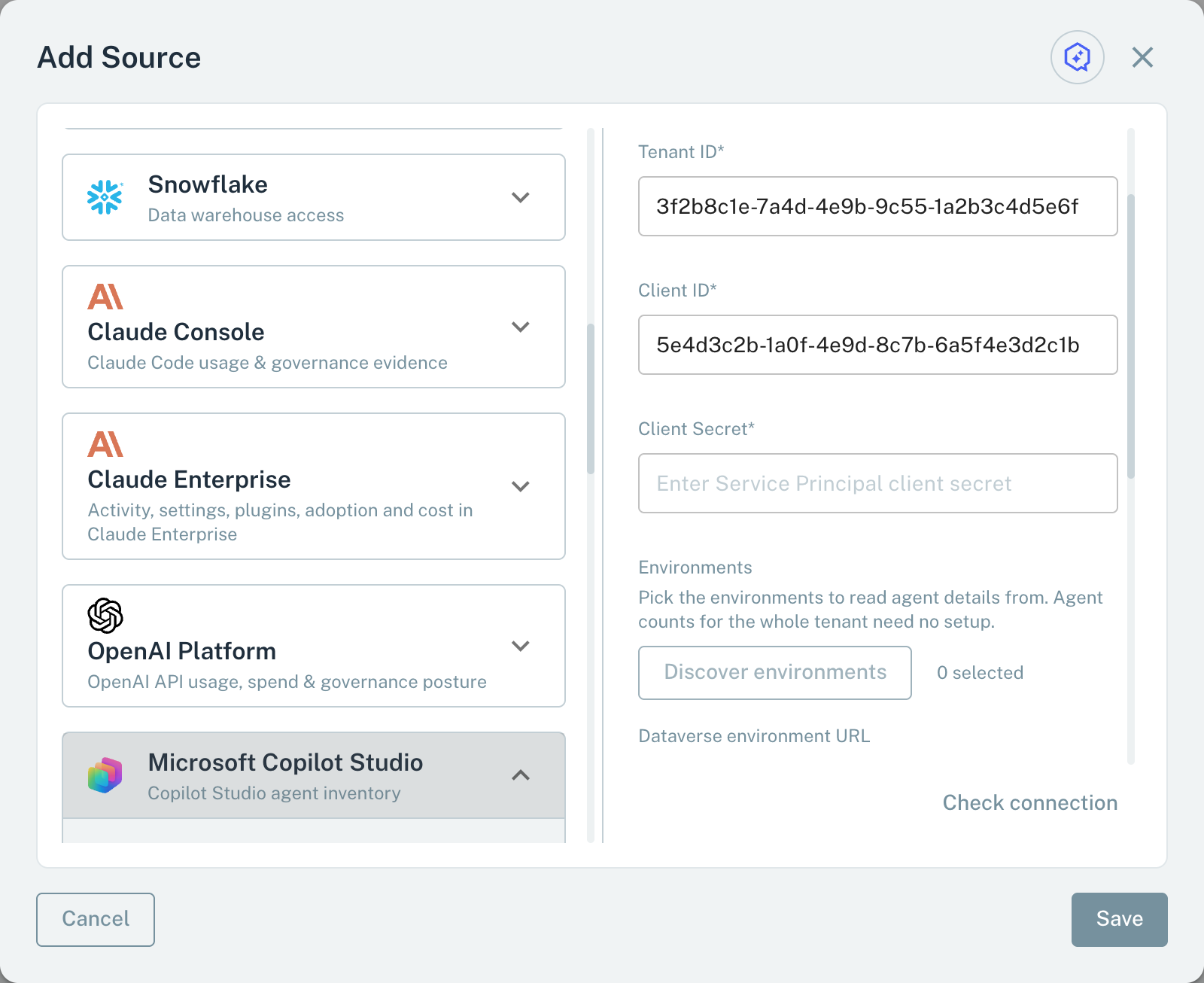
- 1Tenant IDThe Entra tenant of the app.
- 2Client SecretThe client secret of the app.
- 3Dataverse environment URLEmpty: the full tenant. A URL: one environment.
Discover environments lists each environment with its ID and its agent count. The badge App user found shows that the app has an application user in that environment. The badge does not test the security role. While Dataverse environment URL has a value, the environment list is off.
The URL of one environment has the form https://yourorg.crm.dynamics.com. Regional environments use hosts such as https://yourorg.crm4.dynamics.com. Do not add a slash or a path at the end.
When you save, Modulos signs in as the app and makes a test request. If the request fails, the dialog shows the cause. See Save errors. For the full tenant, a usual cause is a missing AI Reader role. For one environment, a usual cause is a missing application user. An expired client secret causes an error in the two cases.
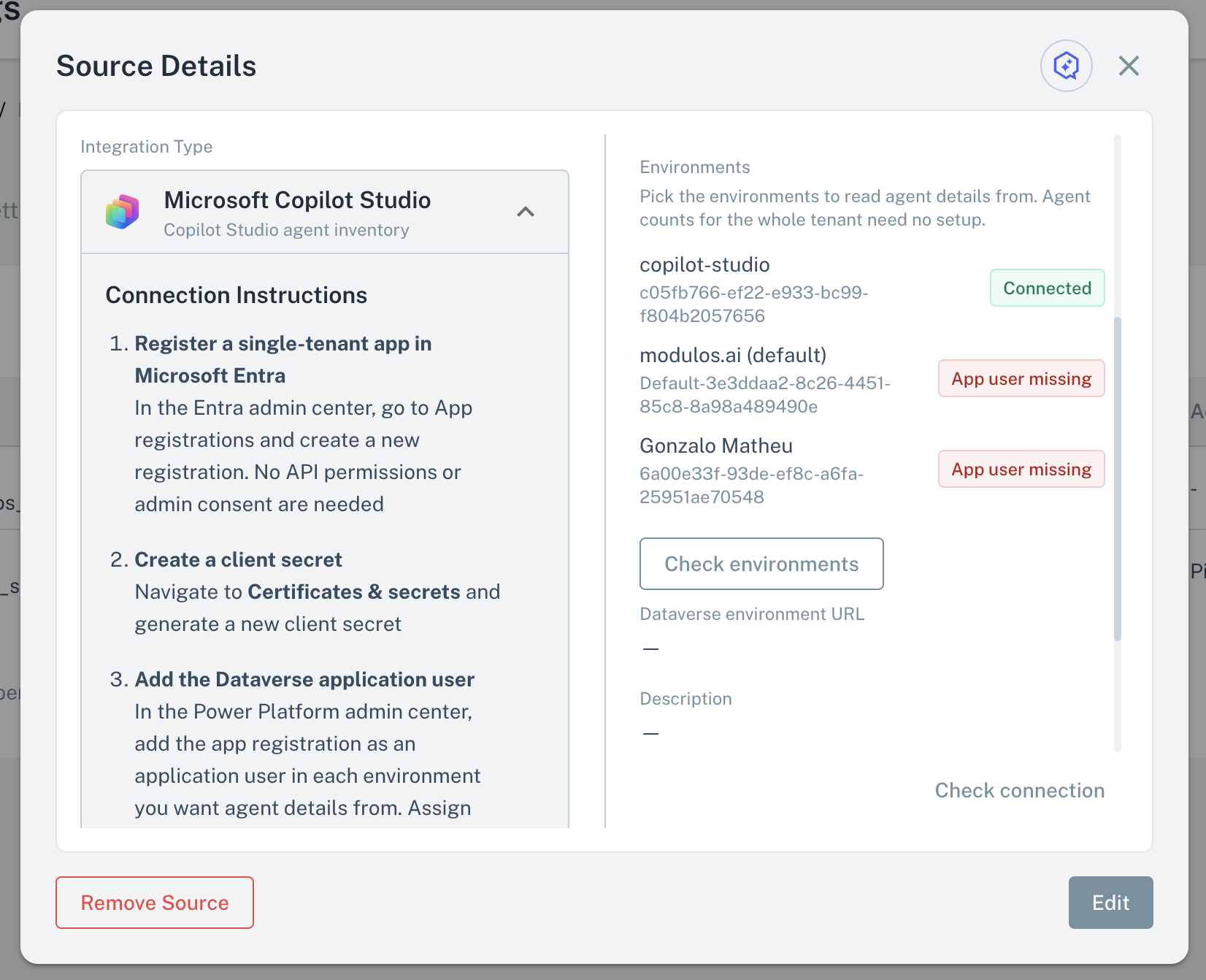
After you save a full-tenant Source, do these steps:
- Open the Source.
- Select Check environments.
Modulos signs in to the Dataverse of each selected environment and reads the Agent and Agent component tables. The check does not change anything in Microsoft. Each selected environment then shows a status. Select Check the rest to check only the environments that show Not checked.
| Status | What it means | What to do |
|---|---|---|
| Connected | Modulos can read the two tables and sees the expected number of agents. | Nothing. |
| App user missing | The app is not an application user in the environment, or the environment has no Dataverse database. | Add the app as an application user. |
| Role missing | The application user cannot read Agent: it has no security role, or no Read on Agent. | Give the security role to the application user. |
| Role too narrow | The security role does not give Read on Agent component, or Modulos reads fewer agents than the environment has. The margin is 5 agents or 10 percent, whichever is larger. Modulos skips this count check at 5000 agents. | Set the two Read rights to the Organization level. |
| Unreachable | Modulos could not connect to the environment, or the environment did not answer in time. | Make sure that the environment runs and that the client secret is valid. Then check again. |
| Throttled | Microsoft reduced the rate of the requests. | Wait some minutes. Then check again. |
| Not checked | Modulos did not check the environment. The check ran out of time, or it reached its limit of 50 environments. | Select Check the rest. |
The badge App user found in the environment list is not the same as the status Connected. Connected means that the check read the two tables and saw the expected number of agents.
Scout, Agent Tests, and the Risk Agent
Scout, Agent Tests, and the Risk Agent read a Copilot Studio Source with read-only queries:
- Agents: the agents with counts, status, owner, dates, and exposure. The tenant inventory comes from Azure Resource Graph and can be about 20 minutes behind.
- Agent details: the instructions, the topic names and descriptions, the actions and connectors, and the knowledge sources of one agent. For a full-tenant Source, the details are available only in a selected environment that you set up. Scout, Agent Tests, and the Risk Agent do not get the content of the topics.
- Environments: for a full-tenant Source, the environments with their agent counts, and which environments you selected.
In the tenant inventory, the owner of an agent shows as the object ID of the Entra user. A filter by owner name does not work for the tenant inventory. In an environment that you set up, the owner shows as a name.
Limits
| Limit | Value | What happens at the limit |
|---|---|---|
| Selected environments in one Source | 500 | You cannot select more. Add a second Source for the other environments. |
| Environments that Discover environments lists | 5000 | The list shows the first environments and a note that the tenant has more. |
| Environments in one Check environments run | 50 | The other environments show Not checked. Select Check the rest. |
| Time for one check | 30 seconds in total, 8 seconds for each environment, 5 environments at a time | The environments that the check did not reach show Not checked. An environment that did not answer in time shows Unreachable. |
| Agent count margin | 5 agents or 10 percent, whichever is larger | Below the margin, the status is Role too narrow. Modulos skips the comparison at 5000 or more agents. |
| Microsoft request limits | About 15 Azure Resource Graph queries in 5 seconds for one app | The status Throttled, or a save error. Wait. Then check again. |
| Agents that Scout lists | No limit in Modulos. Scout reads every page from Microsoft. | A list that takes more than 60 seconds stops with a message. Ask Scout to narrow the list by name, owner, publication, or environment. |
| Agents in one Scout reply | 15 | Scout shows 10 to 15 agents and attaches the full list as a CSV download. |
| Components in the details of one agent | 1000 | Scout shows the first 1000 components and a note. |
Save errors
If the test request fails when you save, the dialog shows one of these messages:
| Message | What to do |
|---|---|
| Could not authenticate with Microsoft Entra. Check the tenant ID, client ID and client secret. | Compare the three values with the app registration in Entra. |
| The client secret has expired. Create a new one in Entra and update this source. | Create a new client secret. Then update the Source. |
| The app registration needs the AI Reader role in Microsoft Entra ID to list Power Platform environments and agents. | Give the AI Reader role to the app. |
| The app registration has no application user in this Dataverse environment. A Dataverse System Administrator must create one bound to this client ID and assign it a read-only security role. This is not a wrong secret or a wrong URL. | Add the app as an application user in that environment. |
Important considerations
- Give the security role Read rights only. Do not give create, write, delete, or append rights.
- You can select a maximum of 500 environments.
- When you change the tenant ID, the client ID, or the client secret, select Discover environments again. A change of the tenant ID clears the selected environments.
- Discover environments needs the client secret. When you edit the Source, enter the client secret again before you select it.