

Appearance
Controls
Controls are the “how” of compliance: the concrete measures you implement to satisfy Requirements. Controls are designed for reuse across frameworks and for audit-ready traceability.
What this is
A Control is a reusable implementation unit. One well-designed Control can satisfy multiple Requirements across frameworks, without duplicating work.
Controls combine:
- narrative (what you do and why it satisfies the obligation)
- proof (Evidence attached to specific claims)
- decision history (comments, logs, and review decisions)
Control anatomy
Evidence attaches to components, not to the control as a whole.
Header
Model input validation
ML Engineering Lead
Components · claims
1
Input data is validated against schema before processing.
schema_validation.py validation_logs_Q4.pdf
2
Statistical drift detection runs daily on production data.
drift_report_Q4.csv
3
Data lineage is tracked from source to model input.
No evidence yet
4
Anomalies trigger alerts and are logged for review.
alerting_config.yaml anomaly_response_proc.pdf
Each component is one claim the control makes; evidence attaches to the claim it proves. A missing-evidence row is a precise gap, not a vague "control incomplete" status.
For the full operating model, see Governance Operating Model.
Where in Modulos
AI System → Controlsto browse Controls and open details. The sidebar filters by status, framework, and assigned to me; the filter bar filters by tags and by AI Assessment (Assessed or Not assessed). Control codes sort naturally (C-2 before C-10).Control detailto fill components, attach Evidence, and request status change reviews
Who can do what
Permissions
- Most AI System members can view Controls and linked Evidence.
- Editors typically implement Controls and attach Evidence.
- AI System Owners unblock work and assign roles.
- Viewers view Controls, Evidence, and decision history for traceability.
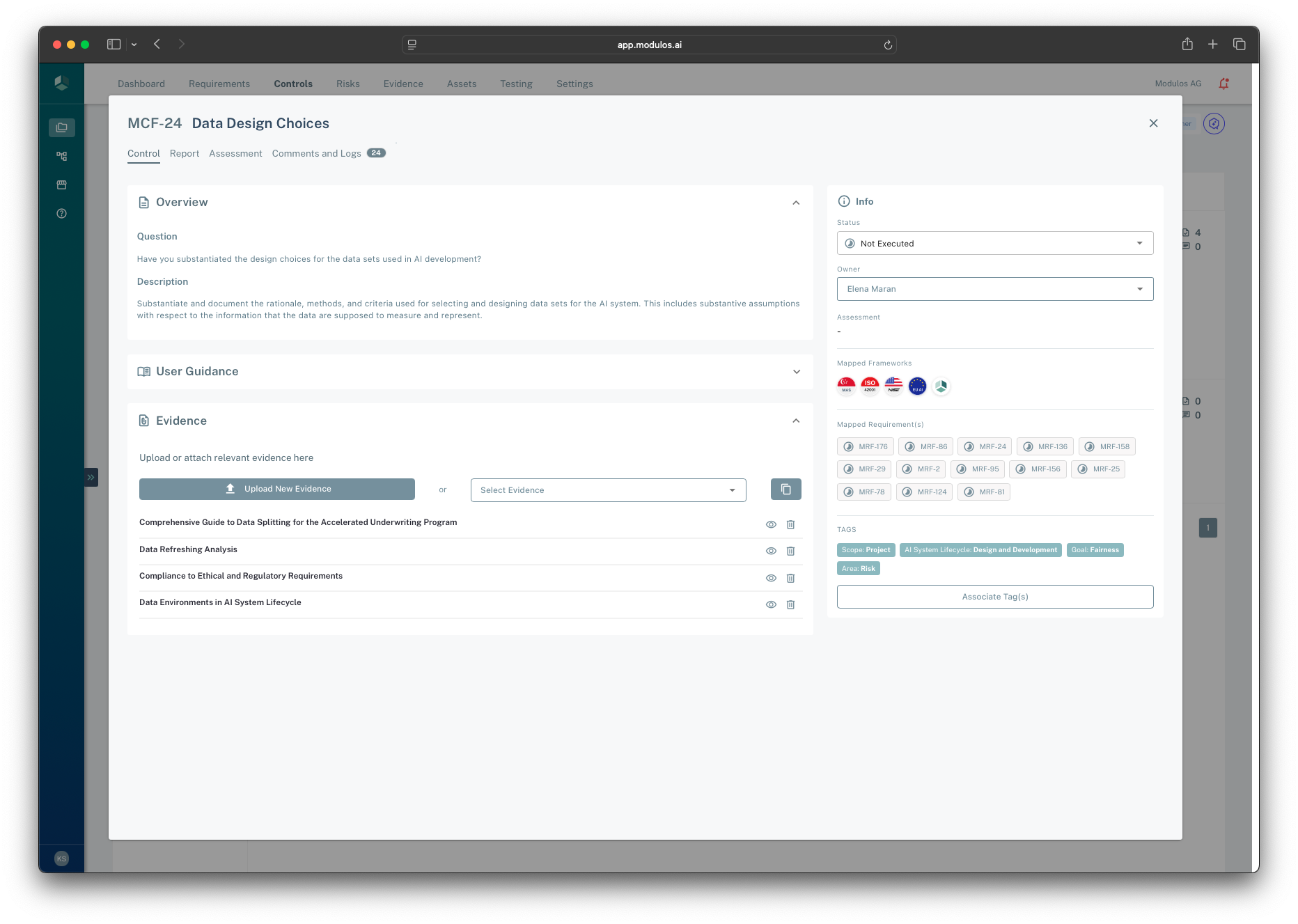
- 1Control tabsUse Control to implement, and Comments and Logs to capture rationale and review decisions.
- 2Evidence attachmentsAttach Evidence to support the Control’s claims and keep audits defensible.
- 3Evidence listSee which artifacts are already linked and identify what is missing.
- 4Execution status and ownerOwners execute Controls; status changes are confirmed with a comment that lands in Comments and Logs.
- 5Mapped RequirementsShows which framework obligations this Control helps satisfy.
How it works
Control anatomy: components and Evidence
Controls are structured into components. Components exist for one reason: so Evidence can attach to the right sub-claim.
This is intentional:
- Evidence links to the precise claim it supports
- a single Control can include multiple distinct claims without becoming unstructured
- the same Evidence item can support multiple Controls while staying traceable
Execution status and reviews
Controls use a simple execution model:
- Not executed → Executed
In practice, teams keep the workflow auditable by using reviews:
- an implementer prepares the Control (components + Evidence)
- a reviewer approves the status change
- the decision and rationale are stored alongside the Control
This preserves separation of duties and creates durable traceability for auditors.
Locking and why it matters
Once a Control is executed, it becomes audit-sensitive. Modulos restricts edits to preserve integrity:
- the Control’s content becomes harder to change without leaving a trace
- Evidence supporting executed Controls becomes locked to prevent after-the-fact edits
This is a feature, not friction: it keeps audits credible.
Links: Requirements, Evidence, risks, and tests
Controls are the execution hub:
- Requirements link to Controls to represent fulfillment
- Evidence attaches to Control components to prove implementation
- risks and tests can link to Controls to connect “why this matters” and “how we monitor it”
How to use it
1
Pick the highest-impact Controls
Start with Controls mapped to many Requirements across frameworks
2
Assign a Control owner
An owner is accountable for execution and Evidence quality
3
Implement in components
Fill the Control narrative and keep claims structured
4
Attach Evidence to claims
Link Evidence to the component it supports so audits are precise
5
Request approval
Use reviewers to approve the status change to executed
Important considerations
- Avoid “one Control per Requirement”. Reuse is the key to scaling across frameworks.
- Do not treat “Executed” as “we wrote something”. Executed should mean the Control is implemented and evidenced for this scope.
- If you must reopen an executed Control, document why. Reversals are normal in continuous governance, but they must be explainable.