

Appearance
OpenAI Platform
The OpenAI Platform Source connects an AI System to one OpenAI API organization on platform.openai.com. Modulos reads the API usage, the spend, the audit log, and the governance settings of that organization. Modulos only reads. It does not change settings in the OpenAI organization.
| Used by | Metric Tests, Agent Tests, Scout, Risk Agent |
| Mode | Pull |
| Credentials | An Admin API key |
| Metric selection | Type the metric name |
What this is
The OpenAI Platform Source reads one API organization, with Codex used through the API keys of that organization. OpenAI records the use and spend of each request for the owner of the API key. A shared key counts for its owner.
The Source does not read these OpenAI products:
- ChatGPT Enterprise and ChatGPT Business workspaces
- Codex used with a ChatGPT sign-in
- the Compliance Logs Platform
- the tenant settings of the Global Admin Console
Where in Modulos
AI System → Settings → Sources → Add Source → OpenAI Platformadds the Source.
Before you start
- An Organization Admin makes OpenAI Platform available. See Source & Connectors.
- You must be an Organization Owner on platform.openai.com.
How to create the Admin API key
- Sign in to platform.openai.com.
- Open
Settings → Organization → Admin keys. - Create an admin key with an expiry date.
An Admin API key starts with sk-admin-.
How to activate audit logging
Do these steps only if you want the audit metrics.
Audit logging
Before you activate audit logging, make sure that your organization wants it permanently. After you activate it, only OpenAI can deactivate it. Modulos does not change this setting.
- Open
Settings → Organization → Data controls. - Activate audit logging.
How to connect OpenAI Platform
- Open
AI System → Settings → Sources. - Select Add Source.
- Select OpenAI Platform.
- Type a Source Name.
- Paste the key into Admin API Key.
- Select Save.
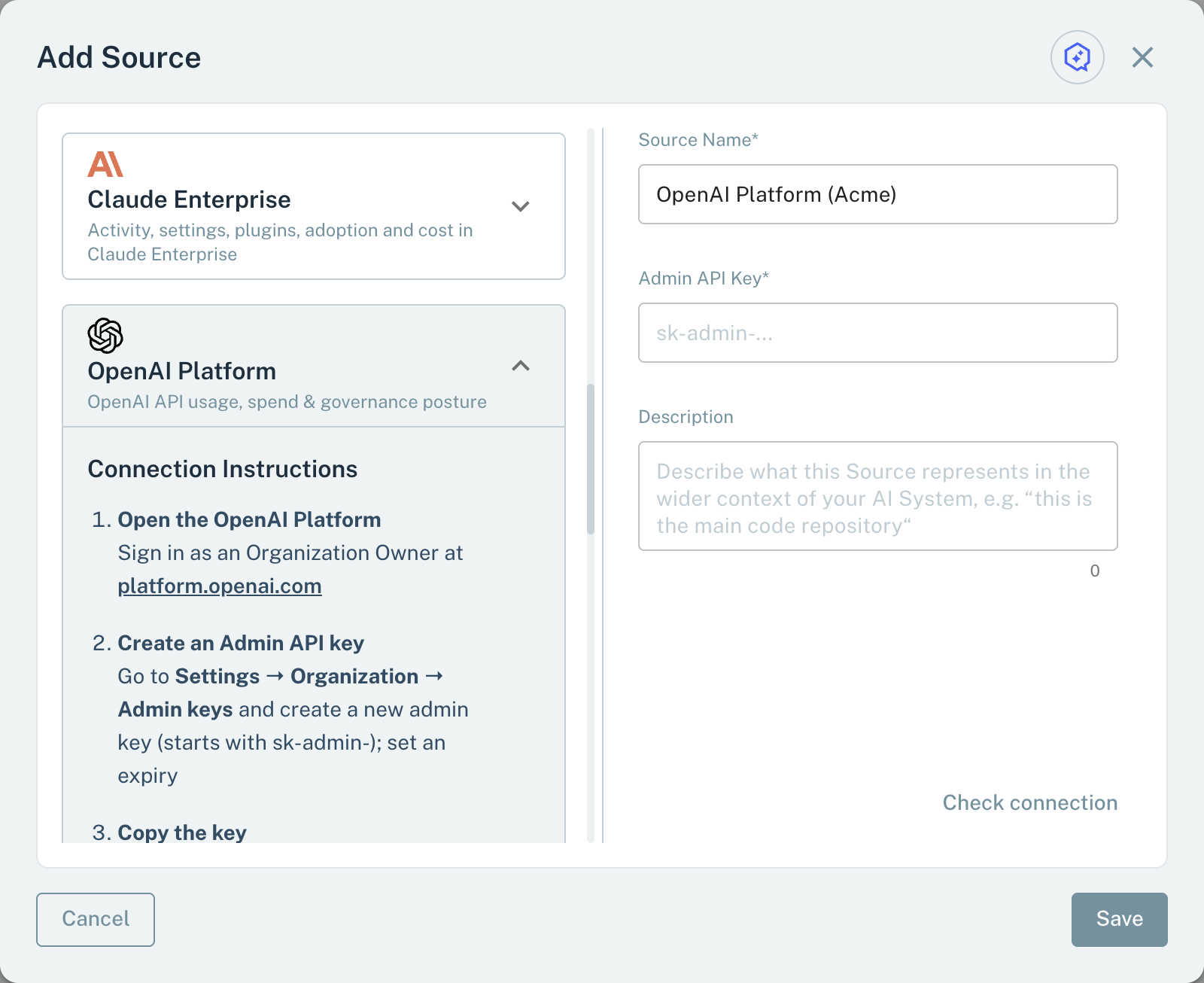
- 1Admin API KeyAn Admin API key from Settings → Organization → Admin keys.
If the key is a project key, the dialog tells you to use an Admin API key from Settings → Organization → Admin keys. When you save, Modulos reads the members of the organization with the key. If OpenAI rejects the key, the Source is not saved.
Metrics for Metric Tests
A Metric Test on an OpenAI Platform Source reads one of these metrics:
- In the test dialog, type the name as the tables show it.
- Select Check.
Modulos reads three kinds of metric:
- Posture metrics give the current settings.
- Use and cost metrics give the most recent closed UTC day that has data in the look-back period. Modulos reads no data of the current day.
- Audit metrics count the events in the look-back period.
The look-back period is 7 to 31 days. It increases with the schedule period of the test.
Members, projects, and keys
| Metric | Value |
|---|---|
org_user_count | Members of the organization, in all roles |
org_owner_count | Members with the owner role |
pending_invite_count | Open invitations |
active_project_count | Active projects |
project_owner_membership_share | Part of the project memberships, from 0 to 1, with the project owner role |
service_account_count | Service accounts in the active projects |
custom_role_count | Custom roles of the organization and its active projects |
group_count | Groups of the organization |
user_api_key_minting_disabled | 1 if members cannot create their own API keys, 0 if not |
scim_managed_org | 1 if SCIM manages the organization, 0 if not |
api_key_count | Project API keys in the active projects |
stale_api_key_count | Keys not used for 90 days, or with no use and an age of more than 90 days |
service_account_owned_key_share | Part of the keys, from 0 to 1, that a service account owns |
admin_api_key_count | Admin API keys of the organization |
non_expiring_admin_key_count | Admin API keys without an expiry date |
Data, tools, and limits
| Metric | Value |
|---|---|
zero_data_retention_project_share | Part of the active projects, from 0 to 1, with zero or enhanced zero data retention |
org_data_retention_configured | 1 if the organization sets a data retention policy, 0 if it uses the default |
model_allowlist_project_share | Part of the projects, from 0 to 1, that let only listed models be used |
web_search_enabled_project_count | Projects with the hosted web search tool active |
mcp_enabled_project_count | Projects with hosted MCP tools active |
code_interpreter_enabled_project_count | Projects with the hosted code interpreter active |
non_global_residency_project_share | Part of the projects, from 0 to 1, with a data residency other than global |
org_spend_limit_enforcing | 1 if the organization has a spend limit that applies, 0 if not |
spend_alert_count | Spend alerts of the organization and its projects |
spend_alerts_without_recipients | Spend alerts with no recipient |
org_mtls_certificate_active | 1 if an mTLS certificate of the organization is active, 0 if not |
byok_configured | 1 if the organization uses its own encryption key, 0 if not |
min_requests_per_minute_limit | The lowest requests-per-minute limit of a model in the active projects |
Audit log
| Metric | Value |
|---|---|
audit_events | Audit events in the look-back period |
privileged_change_events | Audit events about API keys, users, invites, roles, projects, spend limits, service accounts, or the organization |
The audit metrics give no value when the audit log has no events, cannot be read, or has more than 20,000 events in the period. A Metric Test cannot show the difference between a log that is off and a period with no events.
Usage
| Metric | Value |
|---|---|
active_api_key_owners | Owners of API keys with use |
model_requests_total | Requests for completions, embeddings, and moderations |
input_tokens_total | Input tokens for completions, embeddings, and moderations |
output_tokens_total | Output tokens for completions |
distinct_models_used | Different models used |
cached_input_token_share | Part of the completion input tokens, from 0 to 1, that came from the prompt cache |
batch_request_share | Part of the completion requests, from 0 to 1, sent through the Batch API |
codex_model_request_share | Part of the requests, from 0 to 1, made with a Codex model |
image_output_tokens | Image output tokens |
audio_output_tokens | Audio output tokens |
web_search_calls | Calls to the hosted web search tool |
file_search_calls | Calls to the hosted file search tool |
transcription_seconds | Seconds of transcribed audio |
service_account_traffic_share | Part of the requests, from 0 to 1, made with keys that a service account owns |
unresolved_principal_traffic_share | Part of the requests, from 0 to 1, made with keys of owners who left or keys that were replaced |
Cost
| Metric | Value |
|---|---|
cost_usd | Net spend in USD, with negative billing adjustments |
cost_by_api_key_owner_usd | Spend in USD for each key owner, as a JSON object with an unattributed entry |
cost_top_api_key_owner_share | Part of the charges, from 0 to 1, from the key owner with the largest spend |
cost_top_key_share | Part of the charges, from 0 to 1, from the key with the largest spend. No value for days before 6 December 2025. |
cost_line_items | Spend in USD for each billing line item, as a JSON object |
codex_cost_usd | Spend in USD on line items with codex in their name |
web_search_cost_usd | Spend in USD on web search tool calls |
unattributed_cost_share | Part of the charges, from 0 to 1, with no key owner |
cost_by_api_key_owner_usd and cost_line_items are text metrics. All other metrics are number metrics.
Scout, Agent Tests, and the Risk Agent
Scout, Agent Tests, and the Risk Agent read an OpenAI Platform Source with read-only queries:
- Usage: the use of each key owner, totaled for 1 to 14 days, with requests, tokens, models, tool calls, and transcription.
- Cost: the spend in USD for each line item, key owner, and key, for a maximum of 31 days.
- Organization posture: members and roles, invites, projects, service accounts, API keys, data retention, model permissions, hosted tools, spend controls, certificates, and encryption keys.
- Audit events: the newest events first, for a maximum of 31 days and 100 events.
Important considerations
- Give the Admin API key an expiry date, and replace it before it expires.
- Daily use and cost are complete only after the UTC day closes.