

Appearance
Assets & Documents
Modulos separates living documentation from audit artifacts so teams can collaborate without compromising audit integrity.
- Assets are living docs: narratives, system descriptions, and operating procedures you maintain over time.
- Evidence is proof: files that substantiate specific Control claims and become locked when Controls are executed.
What this is
Assets are represented as structured asset cards inside an AI System. They are designed for:
- day-to-day documentation that evolves
- collaboration, ownership, and review
- traceable exports (for example, exporting a system description as Markdown)
Evidence is different: if you need to prove something in an audit, link an Evidence file to the specific Control component that makes the claim.
For the end-to-end governance model, see Governance Operating Model.
Where in Modulos
AI System → Assetsto browse and create asset cardsAsset detailto collaborate, request review, and export contentAI System → Evidenceto manage audit artifacts (files) used as proof
Who can do what
Permissions
- Most AI System members can view assets and their history.
- Editors typically create and maintain assets.
- AI System Owners manage scope and ownership, and can be assigned as reviewers on an Asset's review request.
- Assigned reviewers approve or reject an asset's review requests; the decision lands in the audit trail.
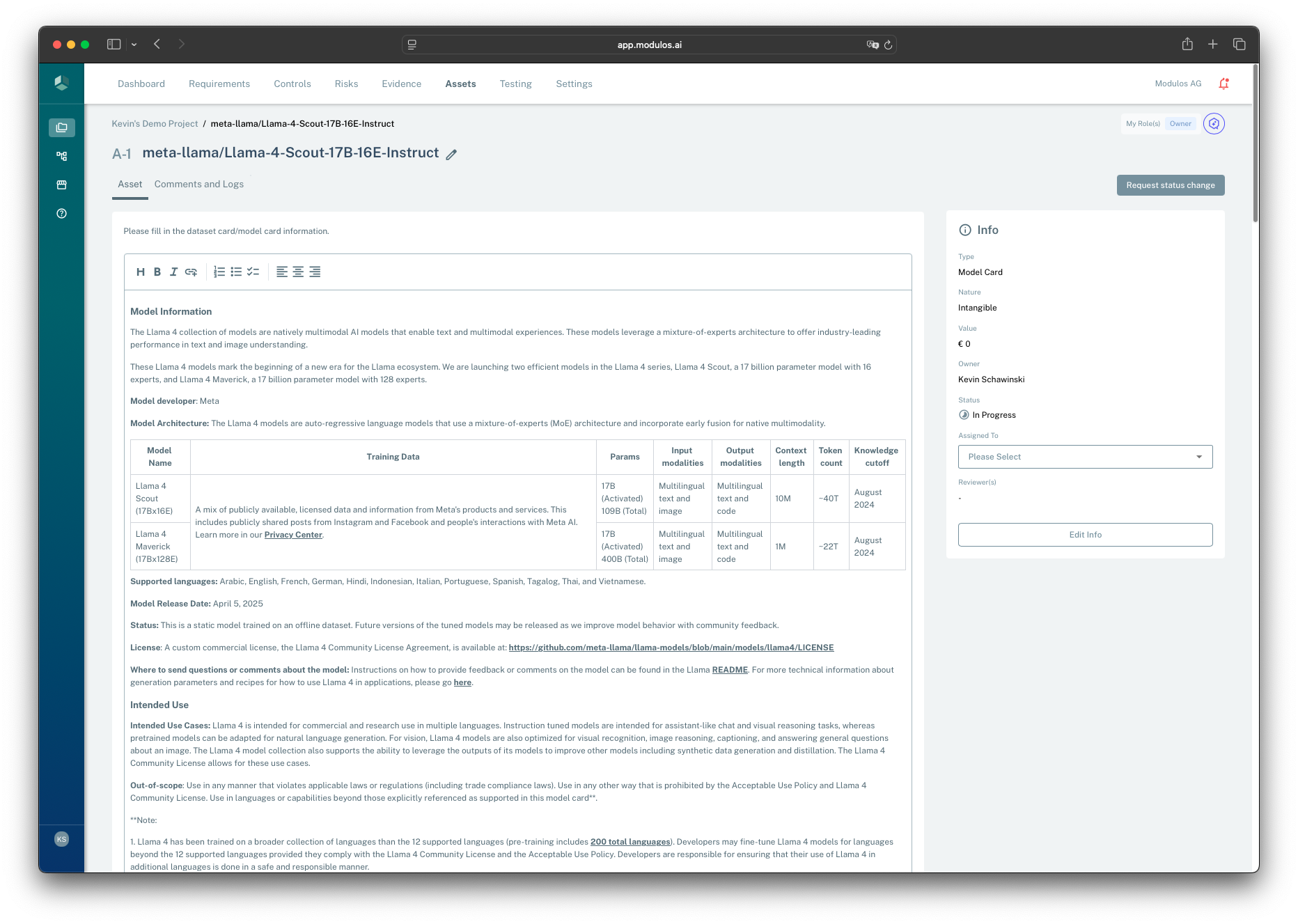
- 1Asset contextThe header identifies the asset and its place in the AI System.
- 2Request status changeUse reviews to approve significant documentation changes.
- 3Living document contentMaintain narratives like model cards, system descriptions, and procedures here.
- 4Ownership and statusOwnership keeps assets maintained as teams change; status shows progress.
How it works
Asset cards as living docs
Asset cards are used to capture and maintain documentation such as:
- system descriptions and architecture notes
- model, dataset, or prompt documentation
- operational procedures and runbooks
Assets support assignment, collaboration, comments, notifications, and review workflows.
Evidence files as audit artifacts
Evidence files are attached to Control components to prove implementation.
Unlike assets, Evidence becomes locked when it supports executed Controls. This preserves audit integrity and prevents after-the-fact edits to proof.
Other documents
Modulos can store different kinds of documents depending on context:
- Vendor documents are typically attached at the vendor level (for example DPAs, SOC reports, security questionnaires).
- Exports (PDF/Markdown) are point-in-time snapshots used for audit sharing.
How to use it
1
Capture narratives as assets
Keep system descriptions, procedures, and policies as living docs
2
Assign ownership
Set owners so documentation stays maintained as teams change
3
Review changes
Use reviews when documentation changes need formal approval
4
Attach proof as Evidence
When a claim needs proof, attach an Evidence file to a Control component
5
Export when needed
Use Markdown/PDF exports as point-in-time snapshots for audits
Important considerations
- Avoid mixing proof and narrative. If an auditor needs proof, link Evidence to the Control component.
- Use assets to keep “why we do this” and “how we do this” current, especially for AI system documentation.
- Prefer stable, well-owned assets over scattered documents in external tools.