

Appearance
Frameworks in Modulos
Frameworks are how Modulos scopes governance work. A framework represents a regulation, standard, or internal policy structure (for example EU AI Act, ISO 42001, or NIST AI RMF).
For an overview of supported frameworks, see Frameworks Overview.
What this is
Frameworks do three things in Modulos:
- define what applies to a project
- preserve traceability back to the source document through requirements
- enable reuse through mapped controls across frameworks
Modulos separates “what” from “how”:
- Requirements are the obligations from the framework and preserve the framework’s structure.
- Controls are the operational “how” and can map to multiple requirements across one or more frameworks.
This mapping is what enables a unified control framework: one control can satisfy multiple requirements, across multiple frameworks, with one set of evidence.
For the full end-to-end flow, see Governance Operating Model.
Where in Modulos
Project → Settings → Frameworksto add frameworks, inspect versions, update to the latest version, and freeze updatesProject → Requirementsto view framework-derived obligations and fulfillment statusProject → Controlsto implement reusable controls mapped across requirementsProject → Dashboardto see progress rollups by framework
Who can do what
Permissions
- Most project members can view which frameworks are applied.
- Project Owners manage the project’s frameworks: add/remove, update versions, and freeze updates.
- Editors typically execute the controls created or mapped by frameworks.
- Auditors can view the framework structure and trace work to requirements, controls, and evidence.
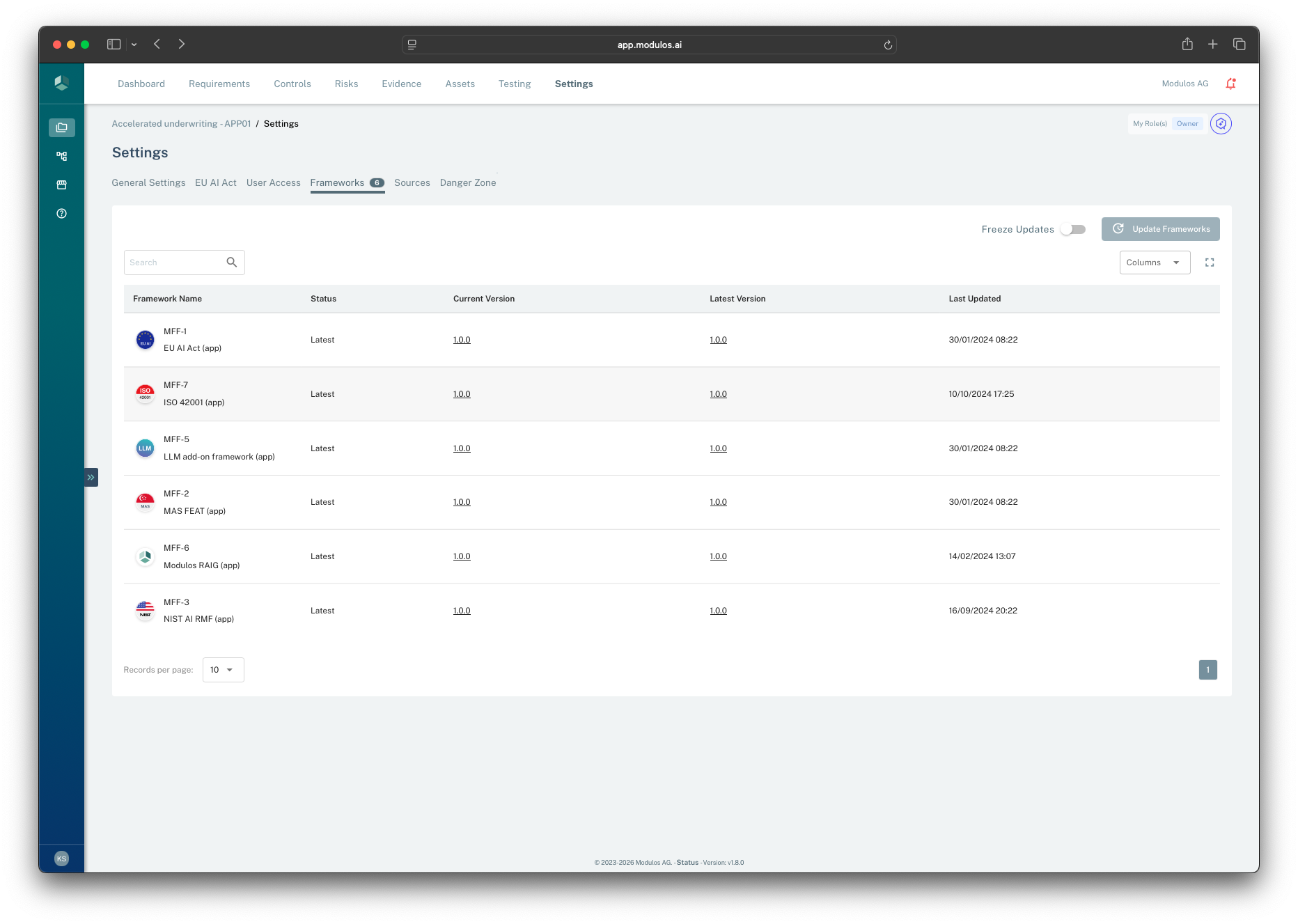
- 1Frameworks settingsThis is the project-level view for adding and maintaining applied frameworks.
- 2Freeze updatesFreeze near audit readiness to keep scope stable while work finishes.
- 3Update frameworksAdopt the latest available versions when you are ready to absorb scope changes.
- 4Current vs latest versionEach framework is pinned to a current version and can have a newer version available.
How it works
Mapping and reuse (“what” vs “how”)
When you add a framework, Modulos scopes work in a way that preserves traceability and enables reuse:
- requirements preserve the framework’s structure and codes (the “what”)
- controls implement requirements and are reusable across frameworks (the “how”)
- evidence attaches to control components so proof stays precise
The diagram below shows how requirements map into a shared control layer, with evidence attached at the component (claim) level.
Frameworks
EU AI ActRegulatory
ISO 42001Standard
Requirements
Art. 9.1Risk management
Art. 10.2Data governance
6.1.1Risk assessment
Controls
Risk assessment processReusable
Data validation checksReusable
Components
Risk identification
Impact analysis
Evidence
Risk registerDocument
Test resultsArtifact
Requirements preserve the source structure
Controls are reusable across frameworks
Evidence attaches to components (sub-claims)
Versioning and scope stability
Frameworks in a project reference a versioned template. This keeps governance stable:
- you can be explicit about “which version did we implement”
- auditors can see what changed between versions
- projects can choose when to adopt updates
In practice, each applied framework has:
- a pinned current version
- a latest available version (if the library has moved on)
Framework updates are a scope change. Updating a framework can:
- introduce new requirements and controls
- adjust mappings (which can change what “complete” means)
Best practice:
- update frameworks early in a program when change is expected
- freeze framework updates when nearing audit readiness so scope stops shifting
The diagram below shows how version pinning and freezing help you control when scope changes enter the project.
Framework template versions
v1.0
Initial
v1.1
Update
v1.2
Latest
Project pinned version
My Project
Pinned to v1.0
My Project
Updated to v1.2
Freeze updates
Prevents framework upgrades while normal editing remains available
Freeze when nearing audit completion to keep scope stable.
How to use it
1
Select frameworks
Add the standards and regulations that apply to the project scope
2
Review scoped requirements
Understand what obligations exist and how they are structured
3
Execute mapped controls
Implement controls once and reuse them across requirements and frameworks
4
Update frameworks deliberately
Adopt new versions when you are ready to absorb scope changes
5
Freeze near audit
Stop framework changes when you need the scope to stay stable
Important considerations
- Framework updates can create new work. Treat “update to latest” as a governance decision, not a maintenance click.
- If two frameworks conflict, document your interpretation in assets and control narratives so reviewers and auditors can follow your reasoning.
- Keep the project description aligned with the applied frameworks. Scope drift is the most common cause of audit rework.