

Appearance
Controls
Controls are the “how” of compliance: the concrete measures you implement to satisfy requirements. Controls are designed for reuse across frameworks and for audit-ready traceability.
What this is
A control is a reusable implementation unit. One well-designed control can satisfy multiple requirements across frameworks, without duplicating work.
Controls combine:
- narrative (what you do and why it satisfies the obligation)
- proof (evidence attached to specific claims)
- decision history (comments, logs, and review decisions)
For the full operating model, see Governance Operating Model.
Where in Modulos
Project → Controlsto browse controls, filter by framework/status/assignee, and open detailsControl detailto fill components, attach evidence, and request status change reviews
Who can do what
Permissions
- Most project members can view controls and linked evidence.
- Editors typically implement controls and attach evidence.
- Project Owners unblock work, assign roles, and can act as reviewers.
- Reviewers approve or reject status change requests.
- Auditors view controls, evidence, and decision history for traceability.
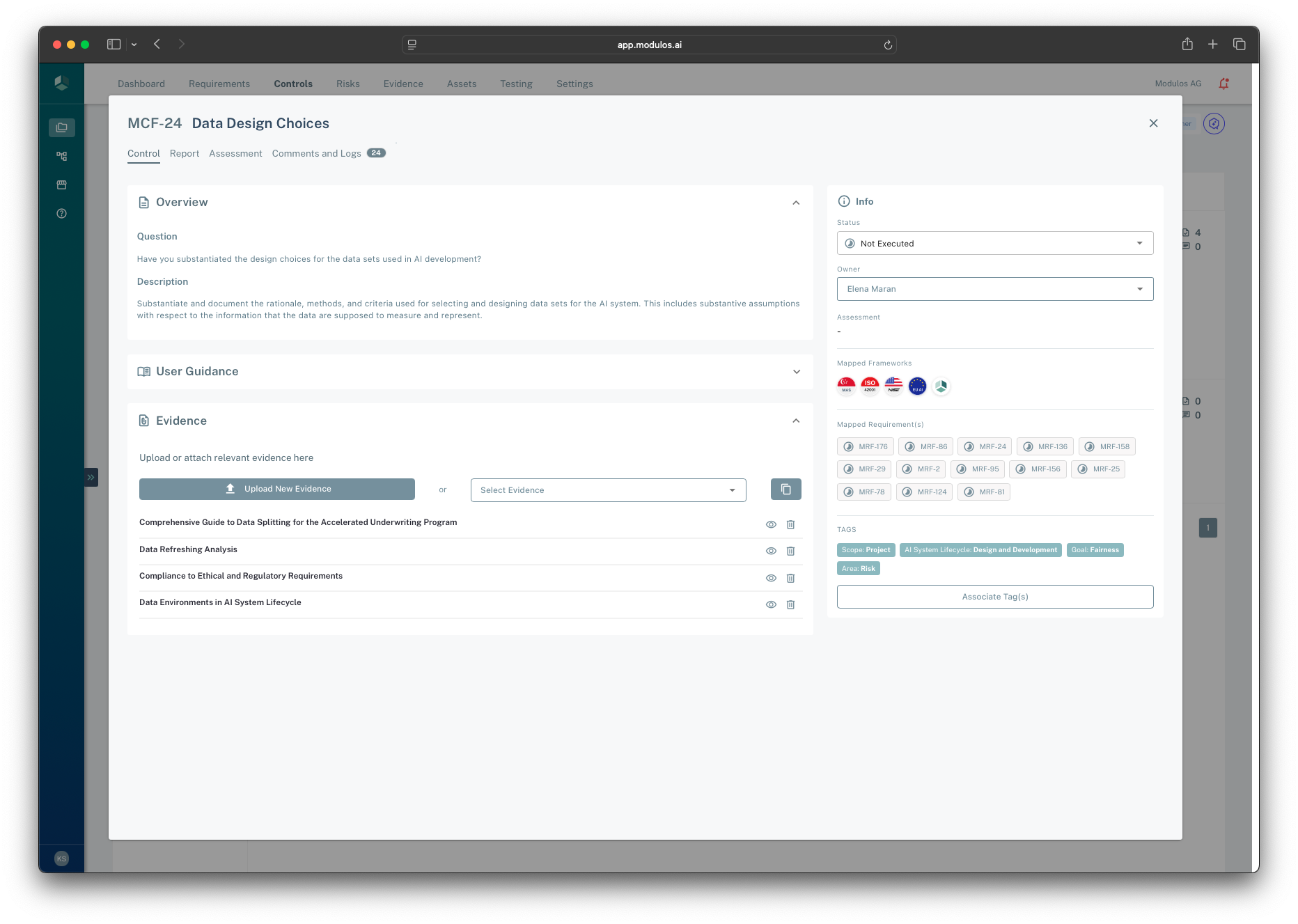
- 1Control tabsUse Control to implement, and Comments and Logs to capture rationale and review decisions.
- 2Evidence attachmentsAttach evidence to support the control’s claims and keep audits defensible.
- 3Evidence listSee which artifacts are already linked and identify what is missing.
- 4Execution status and ownerOwners execute controls; reviewers approve status changes to make them auditable.
- 5Mapped requirementsShows which framework obligations this control helps satisfy.
How it works
Control anatomy: components and evidence
Controls are structured into components. Components exist for one reason: so evidence can attach to the right sub-claim.
This is intentional:
- evidence links to the precise claim it supports
- a single control can include multiple distinct claims without becoming unstructured
- the same evidence item can support multiple controls while staying traceable
Execution status and reviews
Controls use a simple execution model:
- Not executed → Executed
In practice, teams keep the workflow auditable by using reviews:
- an implementer prepares the control (components + evidence)
- a reviewer approves the status change
- the decision and rationale are stored alongside the control
This preserves separation of duties and creates durable traceability for auditors.
Locking and why it matters
Once a control is executed, it becomes audit-sensitive. Modulos restricts edits to preserve integrity:
- the control’s content becomes harder to change without leaving a trace
- evidence supporting executed controls becomes locked to prevent after-the-fact edits
This is a feature, not friction: it keeps audits credible.
Links: requirements, evidence, risks, and tests
Controls are the execution hub:
- requirements link to controls to represent fulfillment
- evidence attaches to control components to prove implementation
- risks and tests can link to controls to connect “why this matters” and “how we monitor it”
How to use it
1
Pick the highest-impact controls
Start with controls mapped to many requirements across frameworks
2
Assign a control owner
An owner is accountable for execution and evidence quality
3
Implement in components
Fill the control narrative and keep claims structured
4
Attach evidence to claims
Link evidence to the component it supports so audits are precise
5
Request approval
Use reviewers to approve the status change to executed
Important considerations
- Avoid “one control per requirement”. Reuse is the key to scaling across frameworks.
- Do not treat “Executed” as “we wrote something”. Executed should mean the control is implemented and evidenced for this scope.
- If you must reopen an executed control, document why. Reversals are normal in continuous governance, but they must be explainable.