

Appearance
Requirements
Requirements represent the “what” in a framework: the obligations that come directly from the underlying regulation or standard.
What this is
Requirements are the compliance “contract” you are trying to satisfy for a project scope. They are:
- framework-derived (they preserve the source document structure)
- mapped to controls (so you implement once and reuse)
- fulfilled deliberately (so an owner records the attestation that the obligation is satisfied)
For the end-to-end model, see Governance Operating Model.
Where in Modulos
Project → Requirementsto browse obligations, filter by framework, and track fulfillmentRequirement detailto review mapped controls and mark the requirement fulfilled when ready
Who can do what
Permissions
- Most project members can view requirements and their mapped controls.
- Project Owners assign requirement owners and manage scope.
- The requirement owner marks a requirement as fulfilled.
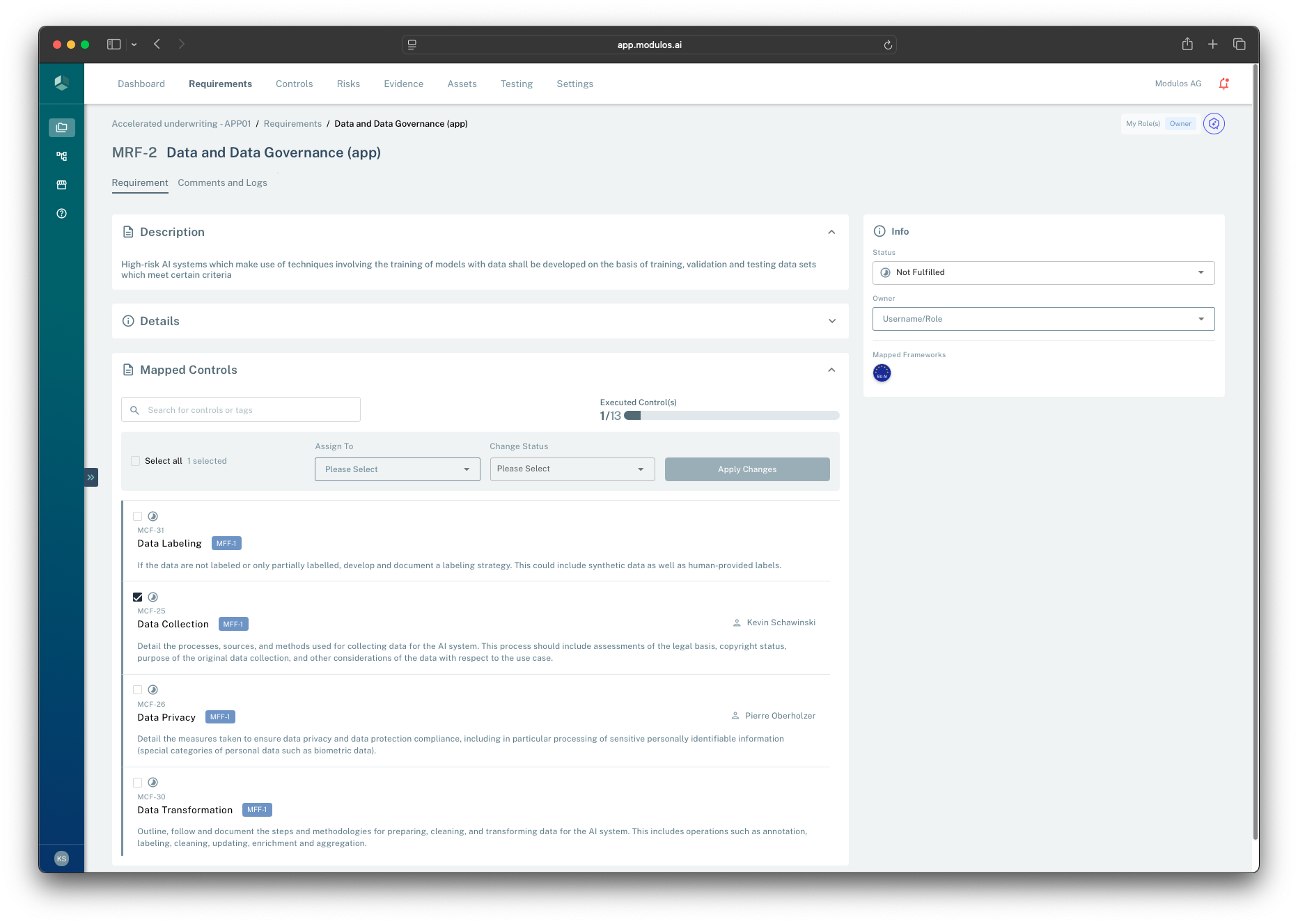
- 1Requirement contextThe header preserves framework codes and keeps traceability to the source.
- 2Fulfillment status and ownerRequirements track not fulfilled to fulfilled; the owner attests when it is satisfied.
- 3Mapped controls progressThe executed controls rollup helps you see how close the obligation is to being reviewable.
- 4Mapped controls listRequirements link to controls so implementation work is reusable across frameworks.
How it works
Requirements are framework-derived
When you add a framework to a project, Modulos creates requirements that preserve the framework’s codes and structure. This protects traceability: auditors can see exactly which obligation a control and evidence item is intended to satisfy.
Controls implement requirements
Requirements do not contain implementation work. They link to controls that implement the obligation.
This enables:
- many requirements → one reusable control
- one requirement → multiple controls (when the obligation needs multiple measures)
Status and readiness are different
Requirements have a fulfillment status:
- Not fulfilled → Fulfilled
- optionally Out of scope for non-applicable items
They also have a separate ready for review signal.
This is the non-obvious part: in Modulos, fulfillment is an attestation step.
What “ready for review” means
A requirement becomes ready for review once all linked controls are in a final state (typically executed or out of scope). This is a prompt to the requirement owner:
- review the linked controls and their evidence
- confirm the obligation is satisfied for this project scope
- then mark the requirement fulfilled
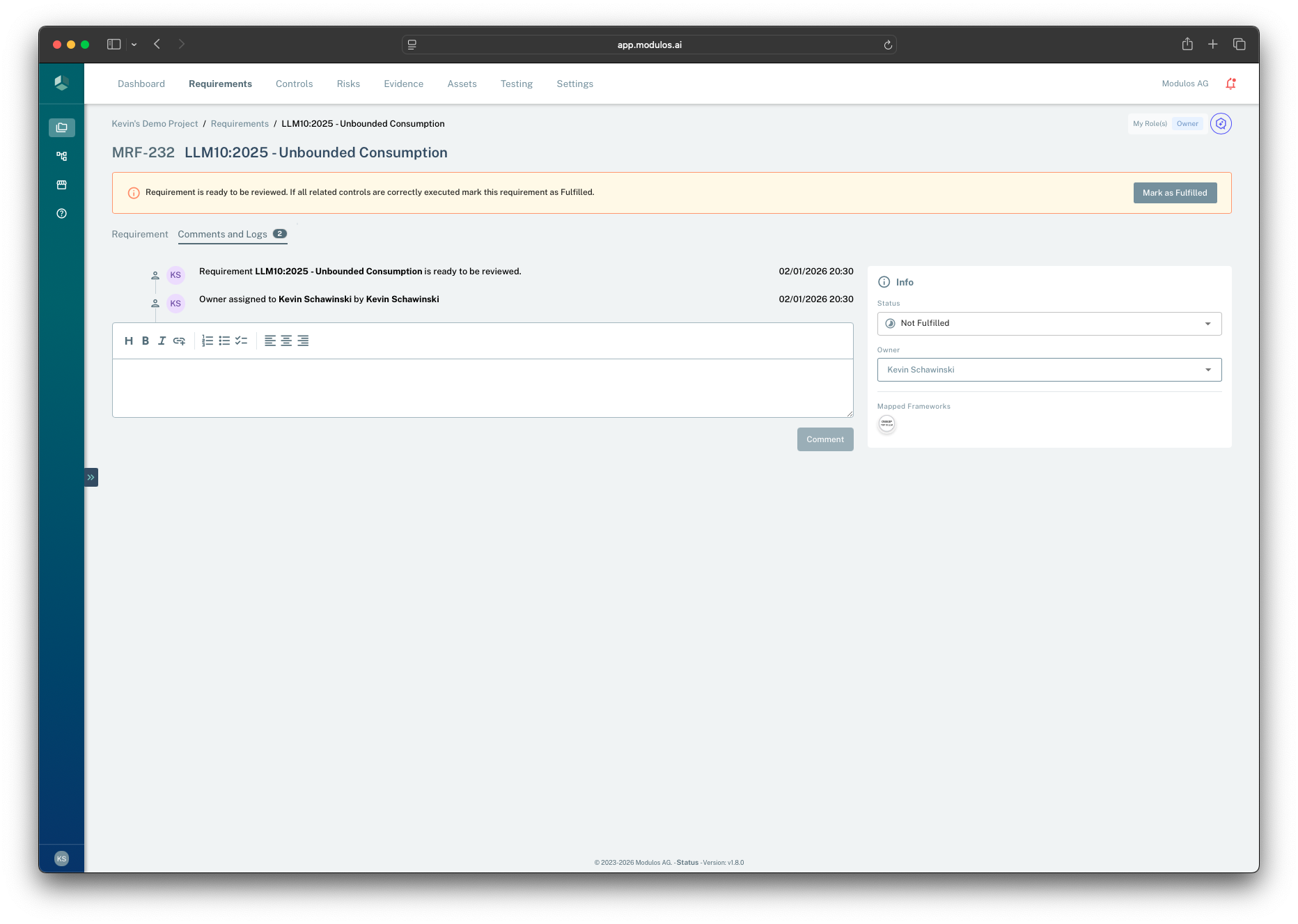
- 1Ready for review bannerSignals the requirement owner that all linked controls are final and it is time to attest.
- 2Mark as fulfilledRecords the fulfillment decision as part of the audit trail.
- 3Comments and logsShows why the requirement became ready and captures the rationale for the decision.
- 4Status and ownerFulfillment status stays explicit until the owner attests.
Marking a requirement as fulfilled
Only the requirement owner can mark a requirement fulfilled, and only when all linked controls are final.
This records the decision “this requirement is fulfilled” as part of the audit trail.
The diagram below shows how a requirement becomes ready for review once all linked controls are final, and how the owner attests by marking it fulfilled.
Requirement
Ready for reviewFulfilled
Owner marks fulfilled
1Control A
Not executed Executed
2Control B
Not executed Executed
3Control C
Not executed Out of scope
A requirement cannot be fulfilled unless all linked controls are final.
How to use it
1
Start from frameworks
Add the right frameworks so requirements match your audit scope
2
Assign a requirement owner
An owner is accountable for fulfillment decisions and keeps the requirement moving
3
Execute linked controls
Implement the mapped controls and attach evidence to control components
4
Review when ready
When the requirement becomes ready for review, validate evidence and rationale
5
Mark fulfilled
Record the attestation decision once all linked controls are final
Important considerations
- Requirements are obligations, not tasks. Use controls to capture implementation work.
- “Fulfilled” should be defensible with evidence. If you cannot explain it to an auditor, it is not fulfilled yet.
- Use “Out of scope” sparingly and align it with the project scope statement so exclusions are auditable.