

Appearance
Reviews & Statuses
Statuses communicate progress. Reviews make status changes auditable.
The non-obvious part of Modulos governance is that different objects use status differently:
- controls use execution status and get approved via reviews
- requirements use fulfillment status and become “ready for review” once controls are final
For the full model, see Governance Operating Model.
The diagram below shows how status changes, review decisions, and exports connect into an audit trail.
From action to audit trail
Action
Update controlAttach evidenceRequest review
Log entry
Logs are durableNotification
Notifications are personalReview decision
ApprovedRejected
Audit-ready traceability
whowhatwhenwhyevidence
Modulos turns day-to-day work into durable traceability through object logs and review decisions, while notifications keep execution moving.
Concept-specific status
Different concepts have different status semantics:
The diagram below compares control execution and requirement fulfillment at a glance.
Controls
Status
Not executedExecuted
Approval
Review request+Reviewer decision
Locks
Executed controls become audit-sensitive
Requirements
Status
Not fulfilledFulfilled
Readiness
Becomes ready when all linked controls are final
Fulfillment
Requirement owner attests by marking fulfilled
Why: Controls are implementation units; requirements are obligations.
Controls
Controls track execution state: Not executed → Executed.
In practice, teams use reviews so the change is auditable:
- the implementer requests a status change and assigns reviewers
- reviewers approve or reject
- the decision is stored and visible in the audit trail
Once a control is executed, it becomes audit-sensitive and edits are restricted to preserve integrity.
Requirements
Requirements track fulfillment state:
- Not fulfilled → Fulfilled
- optionally Out of scope or Archived
Requirements also have a separate ready for review signal. A requirement becomes ready for review once all linked controls are final, and the requirement owner can then mark it fulfilled.
Review workflow and “stale” decisions
Reviews are used to approve status changes for controls (and other reviewable objects such as assets).
A review represents a requested status change for a specific object, assigned to one or more reviewers.
In the current backend workflow:
- a review stores the old status and the requested status
- a reviewer can approve or reject
- the first decision updates the object status
- any other pending reviews for the same object are marked stale once a decision is made
This reduces ambiguity and preserves a single authoritative decision for each status change.
The diagram below shows the typical lifecycle of a review request and how “stale” decisions are handled.
Draft / not executed
In review
pending review requests
Executed
after approval
Reviews create the decision record; logs preserve the history.
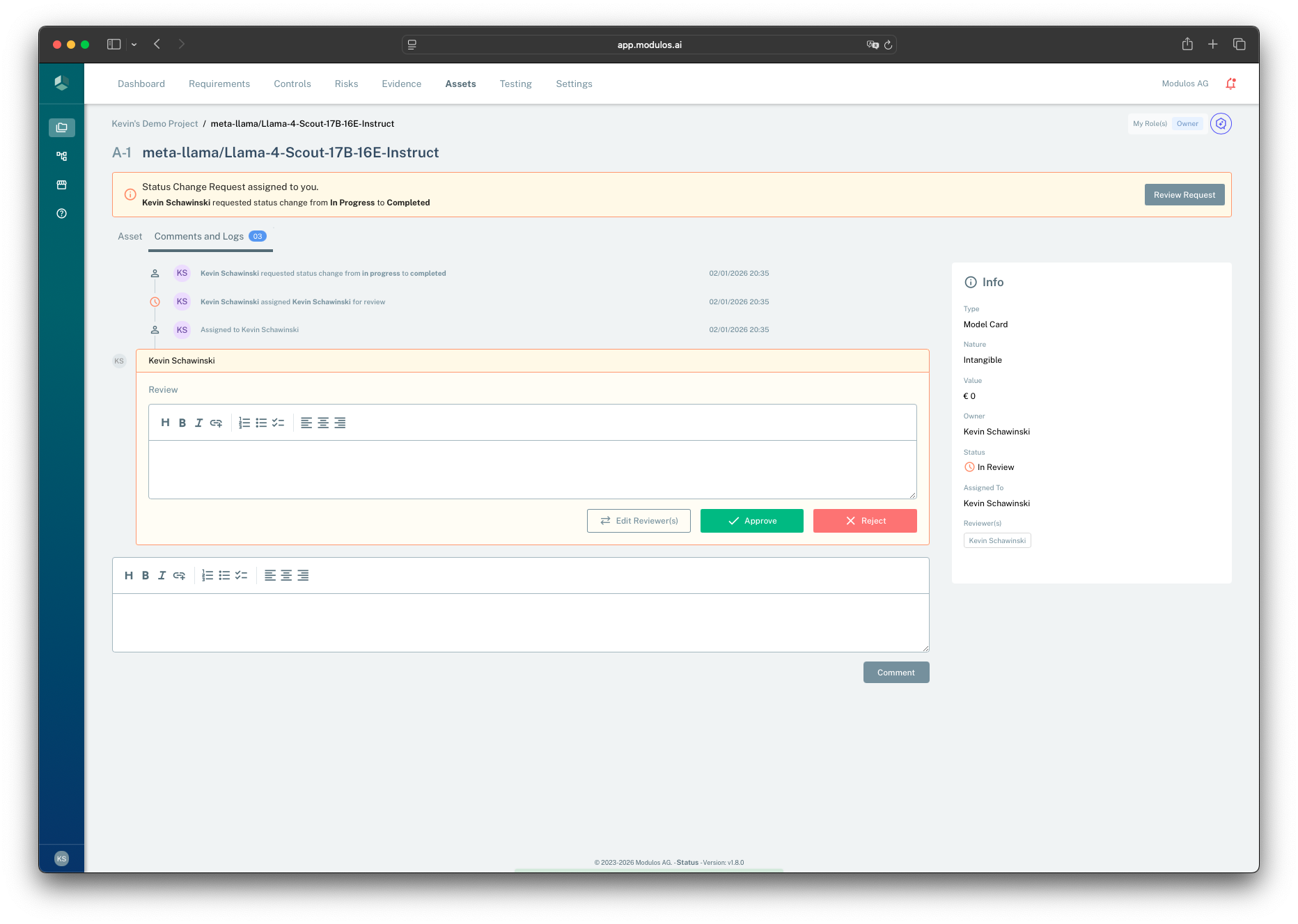
- 1Review requestWhen a status change is requested, reviewers see a banner and can open the review.
- 2Review commentCapture rationale so auditors can follow the decision later.
- 3Approve or rejectThe decision applies the status change or keeps the prior status.
- 4Current stateStatus and reviewer assignment provide the context for the decision record.
How people use this in practice
Control execution: implement → review → execute
Typical workflow:
- An editor (or control owner) implements the control by completing components and attaching evidence.
- When ready, they request a status change to executed and choose one or more reviewers.
- Reviewers approve or reject in the control’s
Comments and Logs. - The decision becomes part of the audit trail.
Requirement fulfillment: ready for review → fulfill
Requirements do not use review requests.
Typical workflow:
- Controls mapped to the requirement are executed.
- The requirement becomes ready for review.
- The requirement owner validates that the linked controls and evidence satisfy the obligation.
- The requirement owner marks the requirement fulfilled.
Reopening work without losing integrity
In continuous governance, things change:
- a system changes
- a vendor changes
- an incident reveals a missing control
Modulos is designed to allow reopening work while preserving the “why”:
- reopening an executed control should be deliberate and explainable
- when requirements are already ready for review, reverting controls requires an explicit reason