

Appearance
Project Risks
Project risks represent the concrete risk profile of a specific project scope. They are project-specific instances of your organization taxonomy.
Where in Modulos
Project risks live under Project → Risks. This is where teams:
- add risks from the organization taxonomy into a project scope
- select which threat vectors matter in this deployment context
- quantify risk threats and monitor rollups against limits
For the full operating model, see Operating Model.
Permissions
- Project Editor can create and update project risks and threat selections.
- Project Owner can also start quantification runs.
- Project Reviewer and Auditor can view risks and results for review and audit.
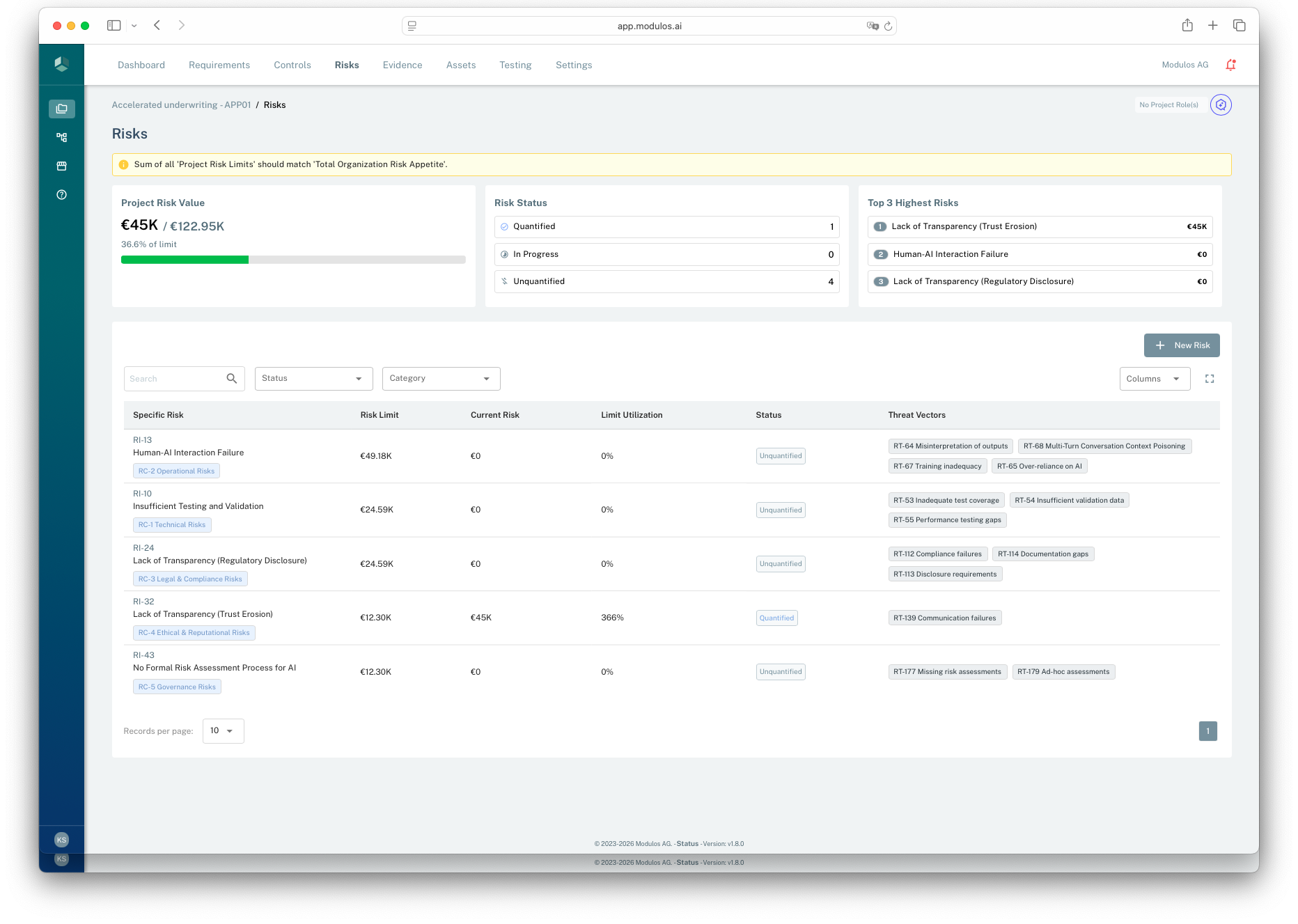
- 1Budget guardrailWarnings appear when project limits do not add up consistently.
- 2Project risk valueSee total quantified exposure and how it compares to the project limit.
- 3Status rollupQuantified, in progress, and unquantified threats roll up to the project view.
- 4Risk listEach risk shows its limit, current value, and associated threat vectors.
How it works
Project risk is taxonomy-driven:
- you add an organization-defined risk into a project
- you select threat vectors that are relevant in this deployment context
- Modulos creates risk threats in the project that reference the taxonomy threat vectors
- you run quantification per threat to produce monetary outputs
The project risk’s total value is the sum of its threat values, and its status is derived from threat quantification status.
Risk threats
A risk threat is a project-level instance of a taxonomy threat vector:
- it copies the threat vector’s name and description into the project context
- it is quantified independently
- it rolls up into the project risk total
Consistency
You can only add a given taxonomy risk once per project. This keeps reporting consistent and avoids duplicate counting.
Selecting threat vectors
When adding a risk, you must select at least one threat vector. The available threat vectors come from the taxonomy risk’s associated threat vectors.
If the right threat vector is missing, update the organization taxonomy first.
How to use it
1
Add risks to the project
Select the relevant taxonomy risks for the system scope
2
Select threat vectors
Pick the concrete pathways that matter in this deployment context
3
Quantify the top threats
Run quantification to produce a monetary value per threat
4
Treat and re-quantify
Invest in mitigations, then re-run as the system changes
Status and rollups
In the platform model:
- each risk threat gets its status from the latest quantification run: unquantified, in progress, quantified, failed
- a project risk is unquantified when all its risk threats are unquantified, quantified when all are quantified, and in progress otherwise
Only quantified risk threats contribute monetary value to rollups. This prevents “half-finished” work from being mistaken for a final number.
Quantification is asynchronous. After you start a run, the threat moves to “in progress” and updates to “quantified” once the run finishes.
Important considerations
Limits turn quantification into governance.
At a high level:
- each project has a total monetary risk limit
- each category has a share of that limit
- within a category, individual project risk limits are distributed across risks and can be overridden
If limits do not add up consistently, Modulos blocks quantification until configuration is corrected.
Manual overrides
If you override individual risk limits within a category, treat it as explicit budgeting across that category. The sum of individual risk limits should match the project’s category budget.
Build vs buy and risk ownership
Risk quantification depends on what you can observe and control.
- If you build the system, you are effectively both provider and deployer. You can quantify and mitigate both model-level and deployment-level threats with high fidelity.
- If you buy the system, you are the deployer. You often lack access to training data, model internals, and evaluation artifacts. Your strongest quantification leverage is usually in the deployment context: integration, usage patterns, monitoring, and incident response.
For vendor-provided systems, demand enough documentation to make quantification defensible: known failure modes, evaluation artifacts, and operational constraints.