

Appearance
Organization Taxonomy
The organization taxonomy is a shared library of risk definitions. It keeps naming and structure consistent across projects so quantified risk can be compared, aggregated, and audited.
What this is
Quantification without consistent categories produces numbers you can’t compare or aggregate.
A good taxonomy enables:
- comparability across projects and systems
- portfolio reporting to leadership, boards, auditors, and regulators
- resource allocation by marginal risk-reduction ROI
- institutional learning when incidents occur and lessons should propagate
Where in Modulos
You manage taxonomy under Organization → Risk Management:
- Category Taxonomy: create, edit, and archive categories.
- Threat Vector Taxonomy: create reusable threat vectors and keep wording consistent.
- Risk Taxonomy: create risks, assign them to a category, and associate threat vectors.
For the full operating model, see Operating Model.
Permissions
Organization taxonomy is typically maintained by the Organization Risk Manager role. Other organization members can usually view taxonomy and portfolio rollups.
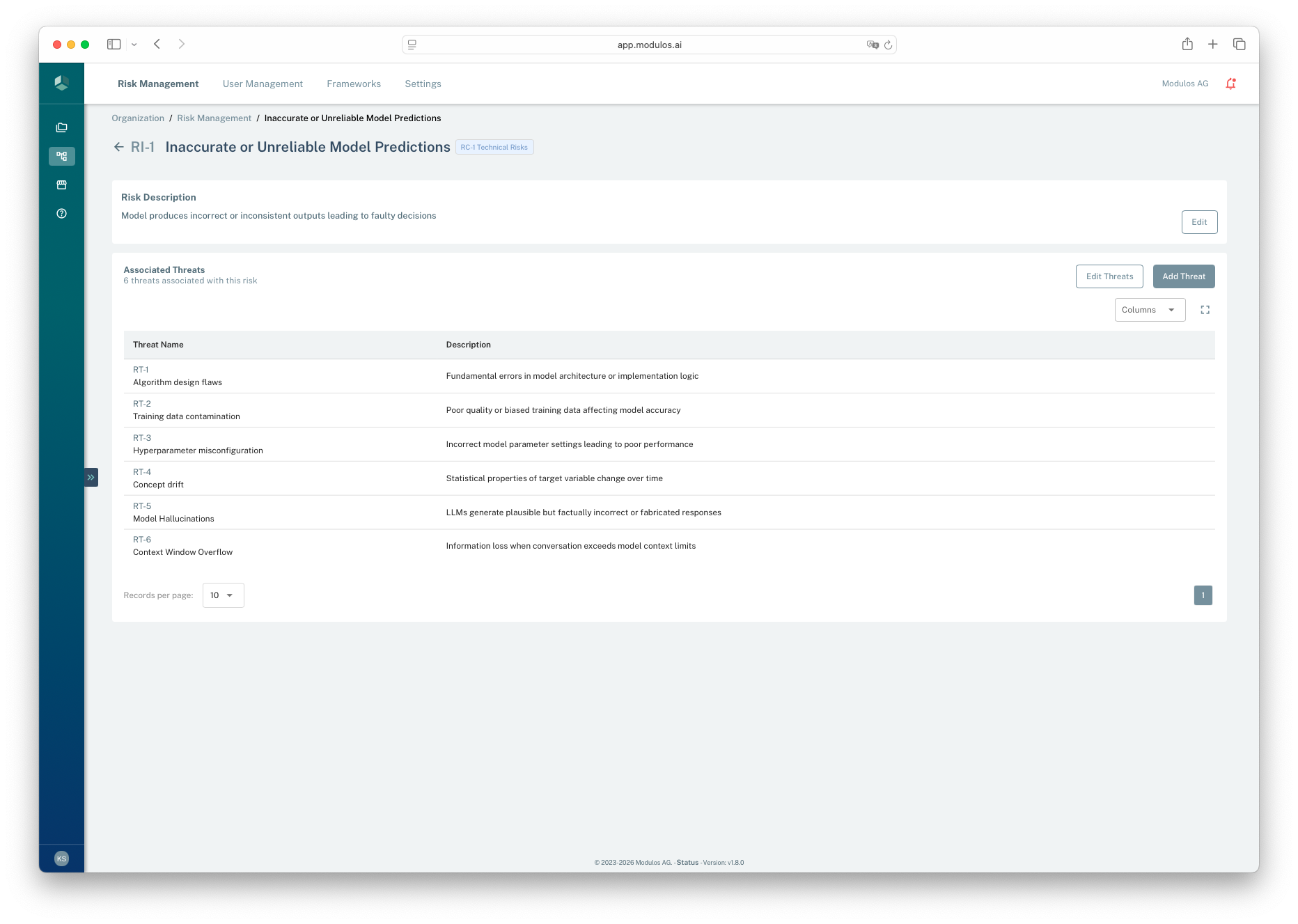
- 1Where you areThis is an organization taxonomy risk, not a project instance.
- 2Edit associationsAdd or remove threat vectors linked to this taxonomy risk.
- 3Associated threat vectorsThese are the selectable pathways teams can apply in projects.
How it works
In the current platform model, the taxonomy is structured as:
- Categories: high-level groupings used for rollups and risk appetite allocation.
- Risks: reusable risk definitions scoped to an organization.
- Threat vectors: reusable pathways that can be associated with one or more risks.
Risk taxonomy
Categories group risks. Each risk has several threat vectors.
Technical
Data quality
Inaccurate predictionsRisk
Hallucinated outputsRisk
Poor data qualityRisk
Concept drift
Training-data bias
Prompt injection
3 risks · 6 vector linksThree risks fan out to three threat vectors via six many-to-many links. Projects can only pick threat vectors associated with the selected risk.
Projects select risks from the taxonomy and then create project-specific risk threats that reference taxonomy threat vectors.
Practical design principles
Principles that keep a taxonomy usable:
- Overlap-free and complete: avoid duplicate definitions that create double counting or confusion.
- Complete but not bloated: detailed enough to guide mitigations, not so detailed it becomes bureaucracy.
- Stable but versioned: preserve comparability over time and record intentional changes.
- Consistent ownership: define who can propose changes and how they are reviewed.
- Covers build and buy: include both model-level threats and deployment-context threats.
Default taxonomy shipped with Modulos
New organizations start with a default taxonomy that covers common AI risks. It is designed to be a starting point and should be extended for your domain, architecture, and operating model.
The default taxonomy includes five categories:
- Technical Risks: model quality, robustness, and security fundamentals
- Operational Risks: human factors, monitoring, and day-to-day operations
- Legal & Compliance Risks: privacy, liability, contractual and regulatory exposure
- Ethical & Reputational Risks: fairness, harmful outputs, transparency, and trust
- Governance Risks: program structure, documentation, accountability, and oversight
Examples from the default library:
| Category | Example risks | Example threat vectors |
|---|---|---|
| Technical Risks | Inaccurate predictions, Poor data quality, Adversarial vulnerability | Model hallucinations, Concept drift, Data poisoning |
| Operational Risks | Human-AI interaction failure, Over-reliance on automation, Insufficient monitoring | Training inadequacy, Automation complacency, Failure to intervene |
| Legal & Compliance Risks | Privacy violation, Product liability, Contractual non-compliance | Data breaches, Unauthorized access, Retention violations |
| Ethical & Reputational Risks | Bias and fairness issues, Harmful content, Trust erosion | Representation gaps, Prompt manipulation, Safety filter bypass |
| Governance Risks | No risk process, Audit trail gaps, Third-party risk management | Ad-hoc assessments, Poor documentation, Version control gaps |
Use these examples as scaffolding. Your goal is a taxonomy that matches your real systems, not a generic checklist.
How to customize it
The association step is important: when a team adds a risk into a project, Modulos only lets them select threat vectors that are associated with that taxonomy risk.
If you want a threat vector to be selectable in projects, add it to the taxonomy risk first.
1
Start with the default taxonomy
Use it as a baseline, not a final answer
2
Add domain-specific threats
Capture how your systems fail in your environment
3
Curate associations
Attach the right threat vectors to each risk
4
Evolve with incidents
Update definitions as you learn from real outcomes
To refine associations:
- open a risk detail page to add or remove threat vectors for that risk
- use archiving to retire outdated items while keeping audit history intact
Guardrails and governance
Taxonomy changes affect comparability over time. In practice:
- adding new categories, risks, or threat vectors is usually safe
- renaming or merging should be treated as a governance change and may warrant archiving the old item and creating a new one
Why customization matters
Risk quantification is only as good as the structure it forces. A domain-specific taxonomy makes estimates criticizable and comparable, which is what turns risk into a decision tool.