

Appearance
Modulos Client
Modulos Client is a Python SDK for programmatic workflows in Modulos:
- upload evidence from CI systems and internal tooling
- push operational metrics into Modulos for continuous testing
- build repeatable automation around governance work
When to use it
Use Modulos Client when evidence and signals already exist in your systems:
- CI pipelines producing model cards, evals, and test reports
- monitoring platforms producing fairness or safety signals
- internal review processes producing PDFs, docs, and logs
Instead of copy-pasting into GRC, you can push artifacts directly into the project that needs them.
Prerequisites
- Python 3.10 or newer
- An API token for a Modulos user
See API Tokens.
Install
bash
pip install modulos-clientDownloads: PyPI
Authenticate
The client uses an API token. The simplest approach is an environment variable:
bash
export MODULOS_API_KEY="your_token"Then in Python:
python
import os
from modulos_client import Modulos

client = Modulos(api_key=os.environ.get("MODULOS_API_KEY"))
Use a dedicated automation user
Create a dedicated user for automation and give it least-privilege project access. Store the token in a secret manager and rotate it regularly.
Upload evidence programmatically
Programmatic evidence upload is designed for audit-ready traceability: evidence is attached to the specific control component it supports.
Get the right IDs
You need:
project_idof the project you’re working incomponent_idof the control component the evidence should support
In the UI, controls expose a Copy code to programmatically upload files action which gives you a ready-to-run snippet. Replace the file path and run it in your automation environment.
Upload a local file
python
from modulos_client import Modulos

client = Modulos()

client.evidence.upload.artifact_file(
    path_to_file="path/to/report.pdf",
    project_id="your_project_id",
    component_id="your_component_id",
    file_name="optional_custom_filename.pdf",
    description="Optional description shown in Modulos",
)
Upload in-memory results as a file
Use this for generated outputs like evaluation tables and JSON summaries.
python
import pandas as pd
from modulos_client import Modulos

client = Modulos()

df = pd.DataFrame({"slice": ["A", "B"], "accuracy": [0.91, 0.88]})

client.evidence.upload.artifact_result(
    result=df,
    file_name="evaluation.csv",
    project_id="your_project_id",
    component_id="your_component_id",
    description="Automated eval output from CI",
)
Evidence integrity
Evidence that supports executed controls is protected to preserve the audit trail. If you need to replace an artifact, do it through a deliberate update workflow and capture rationale in comments and reviews.
Push metrics for continuous testing
Modulos Client can act as a push source for the Runtime Inspection module: your systems push metric values into Modulos, and tests evaluate those metrics over time.
Where in Modulos
Project → Settings → Sourcesto confirm the built-in Modulos Client source is availableProject → Runtime Inspection → New Testto create tests that reference the metrics you push
Permissions
Your API token’s project permissions determine what you can do. In most teams:
- Owners and Editors can create evidence and push runtime inspection metrics.
- Reviewers and Auditors can view runtime inspection results and linked artifacts.
Create a metric
Metrics define the shape of values you will push.
python
from modulos_client import Modulos

client = Modulos()

metric = client.testing.logs.create_metric(
    name="equalized_odds_gap",
    project_id="your_project_id",
    type="float",
    description="Equalized odds gap computed in production monitoring",
)
After you create a metric, it becomes selectable when you create a test in the UI.
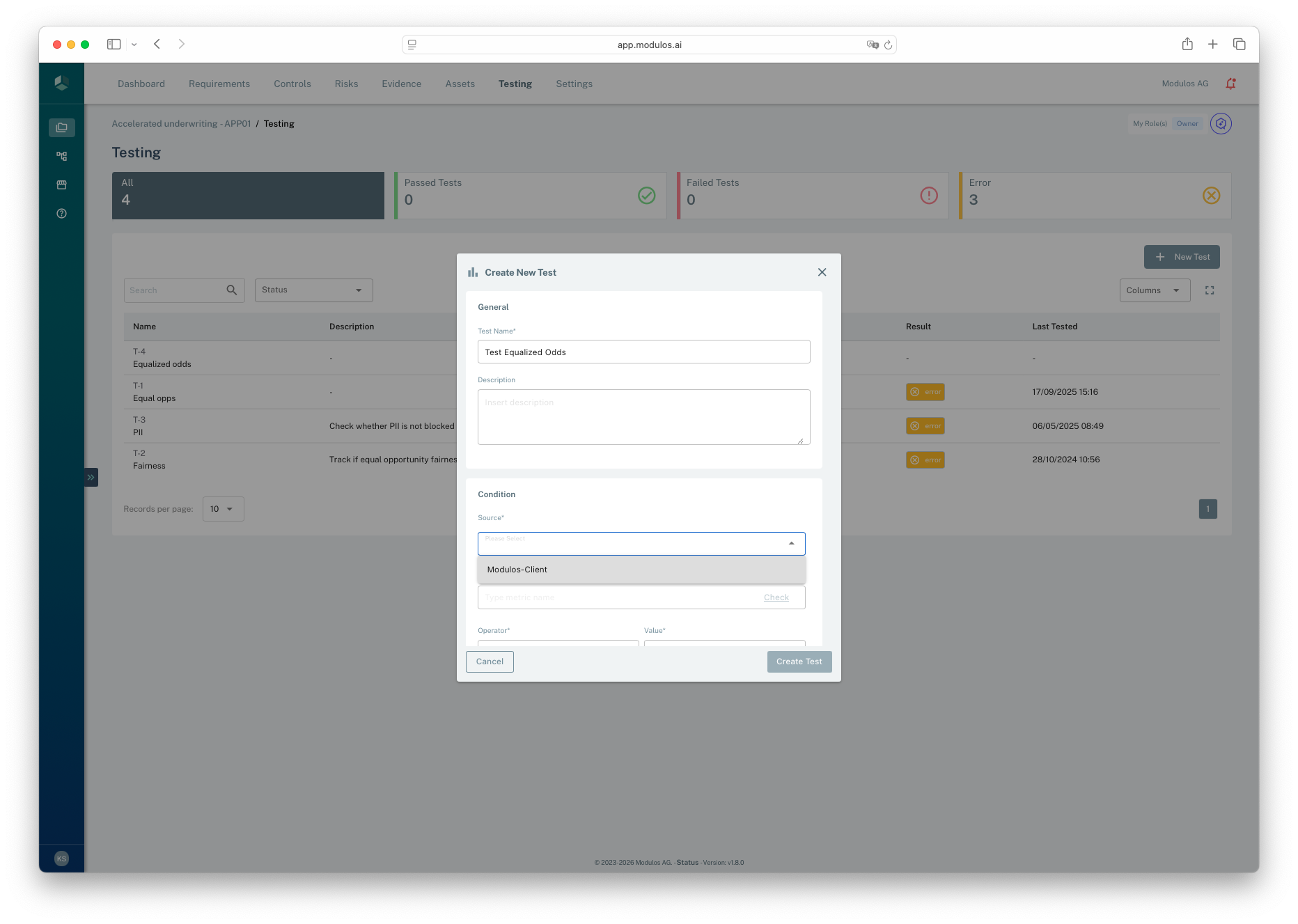
- 1SourceChoose the Modulos Client source that receives your pushed metrics.
- 2CancelClose without creating a test.
- 3Create TestSave the test once you have set the condition.
Push metric values
python
from modulos_client import Modulos

client = Modulos()

client.testing.logs.log_metric(
    metric_id=metric.id,
    value=0.07,
    project_id="your_project_id",
)
List and retrieve metrics
python
from modulos_client import Modulos

client = Modulos()

metrics = client.testing.logs.get_metrics(project_id="your_project_id")
one_metric = client.testing.logs.get_metric(metric_id=metrics[0].id, project_id="your_project_id")
Error handling
The client raises typed errors you can handle in automation jobs.
python
import modulos_client
from modulos_client import Modulos

client = Modulos()

try:
  client.testing.logs.get_metrics(project_id="your_project_id")
except modulos_client.APIConnectionError:
  print("The Modulos API could not be reached.")
except modulos_client.APIStatusError as e:
  print("Request failed.", e.status_code)
  print(e.response)