

Appearance
Vendor Records
A vendor record is a lightweight profile of a third party your organization relies on. It captures ownership, review cadence, and the minimum assessment context needed to support governance and audits.
What this is
Vendor records in Modulos include:
| Field | What it means | Example |
|---|---|---|
| Name | The vendor name as people recognize it | “Acme Cloud” |
| Type | A simple classification for filtering | Supplier, Data Source |
| Status | Where the vendor stands in your diligence workflow | In Review, Active |
| Risk level | A qualitative prioritization label | High |
| Responsible person | Who owns follow-ups and reviews | “Security Lead” |
| Review date | When to reassess the vendor next | 2026-03-31 |
| Annual contract value | Contract value context for criticality | €250,000 |
| Subprocessor | Whether the vendor processes data on your behalf | Yes |
| Links | Quick access to key vendor policies | Privacy policy URL |
| Address | Optional address details | City, country |
Where in Modulos
- Main navigation → Vendors to see the vendor list
- Vendors → New Vendor to create a record
- Vendors → select a vendor → Overview to review and edit details
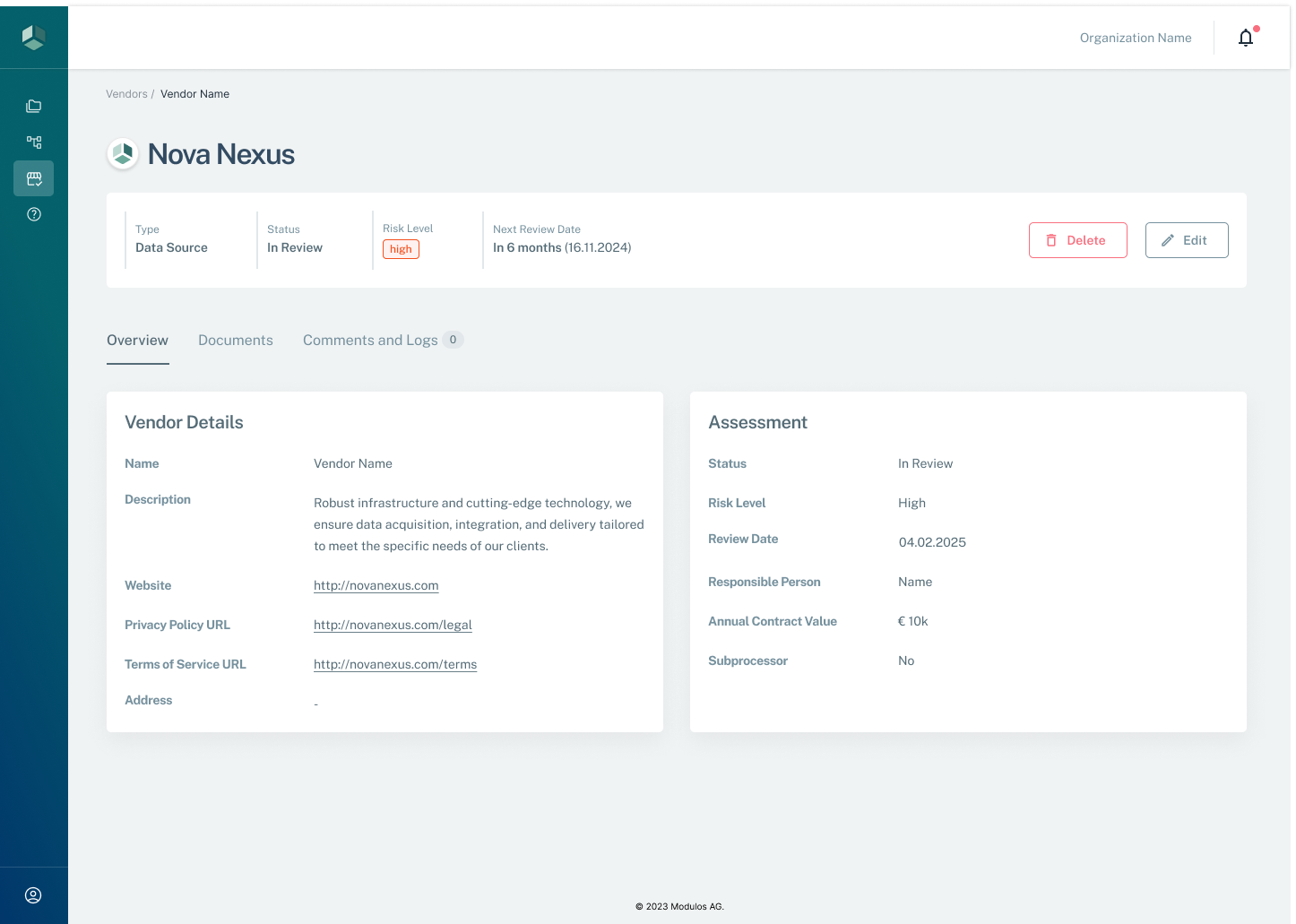
- 1Summary fieldsType, status, risk level, and next review date are visible at a glance.
- 2EditUpdate vendor details, assessment fields, and review cadence.
- 3Vendor detailsCapture identity and key links like website and policy URLs.
- 4AssessmentTrack status, risk level, responsible person, contract value, and subprocessor flag.
Who can do what
Permissions
Vendor records use organization-level permissions.
- Organization Admins can create, edit, and delete vendors.
- Organization Members can typically view vendor details.
How it works
Vendor records are designed to support a continuous operating model:
- Status helps your team distinguish between vendors that are in intake and assessment versus vendors that are approved for use.
- Risk level is for triage. Use it to set diligence depth and review cadence.
- Review date is the mechanism that prevents vendor governance from becoming a one-time checkbox.
- Responsible person ensures there is always someone accountable for follow-up actions.
How to use it
- Create a vendor record as soon as a team proposes introducing a new third party.
- Start with
Status = In Reviewwhile you gather artifacts and assess the vendor. - Set risk level and review date based on the role the vendor plays in your AI system.
- When the vendor is approved, set
Status = Activeand keep the review date current.
Important considerations
- Keep vendor records consistent across teams. Prefer one canonical vendor record rather than duplicates per project.
- Use “Subprocessor” to drive what you collect. Subprocessors often require stronger contractual and privacy diligence.
- If a vendor’s role changes, update the record and trigger a review—even if the next review date is far away.