

Appearance
Modulos Client
Modulos Client is a Python SDK for programmatic workflows in Modulos:
- upload Evidence from CI systems and internal tooling
- push metrics into Modulos for continuous testing
- make repeatable automation for governance work
When to use it
Use Modulos Client when your systems hold Evidence and signals:
- CI pipelines producing model cards, evals, and test reports
- monitoring platforms producing fairness or safety signals
- internal processes that give PDFs, docs, and logs
You can push artifacts directly into the AI System that needs them. You do not copy and paste them into the platform.
Prerequisites
- Python 3.10 or newer
- An API token for a Modulos user
See API Tokens.
Install
bash
pip install modulos-clientDownloads: PyPI
Authenticate
The client uses an API token. The simplest method is an environment variable:
bash
export MODULOS_API_KEY="your_token"Then in Python:
python
import os
from modulos_client import Modulos

client = Modulos(api_key=os.environ.get("MODULOS_API_KEY"))
Use a dedicated automation user
Make a user only for automation and give it the minimum AI System access. Keep the token in a secret manager and replace it frequently.
Upload Evidence programmatically
Programmatic Evidence upload gives audit-ready traceability. Each upload makes an Evidence item in the AI System and attaches it to one Control.
Evidence upload needs Modulos Client 2.0.0 or newer:
bash
pip install "modulos-client>=2.0.0"Get the right IDs
You must have:
project_idof the AI System that you work incontrol_idof the Control that the Evidence supports
On a Not Executed Control, Copy code to programmatically upload files copies a snippet with the two IDs and your Modulos address. Replace the path of the file and run the snippet in your automation environment.
Upload a local file
python
from modulos_client import Modulos

client = Modulos()

evidence = client.evidence.upload.artifact_file(
    path_to_file="path/to/report.pdf",
    project_id="your_project_id",
    control_id="your_control_id",
    name="Accuracy report",  # optional, defaults to the file name
    description="Optional description shown in Modulos",
)
print(evidence.unique_code)
The call returns the new Evidence item, with its id and its unique_code.
Upload in-memory results as a file
Use this for generated outputs, such as tables of results.
python
import pandas as pd
from modulos_client import Modulos

client = Modulos()

df = pd.DataFrame({"slice": ["A", "B"], "accuracy": [0.91, 0.88]})

evidence = client.evidence.upload.artifact_result(
    result=df,
    file_name="evaluation.csv",
    project_id="your_project_id",
    control_id="your_control_id",
    description="Automated eval output from CI",
)
The extension of file_name sets the file type. Use .csv for a pandas DataFrame or a dict, and .txt for a string. Modulos accepts only the file types in Upload files.
Errors
PermissionDeniedError: the API token cannot upload Evidence to the AI System.UnprocessableEntityError: Modulos does not accept the file type or size, or the Control does not accept Evidence because it is Executed, Out of Scope, or Archived. In each case, no upload stays in Evidence Creation.
Evidence integrity
You can attach new Evidence only to a Not Executed Control. While a Control that uses an Evidence item is Executed, Modulos locks that item. An edit changes only the name, the description, and the Controls of an Evidence item. To replace an artifact, upload the new version as new Evidence. See Evidence.
Push metrics for continuous testing
Modulos Client is a push Source for Runtime Inspection. Your systems push metric values into Modulos, and tests check the latest metric values.
A test uses only a value that your systems pushed on the day of the test, by the date of the Modulos server. It does not use the values of earlier days, also for a weekly or monthly test. If there is no value of that day, the result is error.
Where in Modulos
AI System → Settings → Sourcesshows the built-in Modulos Client Source. It is active only when your organization turns on Modulos Client inOrganization → Source & Connectors. If it is not active, the Metric Test dialog does not show it. See Sources.AI System → Runtime Inspection → New Test → Metric Testmakes tests for the metrics that you push.
Permissions
The AI System permissions of your API token set what you can do. In most teams:
- Owners and Editors can add Evidence and push metrics for Runtime Inspection.
- Viewers can view runtime inspection results and linked artifacts.
Make a metric
A metric gives the type of the values that you push.
python
from modulos_client import Modulos

client = Modulos()

metric = client.testing.logs.create_metric(
    name="equalized_odds_gap",
    project_id="your_project_id",
    type="float",
    description="Equalized odds gap computed in production monitoring",
)
After you make a metric, you can select it when you add a test in the UI.
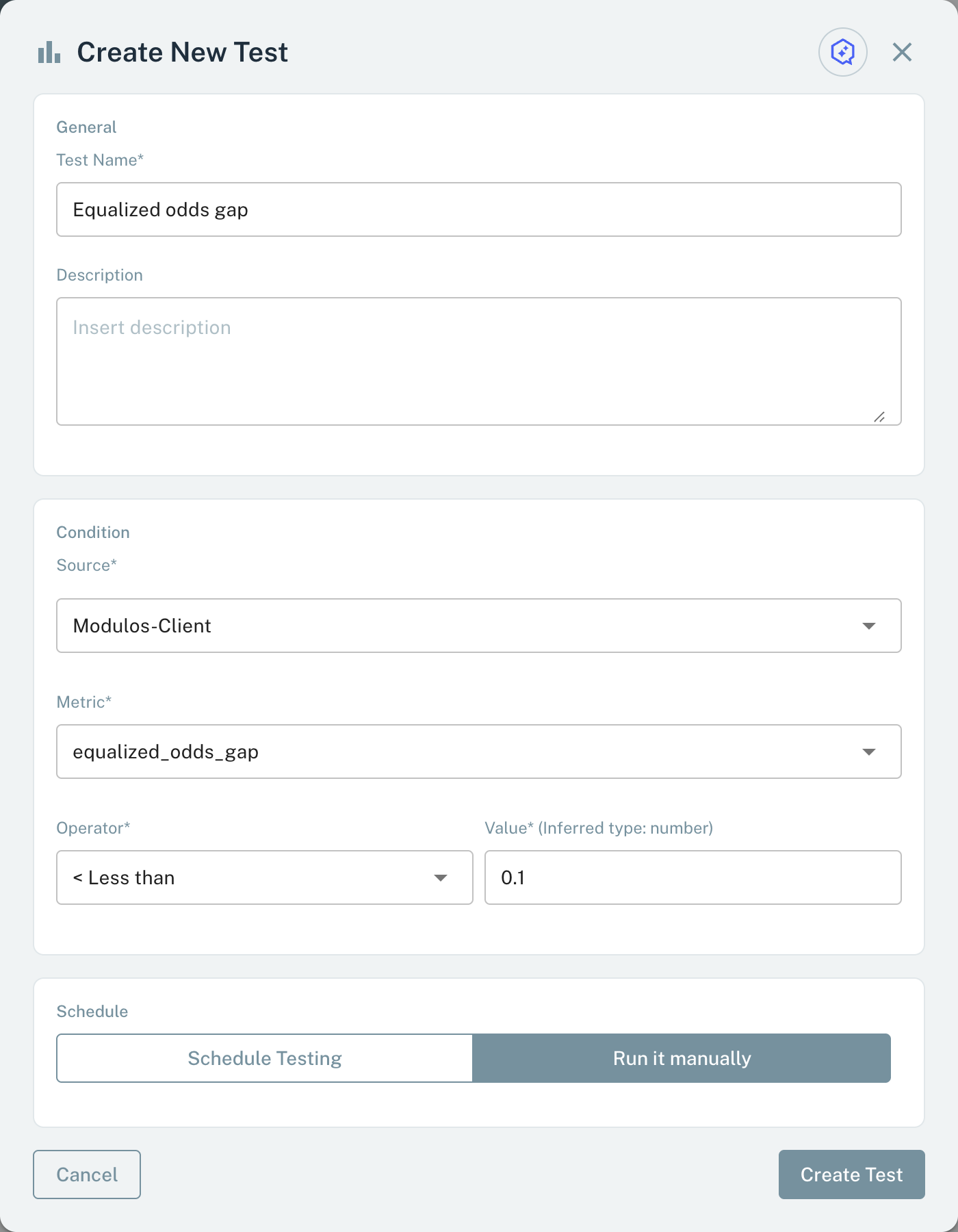
Select the Modulos Client Source and a metric that you push.
- Source Select the Modulos Client Source that receives your pushed metrics.
- Cancel Closes the dialog without a test.
- Create Test Saves the test after you set the condition.
Push metric values
python
from modulos_client import Modulos

client = Modulos()

client.testing.logs.log_metric(
    metric_id=metric.id,
    value=0.07,
    project_id="your_project_id",
)
Get metrics
python
from modulos_client import Modulos

client = Modulos()

metrics = client.testing.logs.get_metrics(project_id="your_project_id")
one_metric = client.testing.logs.get_metric(metric_id=metrics[0].id, project_id="your_project_id")
Error handling
The client raises typed errors. Your automation jobs can catch these errors.
python
import modulos_client
from modulos_client import Modulos

client = Modulos()

try:
  client.testing.logs.get_metrics(project_id="your_project_id")
except modulos_client.APIConnectionError:
  print("The Modulos API could not be reached.")
except modulos_client.APIStatusError as e:
  print("Request failed.", e.status_code)
  print(e.response)